NETGEAR is aware of a growing number of phone and online scams. To learn how to stay safe click here.
Forum Discussion

jkeats
Mar 19, 2015Novice
Fast LAN speed/slow WiFi speeds
I sent in a ticket to support on this but still haven't come up with a solution so I thought maybe some forum users might have an idea... I've got the WNDR4300 with the latest firmware. I use an A...
 Nov 02, 2015
Doing a factory reset on my router WNDR4300 with latest firmware solved the issue. Now I am able to get 89MBPS on 5g & 75MBPS on 2g. Thanks a lot.

ElaineM
Oct 29, 2015NETGEAR Employee Retired
NoMoreN600 Do you have the same exact model number and version of the router?
Can you post a screenshot of the speedtest?
What are the wireless clients used?
Which signal you're connecting to (2.4Ghz or 5Ghz)?
NoMoreN600
Nov 01, 2015Aspirant
WNDR3700v2. I didn't capture any screen shots of the speedtests. The speeds resumed to normal the next day, but not based on any changes I made.
Wireless clients included OSx on a mac laptop, W10 on a HP laptop, and iPhone 4s and 5C as well as an iPad. Most of that was on the 2.4ghz band, not sure if any of them were on the 5ghz band.
- ElaineMNov 02, 2015NETGEAR Employee Retired
vnktsn Do you have the latest firmware installed on the router?
After firmware upgrade, I suggest to do a factory reset and then reconfigure.
Also, do you have the latest driver version installed on your wireless adapter?
What's the model number of your wireless adapter?
Which signal you're connecting to? Is it the 2.4Ghz or the 5Ghz?
NoMoreN600 It might be possible that this is due to interference. Maybe there are other devices that interfere's with the wireless signal like microwave, baby monitors, cordless phones and the likes.
I suggest that you try to relocate the router and check the environment. If you happen to have the Genie installed, verify for other clean channel for you to set on the router.
Other routers such as the neighbors may cause interference as well. Have you tried connecting to the 5Ghz? What's the speed? See if you'll get a better connection on the 5Ghz.
- vnktsnNov 02, 2015Aspirant
Doing a factory reset on my router WNDR4300 with latest firmware solved the issue. Now I am able to get 89MBPS on 5g & 75MBPS on 2g. Thanks a lot.
 8OhmsNov 21, 2015Guide
Glad that worked out and you're finally getting WiFI speed as close to your LAN by going to 5GHz. However, can you please eloberate a little more on what changes you made and where to get the faster speed other than just resetting the router and updating to the latest firmware?
- NoMoreN600Nov 02, 2015Aspirant
I've thought about the interfence, but didn't know how to isolate the conditions. Within my home, we don't have any other phones (outside of cell phones), no baby monitors or wireless security cameras. I don't know of an easy to way test what channels my neighbors wifi is on to try and deconflict that. How can you do that within the netgear genie app?
I'll try connecting to the 5ghz band if it happens again (on the devices that support it). I also can't easly move the modem and router as there are other hard wired connections that I use, and I've had great wireless signal strength from the current location for the past 7 years.
- ElaineMNov 03, 2015NETGEAR Employee Retired
vnktsn Glad to hear that it's up and running!
Thank you for the update.
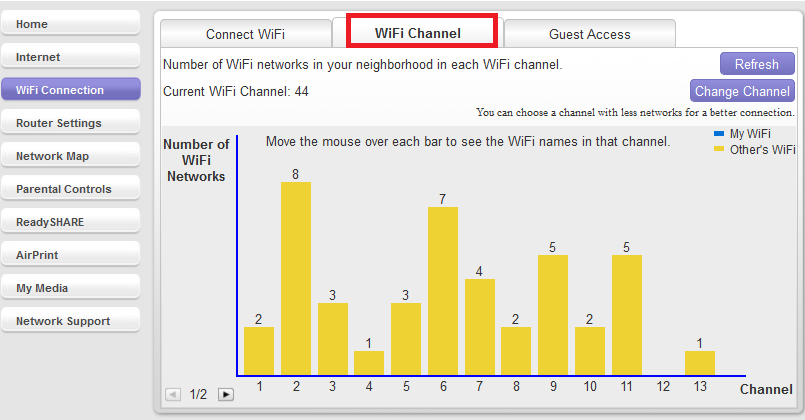
NoMoreN600 If you happen to have the Genie App installed, under WiFi Connection > WiFi Channel you'll see all devices connected to different channels.This window also shows what channels are being used by your neighbor. Select the best channel that have less users in it. For example, below I can select channel 4. You might be wondering about channels 12 and 13, these channels are only available in some countries. But if you're in the US you can only have 1-11 channels. You can easily change channel by clicking Change Channel at the right hand side of that window and then Modify the channel.