NETGEAR is aware of a growing number of phone and online scams. To learn how to stay safe click here.
Forum Discussion

l1955c
Apr 17, 2022Aspirant
Netgear model C6250 the 2.4 ghz is extremely slow (5.0 ghz is ok)
Hello Group,
This router is less than a year old, running comcast firmware v1.02.02.
This morning the 2.4 gHz network speed has dropped real slow, most of the speed tests fail to upload at all.
Last speed test was .03 download and 4.56 upload, ping 11 ms.
I've unplugged it for 5 minutes and reconnected with no improvement.
I can log into the router, changed the password.
Tried changing the channel from automatic to channel 5 (no better)
The problem is that I have several security devices and thermostat that only work at 2.4 gHz.
Again the 5 gHz is working fine.
Thanks for suggestions.
So it works fine on everything but the app version on the iphone.
Kind of points to that app. Maybe its connecting to a bad server when hosted in the app.

7 Replies
- plemansGuru - Experienced User
try channels 1, 6, 11.
See if any of those work.
Also, make sure 20/40hz coexistence is enabled.
- l1955cAspirant
Hi plemans,
I tried channel 1, did not help.
I tried channel 6, did show a minor improvement. 1.5 Mbps down and 11.5 Mbps up.
I tried channel 11, did not help.
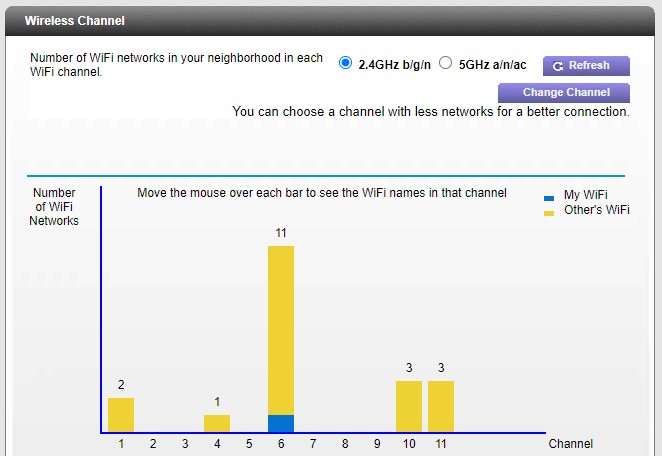
I've attached a look at the channels in use near me.
Where do I find the check box for the 20/40hz coexistence is enabled?
The interface I have is the NETGEAR genie C6250-100NAS.
- plemansGuru - Experienced User
What device are you testing on?
What app are you testing with?
Have you tried other devices?