NETGEAR is aware of a growing number of phone and online scams. To learn how to stay safe click here.
Forum Discussion

CrimpOn
Mar 27, 2025Guru - Experienced User
VLAN Puzzle
I would appreciate assistance diagnosing a VLAN problem. Now that many homes have Ethernet cables installed from most rooms to a central patch panel, some users find that the patch panel is not a gre...
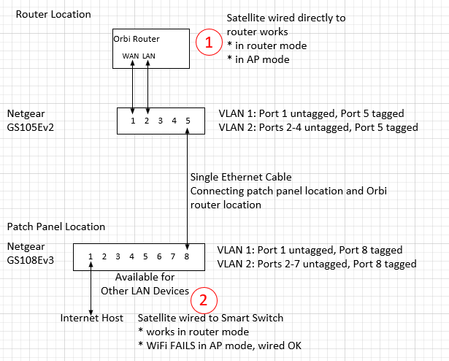

CrimpOn
Apr 15, 2025Guru - Experienced User
The Luddite is still confused.
When a VLAN port on a switch is "tagged", that means that every packet going out that port will contain the 802.1Q Header Type/Size field immediately after the Source MAC address. When the packet goes into another managed switch, the VLAN tag remains part of the packet. When the packet exits that second switch:
- If that port is "tagged", then the VLAN tag remains in the packet.
- If that port is "untagged", then the VLAN tag is removed.
- When packets go through unmanaged switches, nothing is done to the payload. If there is a tag in the packet, it remains in the packet. If the tag has no packet, it just goes through the unmanaged switch "as is".
So, on switch 1 everything from the LAN port on the router is configured to be part of VLAN 4092. If the switch sends it out any of the untagged Ports, it has no VLAN tag. When it goes to switch 2, the 4092 tag goes with it. In switch 2, if the packet goes out any untagged port (like to a printer, computer, etc.) the tag is removed.
If the packet goes out the port leading to the satellite, we want to keep VLAN tag 4092 in the packet.
This is where I am confused. When observing the connection between Orbi router and satellite, I do not pick up any packets that contain VLAN tags. (no switches, just a simple Etherent cable.) Are they optional? i.e. the satellite is so smart it can recognize router packets with or without a VLAN tag?

schumaku
Apr 16, 2025Guru - Experienced User
CrimpOn wrote:
If the packet goes out the port leading to the satellite, we want to keep VLAN tag 4092 in the packet.
Of course, correct!
This is why one has to configure the Ethernet port making up
- the physical between router and switch,
- between the switches,
- and from the other switch to the satellite as a trunk.
The main network will run untagged, while the other network(s) will run tagged.
- CrimpOnApr 16, 2025Guru - Experienced User
This gets more and more fun!
Next step appears to be how to determine if I am able to capture and display Ethernet frames with VLAN tags. The only tagged link in the current experiment is between switch 1 and switch 2. So, tap that link and see if Wireshark displays VLAN tags. (The Wireshark documentation on VLAN is a bit vague and seems to indicate that Realtek adapters may ignore VLAN tags and some other adapters will strip them.)
Does this affect the basic design? The assumption was "two separate Layer 2 networks":
- One for the ISP-WAN port traffic. To be kept separate from the LAN traffic so that no local devices (including Orbi satellites) appear on the WAN port.
- One for devices on the LAN (including Orbi satellites).
Because the VLAN tags are needed only to keep the two networks separate as they pass through the single Ethernet cable and to identify which ports they use to enter and exit the two switches, the actual switch ports are untagged.
This leads to more questions:
- What about connections to other devices? (not Orbi satellites) Printers, computers, etc. are not likely to understand 802.1Q VLAN. Will they always strip the VLAN tag? Should there be another VLAN for non-satellite devices? The "tagged" link can handle as many VLANs as needed. So, add another link from the router to Switch 1 for 'non-satellite' connections?
- What about the router to switch Port? If it is an untagged port with VLID set to 4092, then every frame will have a tag for 4095 added to it. Should it be set to a tagged port with a VLID of (???) for times the router sends out a packet without a tag?
- What about the port going to the satellite. It probably needs to be a tagged port?
Looks like the entire experiment hinges on being able to detect and display VLAN tags.
- schumakuApr 16, 2025Guru - Experienced User
CrimpOn wrote:
- What about connections to other devices? (not Orbi satellites) Printers, computers, etc. are not likely to understand 802.1Q VLAN. Will they always strip the VLAN tag? Should there be another VLAN for non-satellite devices? The "tagged" link can handle as many VLANs as needed. So, add another link from the router to Switch 1 for 'non-satellite' connections?
I'll try to provide some ideas, so you can answer this question by yourself:
Where would you connect these "other devices" on an Orbi system?
- My answer (never having touched an Orbi consumer system in more than a decade): On the Orbi LAN port! These could be the Orbi router box LAN port, as well as the one of the Orbi satellite(s) LAN port - these are either bridged through the Orbi Mesh wireless backhaul, or direct connected by this network "cable" linking the Orbi satellite(s) LAN ports, and the Orbi router LAN port. At that point, the satellites are becoming pure wireless access ports (no magic at all!)
Would these other devices have to be VLAN aware?
- My answer: No, of course not!
CrimpOn wrote:
- ...
- What about the router to switch Port? If it is an untagged port with VLID set to 4092, then every frame will have a tag for 4095 added to it. Should it be set to a tagged port with a VLID of (???) for times the router sends out a packet without a tag?
- ...
See my network laboratory session below! I can't take away your learning curve on these basics. But please scratch and forget the basic port based config options from the Plus switches - it's about the advanced VLAN settings only-
CrimpOn wrote:
- ...
- ...
- What about the port going to the satellite. It probably needs to be a tagged port?
It's a trunk port, carrying the LAN untagged, and the Guest network Tagged. Same as for connecting the Orbi router LAN port.
Of course, assuming you have a dedicated network making up the "WAN" (being your standard consumer grade NAT router LAN with the default NAT and private IP subnet, being a more sophisticated Internet connection supporting more than a single LAN and IP subnet, or handing out more than one public IP address by DHCP (to be configured with multiple NAT routers). Easy to create an additional VLAN (for example VLAN 1234), operating this Tagged over the single Ethernet link. defining a port on the central point ([U]ntagged, PVID 1234, ... the only one) plus one on the far end where you want to operate or test your systems, again [U]ntagged, PVID 1234, ... the only one) ... now you have a "virtual" WAN network Ethernet cable. No rocket science, a simple network laboratory training session for VLAN newbies you have to go through on your own, building your own experience.
- CrimpOnApr 16, 2025Guru - Experienced User
Thanks for not giving up.
Well, the plot thickens! The Tap I had been using at first (Throwing Star with two Ethernet-USB adapters) never showed anything with a VLAN tag on the Ethernet link between RBR750 router and RBS750 satellite. I just now installed the other Tap with a different Ethernet-USB adapter on that cable link (no switches) and it does show two kinds of packets:
- Between the router LAN port and satellite LAN port are ordinary (untagged) Ethernet frames.
- Between the router WiFi MAC address and the satellite WiFi MAC address are frames with VLAN tag 4093.
This may be why "it ain't gonna work."
When the router/satellite transmit Ethernet frames with and without VLAN tags, dumb old Ethernet switches are totally oblivious. They care only about their internal routing tables. "which port do I transmit this packet out to reach this MAC address?"
Now I have to investigate what "managed" switches from Netgear and TP-Link do when some packets appear on a port with VLAN tag and some appear without a VLAN tag. The cool process would be to simply shove another VLAN tag into the packet when it comes into the managed switch. Let that VLAN direct the flow through the switches, and remove that VLAN tag when the packet emerges out the other switch (leaving the original VLAN tag intact for the satellite to deal with).
And, how did the router know where the MAC address for the Satellite WiFi is? With WiFi, it's is radio waves. With Ethernet, the router has to pick one of the Ethernet LAN ports. Have to go back and start the capture before connecting the Ethernet cable.
- schumakuApr 17, 2025Guru - Experienced User
CrimpOn wrote:
..and it does show two kinds of packets:
- Between the router LAN port and satellite LAN port are ordinary (untagged) Ethernet frames.
- Between the router WiFi MAC address and the satellite WiFi MAC address are frames with VLAN tag 4093.
This may be why "it ain't gonna work."
Time to add the VLAN 4093 plus define the [T]agged 4093 on the trunk links connecting (I guess now something for some internal comms on these Orbis), and on the trunk where you connect your switches - so you have the plain VLAN 1 plus two tagged VLANs 4092 (guest) and 4093 (Orbi internal use?)
CrimpOn wrote:
When the router/satellite transmit Ethernet frames with and without VLAN tags, dumb old Ethernet switches are totally oblivious. They care only about their internal routing tables. "which port do I transmit this packet out to reach this MAC address?"
That's' exactly what an Ethernet bridge does!
Try to avoid the term Routing, as this is on network technology more the L3 routing for IPv4 and IPv6. We talk about switches, so it's internally bridging - that is what happens in between the different Ethernet segments.
Sigh, you must be in the age using networks for a longer time I guess - remember fat yellow Ethernet, and much more Thin Ethernet where the meaning of an Ethernet segment was more obvious back than. Breaking a modern switch down to that ancient tec does kind a proof every switch port and it's link does make a network segment, the switch became a very fast Ethernet bridge. This is why the old term of an Ethernet Hub (technically a pure bridge with Ethernet PHYs on each port) does still float around in the net and some wally brains 8-)
CrimpOn wrote:
Now I have to investigate what "managed" switches from Netgear and TP-Link do when some packets appear on a port with VLAN tag and some appear without a VLAN tag. The cool process would be to simply shove another VLAN tag into the packet when it comes into the managed switch. Let that VLAN direct the flow through the switches, and remove that VLAN tag when the packet emerges out the other switch (leaving the original VLAN tag intact for the satellite to deal with).
Sure, you could create some simple config on your two switches where you "invert" the logic, making PVID 1 on the "input" port, VLAN 1 [Tagged], and run the 4093 [U]ntagged between two switch ports if this would simplify your re-engineering efforts (permitting we are allowed to talk like that here in the public Netgear community here, guess they don't care).
CrimpOn wrote:
And, how did the router know where the MAC address for the Satellite WiFi is? With WiFi, it's is radio waves. With Ethernet, the router has to pick one of the Ethernet LAN ports. Have to go back and start the capture before connecting the Ethernet cable.
Looks like we have to open a new break-out session here. A Wireless Access Point (as implemented on the Orbi Router -and- all Satellite(s)) is just yet another Bridge - enhanced with some more or less smart "config and monitoring" tools.
The Orbi Backhaul capabilities (undoubted able to be run over a wireless connection -or- the Orbi LAN ports) are again nothing else then clearly tuned Ethernet bridges, allowing to seamless extend (in a customer friendly way when it comes to "air" or a simple Ethernet cable), avoiding network loops. Together with the wireless all operating on the same SSID, the same security, and letting the APs announce the same SSID all over - that makes up a Mesh system at the end of the day.
And because these additional proprietary control channels are model-specific, only select models of Orbi routers and satellites can be operated into the same config.
Wish everyone happy and peaceful Easter holidays with friends and families.
Regards,
-.Kurt.
Related Content
NETGEAR Academy

Boost your skills with the Netgear Academy - Get trained, certified and stay ahead with the latest Netgear technology!
Join Us!
