NETGEAR is aware of a growing number of phone and online scams. To learn how to stay safe click here.
Forum Discussion

lotanis
Nov 11, 2015Follower
Classical Routing - Simple Firewall
I have 12 public, static IP addresses from the ISP. I want to use these 12 addresses for 12 machines on my network, with the Firewall (Prosafe FVS336Gv3) acting as a basic firewall to control/cut off...

DaneA
Nov 12, 2015NETGEAR Employee Retired
Hi lotanis,
Welcome to the community! :smileyhappy:
Although I have not yet set up Classical Routing, here is what I think the steps to set it up:
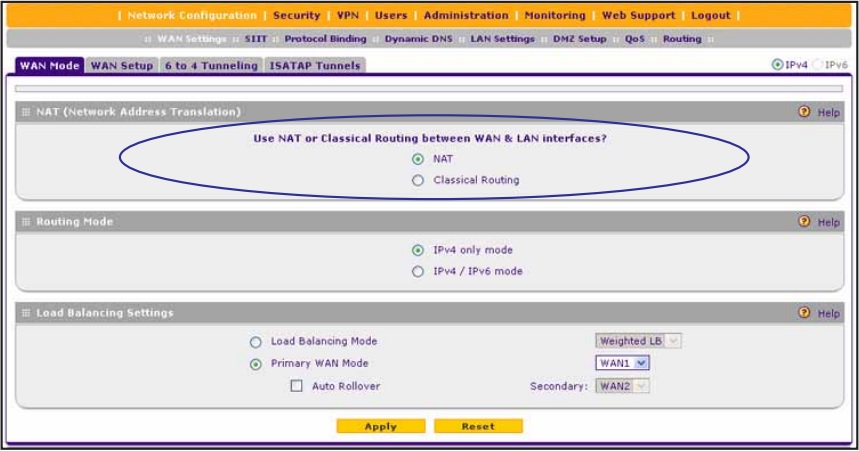
1. Go to Network Configuration > WAN Settings > WAN Mode. Then select Classical Routing under the NAT section. Refer to the image below:
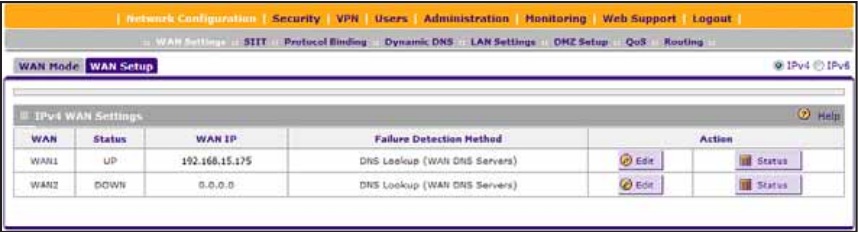
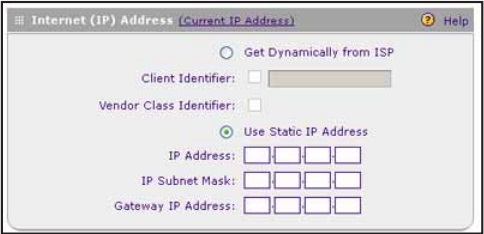
2. Go to Network Configuration > WAN Settings > WAN Setup. Click Edit on the IPv4 WAN interface you want to use. Enter the static Public WAN IP Address on the Internet (IP) Address field. Refer to the images below:
3. On each PC, manually enter the other static Public WAN IP Address. Then verify if you are able to go online.
Hope it helps.
Regards,
DaneA
NETGEAR Community Team
Related Content
NETGEAR Academy

Boost your skills with the Netgear Academy - Get trained, certified and stay ahead with the latest Netgear technology!
Join Us!
