NETGEAR is aware of a growing number of phone and online scams. To learn how to stay safe click here.
Forum Discussion

CrimpOn
Mar 27, 2025Guru - Experienced User
VLAN Puzzle
I would appreciate assistance diagnosing a VLAN problem. Now that many homes have Ethernet cables installed from most rooms to a central patch panel, some users find that the patch panel is not a gre...
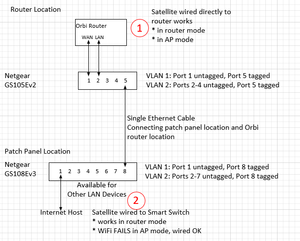

CrimpOn
Apr 24, 2025Guru - Experienced User
Guest WiFi is definitely behind a NAT firewall that prevents access from the internet or from the primary network. Devices on the Guest WiFi can open a connection TO the internet, which allows applications to communicate with cloud resources.
The problem is when a device is on the Guest WiFi of a satellite, and has to communicate with the Guest WiFi on the router through the LAN ports. I would have thought, "no problem. Primary IP subnet is 192.168.1.x. Guest subnet is 192.168.2.x. Just set up a static route." It appears that Netgear decided to use VLAN tag 4093 for any frames going from Guest WiFi on one Orbi to Guest WiFi on another Orbi.
As long as the entire network is "ordinary Ethernet" (wires or dumb switches), these VLAN packets just go where they are supposed to go. The ARP based switch mechanisms will route frames through the switches and cables until they get where they need to go.
What kills things is (a) using the 'wired' router to satellite connection, and (b) running the connection through managed switches.
What would be really cool is if someone could capture the traffic between router and satellite on a BE system. i.e. put a tap on an Ethernet cable. Start Wireshark. Connect the cables. Capture a couple of minutes.
BE Router >--cable--> Tap <---cable--->BE Satellite (leave this cable off until ready)
||
Wireshark

FURRYe38
Apr 25, 2025Guru - Experienced User
Can this tap be a non managed HUB switch, not a newer LAN switch that has separation on the ports, however, I have a older NG 100Mb LAN Hub that should see traffic all on ports. Would this work?
So does Guest Network work with something connected at the RBS using your new found two switch configuration?
"What kills things is (a) using the 'wired' router to satellite connection, and (b) running the connection through managed switches." < Too be clear, this is only in AP mode. I've been able to make the RBS and Guest Network work with 1 managed switch when the RBR is in Router mode.
- CrimpOnApr 25, 2025Guru - Experienced User
One of those ancient switches might work as a tap. It would be fun to set it up and find out. I had one of those years ago. (Geez. What the heck did I do with it? Will dig through boxes.)
Yes. With that "tagged" VLAN 4093 definition, I connected a tablet to the satellite Guest WiFi and it worked just fine. The network tap captured frames to/from the tablet and all were tagged VLAN 4093. Without that VLAN tag, the satellite would have received the frames but not sent them to the tablet.
- FURRYe38Apr 25, 2025Guru - Experienced User
Ok, will give the hub a go.
Hoping this configuration can be narrowed down to one managed switch for more usable realistic configurations. 🤔
- CrimpOnApr 25, 2025Guru - Experienced User
The point of using any managed switch was to carry both WAN and LAN traffic over a single Ethernet cable and keep them separate. That's what requires two switches (one at each end of the cable).
The same VLAN technique could be used to connect router LAN and satellites through a managed switch if that is the only switch that is available. My guess is that it would not matter if the ports that are not connected to satellites have the VLAN 4093 tag on them or not, because the switch ARP routing tables will not send frames intended for a satellite through ports that have no satellite.
- CrimpOnApr 25, 2025Guru - Experienced User
p.s. Used a TP-Link TL-SG105E Smart Switch (managed) to capture the communication between router and satellite using the port mirror feature. i.e.
- Port 1 connected to RBR750 router LAN port
- Port 2 connected to RBS750 satellite LAN port
- Port 5 connected to laptop running Wireshark
- Mirror Port 1 to Port 5
Every frame gets mirrored, including VLAN tags. Have not tried the Netgear managed switches, but see no reason why they would not do the same.
So, there are at least three mechanisms to capture Ethernet:
- Passive mechanical tap. (Throwing Star at $15. I've never seen anything else on Amazon)
- Electronic Network tap (Datacomm is $250. Others are really expensive.)
- Mirror port on a managed switch. (requires a switch with at least three ports. 5 seems to be the smallest generally available. under $20 on Amazon)
The clear winner is a managed switch!
- schumakuApr 26, 2025Guru - Experienced User
Négative, sorry CrimpOn
Port mirroring (aka SPAN ports, which can be local or even remote in a different end if the network!) can be an effective helpers, but often easy hit their limits.. A good collection of reasons is there -> https://www.gigamon.com/resources/resource-library/white-paper/to-tap-or-to-span/
- FURRYe38Apr 26, 2025Guru - Experienced User
Well when in router mode, I've been able to use VLAN 4092 with the RBS ethernet connected to 1 managed switch and both main and GN work at the RBS using 1 switch in between them. Hoping same can be done with the system in AP Mode if possible.
CrimpOn wrote:
The point of using any managed switch was to carry both WAN and LAN traffic over a single Ethernet cable and keep them separate. That's what requires two switches (one at each end of the cable).
The same VLAN technique could be used to connect router LAN and satellites through a managed switch if that is the only switch that is available. My guess is that it would not matter if the ports that are not connected to satellites have the VLAN 4093 tag on them or not, because the switch ARP routing tables will not send frames intended for a satellite through ports that have no satellite.
- CrimpOnApr 26, 2025Guru - Experienced User
Access Point mode worked for me on the 750 using two switches and VLAN 4093. I am confident that it would work using a single managed switch in both router and AP mode.
- CrimpOnApr 26, 2025Guru - Experienced User
schumaku wrote:
Port mirroring (aka SPAN ports, which can be local or even remote in a different end if the network!) can be an effective helpers, but often easy hit their limits.. A good collection of reasons is there -> https://www.gigamon.com/resources/resource-library/white-paper/to-tap-or-to-span/
This article is "spot on". Put another way, "the devil is in the details."
None of the three methods I described will capture a full out gigabit data stream that is active in both directions:
The Throwing Star functions by clamping the connection rate to 100Mbps and using power from the devices being monitored to drive the two 100Mbps taps (one for each direction). So, "keeping up" is not a concern, but the data rate is compromised.
The Datacomm captures gigabit in both directions, but outputs only a single gigabit connection to the monitor. So, if the total data in both directions exceeds about 920Mbps, then it will lose packets.
Mirroring to a single port suffers from the same issue. If both transmit and receive are constantly over a half gigabit, then it will fall behind. The inexpensive TP-Link switch I used for this exercise allows only one "mirror port". However, the two situations where I needed a tap both fell well under the switch capability:
- Tapping my 350Mbps ISP feed was "no problem". The total bandwidth was significantly under the switch capacity.
- For this "wired satellite" experiment, there was very little actual data traffic across the connection, so the switch was easily able to keep up.
- FURRYe38Apr 27, 2025Guru - Experienced User
Have you tried one managed switch yet with VLAN 4093 with the Orbi in AP mode?
Is only 4093 needed while in AP Mode?
CrimpOn wrote:
Access Point mode worked for me on the 750 using two switches and VLAN 4093. I am confident that it would work using a single managed switch in both router and AP mode.
- CrimpOnApr 30, 2025Guru - Experienced User
Was able to test the RBR50-RBS50 when the satellite backhaul is changed from 5G WiFi to 'wired'.
VLAN 4093 is never detected on the wired connection. There is plenty of ieee1905 traffic flying around, but it is all untagged.
The only VLAN detected is VLAN 1537 which appears to be connected to IGMPv3 messages. (join group. leave group)
Orbi systems have long been considered vulnerable to issues with IGMP. This may be one reason why managed switches were such a problem with the original Orbi systems.
My take is that since the original Orbi systems placed devices connected to Guest WiFi in the same LAN IP subnet, there was no reason to implement a method to keep their traffic separate from other device traffic as it went from satellite to router. When the AX systems placed devices connected to Guest WiFi in a different LAN IP subnet, they could not be allowed to "leak" into the primary network data stream and VLAN 4093 created a mechanism to extract those frames at the router interface so they could be processed along with Guest packets going through the WiFi network.
Do not have a WiFi7 system to test
- FURRYe38Apr 30, 2025Guru - Experienced User
What is the IP address seen on the 50 series system for GN device?
A few...
I also looked at my GS728TX and found it was configured for 4091 as well.
- FURRYe38Apr 30, 2025Guru - Experienced User
Ya, looking back at my MS105 switch, it was configured for 4091 for the RBR in router mode with managed switch in between.
Set this on my GS728TX and ya, both RBS are ethernet connected in router mode.I believe I had already done some wiresharking back then looking for any VLAN IDs and I believe I happened to find 4092 when I was looking for something. I believe it was AP Mode however I don't remember which mode as it's been too long.
Let me see if I can get some wireshare logs with this 100Mb HUB in between with the Orbi system in AP mode.
- CrimpOnMay 01, 2025Guru - Experienced User
FURRYe38 wrote:
What is the IP address seen on the 50 series system for GN device?
The test device is a Samsung Galaxy S6 Lite. When connected to the Orbi system, it has an assigned IP of 192.168.1.25. It gets this IP address when connected to the primary WiFi and when connected to the Guest WiFi.
The original Orbi does not have the IoT WiFi network.
- FURRYe38May 01, 2025Guru - Experienced User
Ok Ya, Thought so. Ya Seem to recall users posting about how GN wasn't isolated from the main WLAN back then.
Ya Old Orbi AC doesn't have seperate IoT network.
Got a wireshark log from BE system in AP mode.
- FURRYe38May 01, 2025Guru - Experienced User
Its interesting, after collecting logs, I removed the LAN Hub and re-connected everything to my GS-278TX swtich with VLAN 4091 tagged on all ports. Have a Android Pad and Apple iPhone connected at the RBS thats ethernet connected and Guest Network enabled. Both devices are streaming from youtube currently while both connected at the RBS on the Guest Network. 🤔 Hmmm.
I do have a double NAT condition with a RS600 in router mode behind a Orbi RBR870 in router mode. Not sure if that would effect anything. Its working.
- CrimpOnMay 01, 2025Guru - Experienced User
The tablet and iPhone are connected to the Guest network on the Orbi or on the RS600
- FURRYe38May 01, 2025Guru - Experienced User
RS routers wifi is disabled.
Yes GN has isolation and seperate subnet since Orbi AX.

Related Content
NETGEAR Academy

Boost your skills with the Netgear Academy - Get trained, certified and stay ahead with the latest Netgear technology!
Join Us!
