NETGEAR is aware of a growing number of phone and online scams. To learn how to stay safe click here.
Forum Discussion

joeyfine
Jan 04, 2017Aspirant
ReadyNas 104 500 error
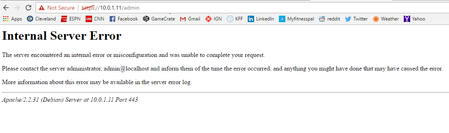
Hey Folks! So i forgot my password to get into the readynas (password did not work). I did a os reinstall to reset the password back to default. now when I log in and it asks for the password it ...
- Jan 05, 2017
I manually reset the password and triggered a normal firmware update to 6.6.1.
Glad the problem is now resolved.

fayazkhan
Jun 03, 2024Aspirant
more output

StephenB
Jun 03, 2024Guru - Experienced User
Delete all the tmp files in the clamav folder and then see what remains in it.
cd /var/lib/clamav
rm *.tmp
ls -als
- fayazkhanJun 03, 2024Aspirant
Throughs error
- fayazkhanJun 03, 2024Aspirant
looks good
shall i simply reboot from here
- fayazkhanJun 03, 2024Aspirant
rebooted after clearing space same error
- fayazkhanJun 03, 2024Aspirant
Hi,
After disk cleaned we have 1.32 GB used space , device booted into normal mode still the same error
putty does not work , what will be the next step please.
Thanks
- StephenBJun 03, 2024Guru - Experienced User
fayazkhan wrote:
After disk cleaned we have 1.32 GB used space , device booted into normal mode still the same error
I suggest trying an OS reinstall from the boot menu next. Note that will reset the admin password back to password.
If you can log into the web ui, then immediately disable the antivirus software on system->settings->services
- fayazkhanJun 03, 2024AspirantHi,
We dont want to lose data as no backup i will re install os from boot menu if it does not wipe data please advise
Thanks - SandsharkJun 03, 2024Sensei
As long as you do an OS re-install, not accidently do a factory default, then your data will be fine.
- fayazkhanJun 04, 2024Aspirant
Hi,
what are the steps to re install OS
Thanks
- fayazkhanJun 04, 2024Aspirant
I have re installed OS and logged in but some of the data missing
- fayazkhanJun 04, 2024Aspirant
Hi,
I disabled anti virus , not entire but some of the folder are empty , i only have homefolder with some the data 1.3 TB data still there
- fayazkhanJun 04, 2024Aspirant
i am unbale to join to domain as well
- fayazkhanJun 04, 2024Aspirant
I am downloading data it is taking long time 3 GB in 2 hour what is the best and quick way to backup data.
Thanks
- fayazkhanJun 04, 2024Aspirant
all data setting in there and i cannot share it
there were share before OS re install
- fayazkhanJun 04, 2024Aspirant
i am seeing some folder empty only one folder showing data that is not that much what is taking that much space 1.3 TB , i checked folder with highlighted folder they all empy
i can see folder structre but all folders empty look like data is hidden and it says uage
there is data not sure how i will see that data
Thanks
- StephenBJun 04, 2024Guru - Experienced User
Is all the missing data in the home folders?
Or is some in public shares? (Grateley appears to be a public share, there might be more below the home folders).
You can see the home folders from Windows if you connect to the NAS using admin credentials.
For instance, if you enter this into CMD
net use * /d /y
net use z: \\GHSReadyNAS\data /u admin admin-password
Substituting the real NAS admin password for admin-password.
This mounts the full data volume as drive letter Z. Note this won't work if you still have the admin password set to password.
:
- fayazkhanJun 04, 2024AspirantHi,
Folder Grateley i created after os re install that does not have any data Home folder have all the data but not visible i reset password tomorrow and will map drive may be will see data
Thanks - StephenBJun 04, 2024Guru - Experienced User
fayazkhan wrote:
Folder Grateley i created after os re install that does not have any data Home folder have all the data but not visible i reset password tomorrow and will map drive may be will see dataNormally there is one folder per account in home. Access either requires using the credentials for that account, or using admin credentials.
Your home folder looks like you might be sharing an account with multiple users - not sure if that is how you set it up, or if that is a side-effect of damage to config files that was done when the OS partition filled.
I am thinking that the priority now is to get all the data copied off. Then we can upgrade the firmware (which requires two steps in your case).
There is a repair script we could try to fix the shares - not sure if it will work, and we definitely should back up the files before we attempt it.
Another option would be to do a factory default, reconfigure the NAS from scratch and restore the files from backup.
- fayazkhanJun 05, 2024Aspirant
Hi,
How i will see data and can take backup then can proceed with further actions
Thanks
- fayazkhanJun 05, 2024Aspirant
i have reset admin but still not mapping share
net use * /d /y
net use z: \\GHSReadyNAS\data /u admin admin-password
- StephenBJun 05, 2024Guru - Experienced User
What error are you getting?
Did you replace admin-password with the real admin password?
Also try replacing GHSReadyNAS with the NAS IP address.
- fayazkhanJun 05, 2024Aspirant
getting below when using IP
The network path was not found.

Related Content
NETGEAR Academy

Boost your skills with the Netgear Academy - Get trained, certified and stay ahead with the latest Netgear technology!
Join Us!
