NETGEAR is aware of a growing number of phone and online scams. To learn how to stay safe click here.
Forum Discussion

Fandango2022
Nov 03, 2022Apprentice
ReadyNAS 2100 FrontView blank page - Firmware 4.2.31
Hi, Not sure If I am in the right place but here goes as I need some help. I have three readyNAS 2100's. I have had no issue installing OS6 on the first two. This third one did not like it an...
Fandango2022
Nov 25, 2022Apprentice
Well, I have finally managed to telnet to the broken NAS and can list some directories (bin, data, etc, init, mnt, root, sys, tmp, var, boot_flash, dev, frontview, lib, proc, sbin, sysroot, and usr) but the commands in the VPD copying document are not working for me . I am concerned that the instructions say not to copy the VPD from another machine under any circumstances, as it could cause issues and I have three other machines running on my network. Are there any MOD's available who could help to repair the VPD file on the broken NAS? Happy to be told it's not possible ,and I will just use the machine for temporary storage. Many thanks.

Sandshark
Nov 26, 2022Sensei
What specific commands are not working, and what error message do you get?
You cannot copy the VPD from a different base model NAS, but you can copy one from the same type. For example, minor differences in what drives it shipped with will make no difference. But copying a Pro4 VPD to a 2100 will cause problems, for example, even though both are 4-bay units.
If you do copy from one machine to another, they will show the same serial number, which will make it impossible to use ReadyCloud, if you were to convert to OS6 (assuming your 2100 is a V2 and can even be converted).. But that's the only issue I know of.
- Fandango2022Nov 27, 2022Apprentice
Thanks for getting back to me Sandshark . Much appreciate.
I have gone right back to the beginning and started a telnet session to the working box to copy the VPD file to USB, which is on OS 6.10.8.
1. USB has been formatted as detailed in the document with a single text file to allow easy identification
2. NAS has been booted in tech support mode and appears in RAIDar as such.
3. TELNET session established without issues using the credentials supplied in the document.
4. Ran command CD / as this is a OS 6 NAS - Ok
5. Ran command mount /dev/sde1 mnt - Ok (this is the only drive name I could get accepted as SDC1 and SDD1 did not work)
6. Ran command ls mnt and got a list of files including the VPD - Ok
7. Ran command mkdir usb - Ok (ls confirms the folder is created and present)
8. Ran command mount /dev/sde1 usb - fail with message -
mount: mounting /dev/sde1 on usb failed: Device or resource busy
I have waited and re-tried but no change to the message. RAIDar shows the following -
Thanks for your continued efforts to help me with this.
 StephenBNov 27, 2022Guru - Experienced User
Fandango2022 wrote:
5. Ran command mount /dev/sde1 mnt - Ok (this is the only drive name I could get accepted as SDC1 and SDD1 did not work)
8. Ran command mount /dev/sde1 usb - fail with message -
mount: mounting /dev/sde1 on usb failed: Device or resource busy
Why are you trying to mount /dev/sde1 a second time?
Step 8 is to mount the USB device you want to copy the VPD to (e.g, the destination), not remounting the source
- Fandango2022Nov 27, 2022Apprentice
Apologies... a misunderstanding of the document on my part.
At this point I am supposed to be mounting the USB , so how do I easily identify the drive name for the USB on my machine to use here? Is there a command? I have had difficulty finding commands for disk info.
Thanks for your patience.
- StephenBNov 27, 2022Guru - Experienced User
Fandango2022 wrote:
At this point I am supposed to be mounting the USB , so how do I easily identify the drive name for the USB on my machine to use here? Is there a command? I have had difficulty finding commands for disk info.
lsblk should list all the disks (and their partitions).
- Fandango2022Nov 27, 2022Apprentice
I get the following when I try this... I have entered the lsblk command after I have created the USB directory.
# lsblk
-sh: lsblk: not found - Fandango2022Nov 27, 2022Apprentice
Ok, thanks StephenB Sandshark - making some progress...
lsblk did not work for me but I tried ls dev, which gave me a list of device ID's I think. I tried the one at the end that looked like ti was in isolation i.e. sdf1 and command mount sdf1 usb worked. I could then list the contents of the usb and see my text file. Copy operation of cp /mnt/vpd /usb worked fine and I now have a copy of the file.
Next step to put it on the broken 2100 and see If it gets FrontView working again. Thanks for both your help so far.
- Fandango2022Nov 27, 2022Apprentice
Ok, thought all was going well. Managed to copy the VPD file to the broken NAS with no issues. Once started-up, it displays 'Corrupt Root' in RAIDar, and I cannot connect to Frontview in an old version of Firefox that used to allow it previously. Is this because the VPD file was from one of my OS 6 machines? I do not have this broken one upgraded yet from 4.2.31 and do not have any other older OS machines.
Many thanks.
- StephenBNov 27, 2022Guru - Experienced User
Fandango2022 wrote:
lsblk did not work for me but I tried
Ok. Some of the tools require you to mount the OS partition and chroot when in tech support mode.
Fandango2022 wrote:
Once started-up, it displays 'Corrupt Root' in RAIDar
That is a different problem. Try doing an OS reinstall from the boot menu. Note that will reset the admin password to netgear1.
- SandsharkNov 27, 2022Sensei
The VPD isn't changed between OS4.2.x and OS6. In fact, native OS6 units don't use it at all. But writing to the flash and then getting the "corrupt root" message could be an indication that the flash is actually faulty, since it wasn't before. But do try an OS re-install as StephenB suggested before you reach that conclusion.
- Fandango2022Nov 27, 2022Apprentice
Further update...
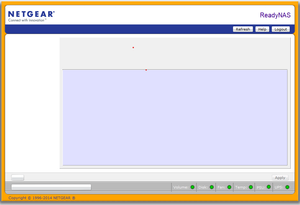
I took out the single 250gb disk that was in the unit and deleted the volumes in windows leaving an empty partition. When I rebooted with the disk in, the NAS started to check the disk in RAIDar. It then finished and let me choose 'Setup' to configure a raid type, showing formware version as 4.2.31. The 'Corrupt Root' message had dissapeared. I chose the default ,and it completed and told me about the lack of redundancy, which was expected. Frontview was loadable using the default credentials, but once again still shows blank screen, with just a few buttons...
- Fandango2022Nov 27, 2022Apprentice
Just tried an OS re-install to see if that rectified things, but sadly not. Still a blank FrontView screen. Do you think it is worth trying a RADiator 4.2 USB fash recovery?
- Fandango2022Dec 01, 2022Apprentice
Anybody got anything else I can try before this NAS has to be retired?
- mdgmDec 02, 2022Virtuoso
You could try an older web browser version.
If this is a v2 and you want to put OS6 on and try that you could rename the OS6 firmware .img file to RAIDiator-x86-something and use that instead when doing USB Boot Recovery.Note that the VPD may be corrupt after doing a USB Boot Recovery.
- Fandango2022Dec 02, 2022Apprentice
Already trying an old Firefox browser, that originally allowed me to view FrontView before I attempted the upgrade to OS6. This browser version has allowed me to upgrade other 2100's also. Not sure why the VPD file copy has not sorted my issue out. I will try a USB restore and see If that sorts things out. Other than that I am out of ideas on this one. Thanks mdgm .
- Fandango2022Dec 02, 2022Apprentice
No joy with any of the USB restore options. Tried both a 4.2 and a 6 version with no difference. NAS boots into 4.2.31 with the bad FrontView system visible. Thanks to you all mdgm , Sandshark , StephenB for having a go at helping me. Much appreciated. Think I will EBay this one for spares or repairs.
 SamirDDec 10, 2022Prodigy
I would still try some period correct portable versions of browsers to see if you can see everything in frontview. I somehow recall having this problem with just the wrong browser on my os4 units...
- Fandango2022Dec 10, 2022Apprentice
Thanks for your reply SamirD . I'll take your advice and try some Android browsers to see If I get anything different.
- Fandango2022Dec 16, 2022Apprentice
Still no joy. Tried phone browser versions and both old (V3.0) of Firefox and current version with TLS 1.0 support switched on. Still no Front-view options available just blank Front-view container screen. it seems as though the VPD file repair I did has not worked. It went onto the machine fine but hasn't done the intended job. I have tried adding more drives to the unit and this has not made any difference either. Is there anything I can do to try to see if the EEPROM is corrupt? Any documentation that will allow me to attempt a repair? I have nothing to lose by trying. Also, are there any Netgear guru's that could fix it? I Remember saying only Netgear support could build a new VPD file? How much would it cost to get the unit fixed ?
Thanks
- SamirDDec 19, 2022Prodigy
Strange, but a phone browser just may not work. I believe firefox 52 esr is what I'm using that works. I've moved my nas units for now so I can't double check, but I did get a 'new to me' one recently that should have os4 on it so I can try. Just don't know when I can get to building this new one or moving the other ones back where I can access them.
- mdgmDec 19, 2022Virtuoso
Fandango2022 wrote:No joy with any of the USB restore options. Tried both a 4.2 and a 6 version with no difference. NAS boots into 4.2.31 with the bad FrontView system visible. Thanks to you all mdgm , Sandshark , StephenB for having a go at helping me. Much appreciated. Think I will EBay this one for spares or repairs.
To put OS6 on you still have to use the 4.2 USB Boot Recovery, but you have to rename the OS6 image so that the recovery script will accept it. Each time you do USB Boot Recovery the EEPROM may become corrupt if it is not already.
- Fandango2022Dec 19, 2022Apprentice
Hi SamirD , thanks for the info. I think my whole problem here is that i should not have attempted to upgrade this unit to OS6. Think it might have been a V1. I am not sure how to tell now.
- Fandango2022Dec 19, 2022Apprentice
Hi mdgm , thanks for replying. As I said above, I think the OS6 upgrade attempt is what has caused me the issue in the first place. Think this unit was a V1. All I need to do now Is get it back to a working 4+ version. The various fixes have not worked in this area, so think I am going to have to seek out help to repair the VPD or EEPROM.
- SamirDDec 19, 2022Prodigy
If you're getting the general outline and format of the frontview page, then I think your os4 is fine and that it's the browser since os4 is old enough that the browser makes a huge difference. Have you tried ff 52 esr? I use the portable version of it I believe. The other versions of portable browsers I would try are x-chrome 45 (winpenpack) and slimjet portable v10 (based on chrome 49).
What is your current drive configuration? Single drive?
- SamirDDec 19, 2022Prodigy
Good to know even though the best bet is to always use something from the same era when working with older gear ime.

Related Content
NETGEAR Academy

Boost your skills with the Netgear Academy - Get trained, certified and stay ahead with the latest Netgear technology!
Join Us!
