NETGEAR is aware of a growing number of phone and online scams. To learn how to stay safe click here.
Forum Discussion

tony359
Mar 30, 2023Apprentice
ReadyNAS Pro 6 crashed again
Hello all, My ReadyNAS Pro6 periodically stops responding to the network. When that happens I can push the button to shutdown it but it will sit on "shutting down" forever and then I'll have to p...

Sandshark
Jun 04, 2023Sensei
The "missing" drive could be because of weak power causing it to spin up too slowly.
I never bother replacing caps in a supply. The supplies just aren't expensive enough to go to that trouble (my time has value, too).
The terminal is just like an SSH session. User name root, password same as admin password.

StephenB
Jun 04, 2023Guru - Experienced User
Sandshark wrote:
The "missing" drive could be because of weak power causing it to spin up too slowly.
tony359: I'm wondering if swapping disk 1 and disk 6 (with NAS powered down) would be worth a test. The slower spin up time might not be power-related.
 tony359Jun 04, 2023Apprentice
Thanks for the inputs! Yes I guess a new PSU is a good idea regardless. This NAS is 15 years old.
I didn't realise I can look for SFX power supplies. I found this
Scan is a famous dealer in the UK and this seems to be a 100% replacement. I can look for a higher wattage indeed.
Can someone please confirm that any SFX power supply would work?
Actually this one would be a good option. I like BeQuiet! and this is a 450W.
https://www.bequiet.com/en/powersupply/2309
I thought about that, looks like a good idea. Can you confirm the RAID is not going to be affected by the position of the drives? Obviously I appreciate a backup is in order and nothing is a certainty when moving drives around 🙂
Thanks!
 KDSJun 04, 2023Guide
Good guide here
Google : ReadyNAS Pro 6 Power Supply FAN replacement
The OEM has a protruding fan case. The newer modern PSUs don't have these, though the fan outlet is same place though flush with the PSU box. Any SFX power supply should fit, though I bought a Lian Li Sp750, which is fairly good quality, though this unit was a very tight fit and the unit is slightly 1mm bigger than the old OEM 350W unit. If you are buying a modular unit, check the 24pin lead is long enough. (at least 450mm long) .The unit I got the leads just made it though can't be installed as original OEM.
As far as PSU wattage goes, OEM is 350W.
What people say on line is the average HDD tested consumes 21W, even though manufacturers say 8-10W.
So if all fully power loaded. So rule of thumb allow 25W per HDD x 6 =150W, then fans say another 25W, main board/NICs 50W, CPU (Q6600) can draw approx 125W, your already at 350W. A 350W unit will probably do the job, maybe struggle under load. with a good 20% safety factor, in perfect world conditions. With drives drawing only say 10-12W each. Though as components get older and heat accumulates in the NAS, the power draw can greatly increase. remember HDD perfect R/W power consumption test are based on continuous R/W, real world can be much more erratic. Considering you have upgraded the CPU from a stock 65W unit to a 105W unit, with all the associated heat and electrical load. Suggest you consider at least a 450W unit.
My thinking was buy a better PSU, with less load on its capacity, I can always remove and reuse elsewhere.
- tony359Jun 04, 2023Apprentice
Thanks Stephen,
I also suppose that 4 and 6TB HDDs did not exist when the unit was developed and the PSU was designed around smaller units which don't have to spin so many platters around.
Anyways, knowing that the existing PSU is probably running close to 100% when under load, I guess a replacement is good.
I think I'll still test with an ATX one though. Main reason is that I believe the new PSU will need to be disassembled to fit the mains cable if what I see from online pics is correct? Ideally I don't want to invest money in a good quality PSU to then have to open it up straight away. If the NAS still misbehaves, I wouldn't be able to return it. So I'll test with a regular ATX.
I would also like a PSU with 3 Molex connectors - last thing I want is *another* fire in my PC because of crappy SATA-Molex adaptors 🙂
I'll consider the Lian Li, thanks. That seems like good value for money considering 750W output. The BeQuiet is 450W and cost similar money.
Weird about the dimensions, according to LianLi's datasheet it's standard SFX.
Did you need to do any modification to it? Cable extenders, Molex adaptors? And can you confirm if it needs to be opened to wire mains in?
Meanwhile the NAS disappeared again but this time I could reboot it via terminal (blindly). I forgot to turn on the monitor to see whether all the drives were being seen... 😞
- tony359Jun 04, 2023Apprentice
I can answer one question myself: no disassembly of PSU required, I've just removed the PSU and I had forgotten it comes with an IEC to IEC contraption.
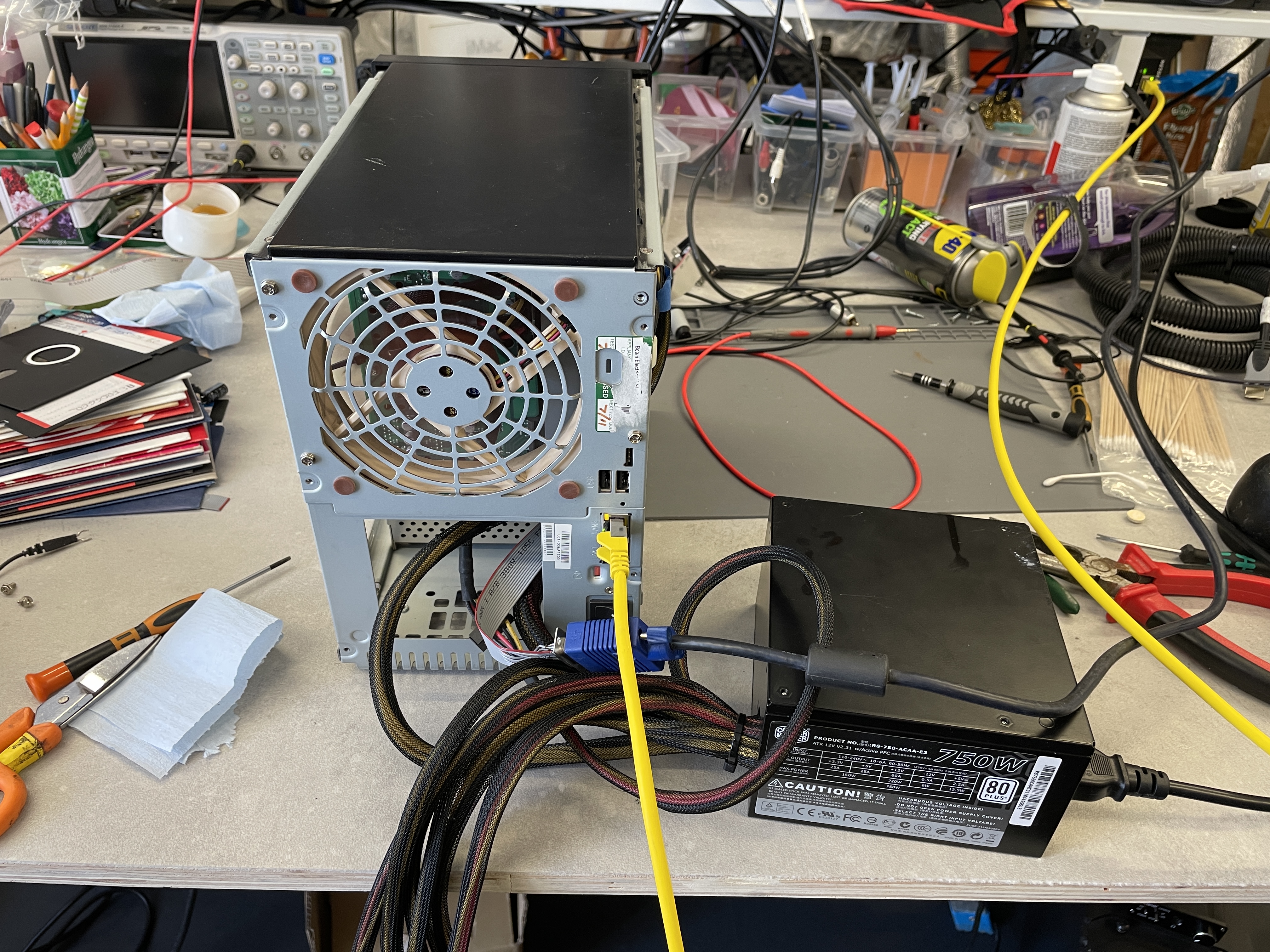
Cooler Master 750W ATX PSU is in. First thing I noticed is that upon power up HDD0 failed to show up - so it's not a PSU issue. I'm wondering if it's a red herring here or maybe HDD0 is having some issues. Maybe the MB fails to recognise it but by the time the OS has started it's managed to come back to life. (I've compare the spin up time of SDA and it's identical to SDB).
Second: I've now tried thee different monitors and none displays any VGA output after the OS has botted up. One showed some "noise" as if the signal was not locked on properly. But I could not improve it.
I haven't touched the HDD yet, I want to see what happens with this PSU first. If it fails again, I'll work on the HDD.
- SandsharkJun 04, 2023Sensei
I recommend at least a 400W supply to all. The original Seasonic has a higher 12V rating (which is used to spin the drives) than most 300W supplies. A few (like the Seasonic model that replaced the one in the NAS) have a fan that is offset. Some have said here that they've had no problem with that, but I avoid them. With most, you'll need to get a 12cm or so extender for the 24-pin connection and/or more 4-pin Molex (old style hard drive) connectors. You can get more 4-pins in a few ways: SATA to Molex adapter(s), Molex Y cables (probably the worst option), or remove the 90° IDC connectors for the old and install on the new, which is best for keeping the cables tidy so as not to affect the air flow but does render going back to the old supply more difficult.
The symptoms reported by KDS are typical of a failing +5VSB (5 volt standby, labeled just 5Vs on the original supply), as it powers the on/off circuit and network components. It is always on (so it can support WoL) unless you unplug the unit or use the rear switch, but the fans aren't on when the NAS is "off". So especially if your "off" NAS can get a bit warm, it's often the first casualty on a unit that is powered down a lot. The original PSU has a 2A rating on +5VSB, so make sure the new one has at least that (I don't think I've seen a 400W PSU that didn't). A bit more there could help.
FYI, the spin-up inrush current of modern drives is actually typically lower than that of many (especially enterprise grade) drives from when the Pro6 was released. Thinner platters with more densely packed data (so not a huge number of added ones) and better start-up control account for that. Lighter materials, too, I suspect, but the manufacturers keep that close to their chest. But because of the better spin-up control, they often require better regulated 12V than did their predecessors. But the bigger they get, the more they "catch up" power draw wise.
- SandsharkJun 04, 2023Sensei
Is SSH enabled? Whatever setting the NAS uses for that also affects whether or not you can use the console.
- tony359Jun 04, 2023Apprentice
Yes, SSH is enabled.
Thanks for the details.
I've tested the Seasonic PSU a bit with my digital dummy load and at 7A (max is 8A) the 12V is pretty bad. Not sure if it's supposed to be like that. But 1.6V of ripple doesn't seem normal to me. Voltage also drops to 11.4V.
In comparison the 5V line remains at low ripple even when pushed up to 19A (20A max).
Let's see how the replacement PSU behaves. Then I'll make a decision. 450W is going to be the minimum indeed. But I might want to replace the capacitors of the Seasonic anyways, 7A at 12V is within spec.
Oh, and because I thought the noise might have been coming from the digital load (which is a mosfet after all), I tried with a 1Ohm resistor. The attached is the resistor, not the digital load.
- tony359Jun 04, 2023ApprenticeI think the original PSU is indeed faulty. It shuts down when I apply more than 3A on the 12V rail when cold. After several attempts, it stays on and behaves ok - but with the ripple previously mentioned.
I tried loading the 5V line as well - I know some PSU don’t like not having a load - but no change.
I guess this is good news 🙂
StephenB
Reviews of the LianLi say it’s a bit noisy, what’s your experience? - StephenBJun 04, 2023Guru - Experienced User
tony359 wrote:
Can you confirm the RAID is not going to be affected by the position of the drives? Obviously I appreciate a backup is in order and nothing is a certainty when moving drives around 🙂
The RAID will assemble with the drives in any order.
That said, keeping the drives in order for troubleshooting is often useful. So I do recommend swapping them back if it makes no difference.
- StephenBJun 04, 2023Guru - Experienced User
KDS wrote:
What people say on line is the average HDD tested consumes 21W, even though manufacturers say 8-10W.
So if all fully power loaded. So rule of thumb allow 25W per HDD x 6 =150W, then fans say another 25W, main board/NICs 50W, CPU (Q6600) can draw approx 125W, your already at 350W.
FWIW, my Pro-6 draws about 145W during boot, then drops to 80W.
It is using the stock CPU (E5300), with 8 GB of RAM. The disks are
- two WD80EFAX
- one ST8000VN004
- three WD30EFRX
The TDP for the Q6600 is about 40W higher than the E5300.
- tony359Jun 04, 2023Apprentice
Thanks for confirming Stephen. I'll give the NAS some time with the ATX PSU, then if the issue resurfaces I'll move HDDs around.
BTW, please ignore the issue with the Seasonic PSU:
1. The ripple disappears if the 24pin connector is plugged into a motherboard so it looks like the PSU doesn't like if only 12V is being used
2. The issue powering up was my fault 🙂
- tony359Jun 05, 2023Apprentice
Update.
Sigh. The NAS disappeared from the network again, this is with the ATX power supply.
I rebooted via terminal (blindly) and took a video of the POST. HDD0 was correctly detected.
This is incredibly frustrating! I guess I can remove the PSU from the equation, that leaves the HDD - but even that is guesswork.
Sandshark any more ideas about displaying the UI on VGA? It would definitely help to see what's working and what's not when the NAS disappears from the network.
- SandsharkJun 05, 2023Sensei
I would have to pull a Pro6 with VGA out of storage to see if I get the command prompt. I currently only run rack-mount units at home and a native OS6 unit as remote backup. I'm assuming you already verified you have SSH enabled.
- tony359Jun 05, 2023Apprentice
I do have SSH enabled! 🙂
I've just tested turning SSH off and on again but I still don't get an output.
I appreciate I only have DELL monitors but I never had issues with VGA. I even managed to display out of spec EGA signal on one of them!
I appreciate the hassle of having to dig out a Pro6. You have my appreciation if you could do it - but no hard feelings if you can't do it! 🙂
- itachi2Jun 06, 2023Tutor
I had sporadic network drops in my Pro 6 but I could reconnect via the second port. I could SSH again in that way but filesystem was unresponsive and shutdown would hang. I did have a btrfs error in the logs though and eventually ran an offline btrfs-check after booting from a live Debian USB that found one file that was often accessed was corrupt. I think I wound up deleting the file vs. having btrfs-check repair it -- this was a while back so details are a little hazy, but btrfs-check (or a scrub) eventually found it. There may have been a CSUM ref or two in the logs as well.
The only similarity may be the kernel fault that showed for me as well, but might be worth a filesystem check or two. Hope you get closer to an answer - my bug took months and I still have a remote power plug to cycle it when necessary.
- tony359Jun 06, 2023Apprentice
Thank you for your input, really much appreciated.
I cannot remember if I tried accessing via the second port - it's been many months of tests! I'll set it up and keep it disconnected and try accessing only when it hangs.
My Linux skills are limited - but I learn fast 🙂
is this https://www.debian.org/CD/live/ ok to make a live USB install? Do I boot it by changing the boot order in the BIOS?
Once booted does it take me to terminal or GUI?
So I'd imagine I boot into Debian CD, then I issue
btrfs-check --readonly /dev/sda (or whatever drives I want to check).
and I repeat for all the other drives?
I guess this should not affect the NAS but as usual nobody can guarantee that 🙂
This is the only reference of CSUM I have in my logs
D:\Downloads\System_log-Enterprise-NAS-20230531-191137\btrfs.log (21 hits) Line 130: csum_type 0 (crc32c) Line 131: csum_size 4 Line 132: csum 0xa36bf3b8 [match] Line 195: backup_csum_root: 34406400 gen: 621032 level: 1 Line 206: backup_csum_root: 39092224 gen: 621033 level: 1 Line 217: backup_csum_root: 32161792 gen: 621029 level: 1 Line 228: backup_csum_root: 32538624 gen: 621030 level: 1 Line 236: csum_type 0 (crc32c) Line 237: csum_size 4 Line 238: csum 0x881ca9bc [match] Line 301: backup_csum_root: 17009663148032 gen: 166700 level: 1 Line 312: backup_csum_root: 17009663148032 gen: 166700 level: 1 Line 323: backup_csum_root: 17009663148032 gen: 166700 level: 1 Line 334: backup_csum_root: 17009663148032 gen: 166700 level: 1 Line 342: csum_type 0 (crc32c) Line 343: csum_size 4 Line 344: csum 0xf5e3c214 [match] Line 407: backup_csum_root: 17009663148032 gen: 166700 level: 1 Line 418: backup_csum_root: 17009663148032 gen: 166700 level: 1 Line 429: backup_csum_root: 17009663148032 gen: 166700 level: 1 Line 440: backup_csum_root: 17009663148032 gen: 166700 level: 1 - tony359Jun 06, 2023Apprentice
Ok good news. I can access the NAS via the second NIC when it goes down. It was very slow authenticating but then it sped up.
Here it shows up my lack of linux knowledge to be honest! I wanted to reset the network (or maybe just one of the NICs) but ifdown and ifup are not available?
Also traceroute is not available?
fdisk -l correctly lists all the drives.
What would you suggest I checked once I've got access?
- tony359Jun 06, 2023Apprentice
Update.
I found
ifconfig ETH1 up|down
Disabling ETH1 and bringing it back up, made the NAS appear again on my other network. At that point, logging in via SSH did not show any delay as before and everything seems to be working normally.
So it looks like it could be a NIC issue - even though I know that sometimes when I plug a keyboard, the CAPS LOCK button does not respond, showing a complete unresponsive system.
Two scenarios I guess
1. Faulty NIC HW
2. Software issue involving the NIC and when the NIC is in that weird state, everything which is using the network hangs
Any ideas?
- StephenBJun 06, 2023Guru - Experienced User
tony359 wrote:
Two scenarios I guess
1. Faulty NIC HW
2. Software issue involving the NIC and when the NIC is in that weird state, everything which is using the network hangs
Are both NICs always connected to the switch? Or did you move the cable to the second NIC???
- tony359Jun 06, 2023Apprentice
The second NAS NIC would directly connect to the second NIC on my desktop. NIC1 and NIC2 are on a different network range of course.
For this test, the secondary NIC was physically unplugged - but configured and ready to go. When the NAS disappeared from the main network, I plugged the secondary cable to the NAS and I could see the NAS from my desktop.
I thought of keeping the second NAS NIC disconnected rather than always connected. I guess I'll leave them both on for a test - but one NIC is going through the switch and to the main network, the other is only directed connected to the desktop.
Under normal circumstances, I would only use one NIC on the NAS.
- tony359Jun 07, 2023Apprentice
Just for the Hardware Geeks, I decided to replace the capacitors of the PSU anyways. I know, waste of time. And massive one as those large traces with wired made the process very difficult.
HOWEVER, 90% of the caps were bulged and were reading either nothing or a fraction of the original capacitance!! But the NAS was working, I wonder how.
And I wonder how is it even possible that the replacement (temporary) PSU hasn't fixed the issue!
I think I'll replace the Seasonic anyways but a small PSU is always handy so I'll fix it anyways.
The NAS didn't disappear over the past couple of days.
- KDSJun 09, 2023Guide
Just on an off chance you haven't tried yet.
CPU & RAM swap out?
- tony359Jun 09, 2023ApprenticeConsidering it’s happening very rarely it’s not such a bad idea.
I’ve run overnights of ram tests but maybe it didn’t catch it because it happens very rarely.
I still have the original CPU so I could try that too.
That said, the fact that just the network went down last time is suspicious. A ram or cpu issue would have much bigger impact I reckon. I might want to put a switch in between the nas and the main switch. It’s always been that switch and maybe it’s faulty. After all the nas stopped crashing when I took it off the main network - which takes the main switch out of the equation.
And it worked for a while while connected to my main desktop, again no main switch involved.
Uhm… I like this idea 🙂 - KDSJun 09, 2023Guide
I have my router dishing out DHCP addresses>>>Unmanaged 2.5G switch>>>both NICs into switch.
Static IP's on both Netgear NIC settings (IPV4) and router address.
Router set to static IP addresses for both NICs.
Since doing that both NICs are very stable.
Ram is 2 x 2GB PC800.
CPU is now E7600, Just upgraded from E5300, find this much faster than the Q6600, though my NAS is mainly used for backup, and file server, not really serving any Apps. E7600 runs faster and much cooler than Q6600.
Related Content
NETGEAR Academy

Boost your skills with the Netgear Academy - Get trained, certified and stay ahead with the latest Netgear technology!
Join Us!