NETGEAR is aware of a growing number of phone and online scams. To learn how to stay safe click here.
Forum Discussion

7lkf7
Mar 25, 2018Aspirant
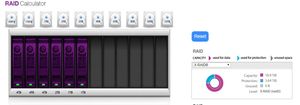
Why My ReadyNAS PRO is 1T less than the Raid Calulator
Hi everyone, I did use the Netgear Xraid calculator configured my raid setup, three 4TB drives, one 2TB plus two 1TB drives in X-RAID . refer to Calculator I should get 10.9TB in total. but my real...
- Mar 28, 2018
Hi 7lkf7
You can perform factory reset if you want but make sure you have backed up all your data. You may want to wait for StephenB 's advise once the log has been checked.
Doing factory reset removes all data so make sure everything has been copied or updated. I'm pretty sure what the calculator is showing will be the same with your volume after the factory reset.
Regards

7lkf7
Mar 27, 2018Aspirant
I will get log uploaded when I back home.
I installed 3, 4TB drive to replace its old 1TB drive.
would you please advise me should I copy the data out and factory reset it? or just leave as its. because I am considering to get another 4TB drive replace one of the 1TB soon and capacity requirement.
I just make it right in the beginning.
Thank you

Marc_V
Apr 01, 2018NETGEAR Employee Retired
Hi 7lkf7
We’d greatly appreciate hearing your feedback letting us know if the information we provided has helped resolve your issue or if you need further assistance.
If your issue is now resolved, we encourage you to mark the appropriate reply as the “Accept as Solution” or post what resolved it and mark it as solution so others can be confident in benefiting from the solution.
The Netgear community looks forward to hearing from you and being a helpful resource in the future!
Regards,
Related Content
NETGEAR Academy

Boost your skills with the Netgear Academy - Get trained, certified and stay ahead with the latest Netgear technology!
Join Us!
