NETGEAR is aware of a growing number of phone and online scams. To learn how to stay safe click here.
Forum Discussion

pdabrowski
Aug 18, 2016Aspirant
share connect to windows - error
Hi I have problem on Windows with this NAS. I have created a network share - public access and user account (login and password). Maps in windows account first user(given a login and password), the...
 Aug 19, 2016
You have to use the same credentials for both X and Y, otherwise Windows will give you an error. That is a windows restriction.
I am thinking that when you restart, X is being mounted first without credentials- so Windows will use its logon/password. Then Y won't mount.
Try changing X to use the hostname, and use the IP address for Y. See if that works differently,
StephenB
Aug 19, 2016Guru - Experienced User
Is there anything else on the PCs that might be accessing the NAS at startup? For instance a backup program?
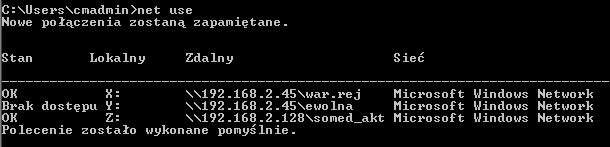
After the error, did you try opening CMD and entering net use
That should help you track down what the other connection is.
pdabrowski
Aug 19, 2016Aspirant
There is nothing in PC backup or something else related to the NAS.
Net use with the share of the user account is: lock of access.
- StephenBAug 19, 2016Guru - Experienced User
I meant just net use with no parameters, so you could see any existing sessions.
- pdabrowskiAug 19, 2016Aspirant
Y: is encrypted (login and password)
- StephenBAug 19, 2016Guru - Experienced User
What IP is the NAS?
Related Content
NETGEAR Academy

Boost your skills with the Netgear Academy - Get trained, certified and stay ahead with the latest Netgear technology!
Join Us!
