NETGEAR is aware of a growing number of phone and online scams. To learn how to stay safe click here.
Forum Discussion

Gran_Maestro
Sep 25, 2015Guide
Time machine backups last only a few months than need to be started again
Hi everybody, in short: I have been making regular backups using Time Machine for the last 6-7 years
I started initially using a Time Capsule and those files are still perfectly ok after quite a few years
With ReadyNAS they become un-writeable after 2-3 months. I get an error message stating the backup is beyond repair and being locked into read-only mode hence, the whole process has to start again and again and again
About 4 times now in one and half year or so and this way you loose your back up history.
It's most annoying and I wonder if there is something wrong that can be fixed.
It appears to me be OSX related as it happens also with several other NAS makes.
Any idea as to how to reduce this issue?
I found some instructions online in order to repair a un-useable sparse.bundle here: http://www.garth.org/archives/2011,08,27,169,fix-time-machine-sparsebundle-nas-based-backup-errors.html and would like to try give it a shot.
Time Machine however has automatically started a new file and there is not much I can do so far to retrieve the old data unless I can restore an old snapshot of the TimeMachine backup. If any was available.
I wonder if ReadyNAS makes snapshots also of the Time Machine sparse.bundle and if/how they could be retrieved for further investigation.
12 Replies
Replies have been turned off for this discussion
- mdgm-ntgrNETGEAR Employee Retired
Which ReadyNAS model are you using and which firmware version?
Which version of Mac OS X?
Are you backing up to the NAS via ethernet or wireless?No we don't take snapshots of TM backups. Snapshots aren't designed for that.
My ReadyNAS is a model 102 running the latest firmware update, 6.2.5 that is.
2 x 3TB hard disks filling the disk bays.
Connection is via a 3rd gen TimeCapsule and WiFi network access in other words TC is both Gateway to the Internet as well as router of my Local Network.
ReadyNAS connected to TC with a short Ethernet Cable
TimeMachine is active over the air
Macintosh is running OSX 10.10 Yosemite
My apologies for late response, I just got notified of your request a few minutes ago.
Thanking in advance for the given attention
/P
Dear Matthew, would it be asking to much for some follow-up on this issue by you or anybody in charge?
After all, I passed you the requested info two weeks ago, replying should be just a matter of being polite.
I wonder if this bug has been acknowledged by Netgear s/w developers or are you guys just left on your own? If yes, is there at least any kind of bug-squeezing activities carried on in the meanwhile? Just wondering.
It appears to me like this is a real issue affecting more than one customer, I don't think ignoring it is doing any good to Netgear's reputation..
I am not asking for much, at least give us users some kind of hope the problem is being looked into..
Thank you
P
- AlexPeNETGEAR Expert
Dear Gran_Maestro,
First, I want to thank you for your patience and your diligence in providing us with the data regarding this issue.
Matthew has been helping us out on some other issues.
Can you forward the logs to me?Send Logs to me
Put in the Subject: ATTN: Alex Timemachine backups issue
Thanks
Alex
Hello everybody, just a quick update on the TimeMachine backup debacle..
Today I got a few error messages from Time Machine indicating it couldn't perform a backup.
I tried manually and eventually got the dreaded message again (corrupted sparse.image) ..
It seems llike things are getting worse, this time about 2 weeks between a failure and another.
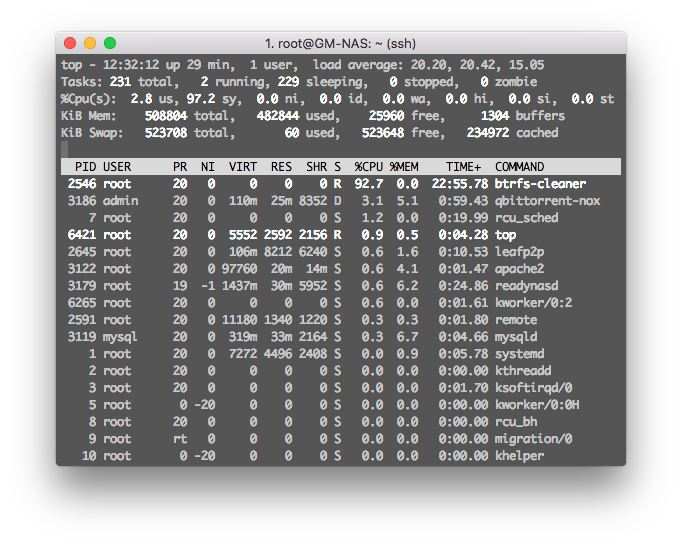
All this on top of the other OS 6.4 major issue that yesterday forced me to update firmware to 6.4.1 beta as the infamous btrfs-cleaner had kicked in killing de-facto the unit.
Oh boy oh boy what a disaster this is.. :manfrustrated:
 notaknightAspirant
Any update? I have found that this problem happens regularly if Time Machine starts a backup while ReadyNAS is running a backup job to a USB drive.
I'd like to get some answers as I got my system just for TIme Machine backups too.


Related Content
NETGEAR Academy

Boost your skills with the Netgear Academy - Get trained, certified and stay ahead with the latest Netgear technology!
Join Us!
