NETGEAR is aware of a growing number of phone and online scams. To learn how to stay safe click here.
Tips from other users
900 Topics
Ran Into Problems A Using My RNDuoV2
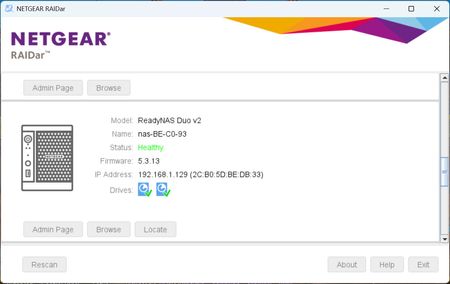
Dear Forum Members First, had to use a new registration and email to actually make this post, for some reason I could not use my old info to gain access to this forum. Anyway, my problem is this:- I have an RNDuoV2 that now house my 2 x 4GB WD Red HDs, which were originally in my RNDuoV2 bought in 2012, i.e. it died after 14 years. This RNDuoV2 was working perfectly up until one of the recent Windows 11 updates. Now I have found that I cannot access Plex any more, although my other two RNDuoV2s still work perfectly. However, I can still access the problematic RNDuoV2's Dashboard, thanks to that utility this forum supplied a few years ago but Plex, on this device, is locked away. As you can see, from the screen print below, The Name is from the failed (2012) original RNDuoV2, which contains part of it's primary MAC address, and IP Address with the MAC address (in brackets) from the recently bought hardware. I believe the problem is probably caused by this RNDuoV2 now has two MAC addresses, one from the original failed device, i.e. this number is embedded in HDs, and the second MAC address is part of the new (old stock) RNDuoV2's hardware that is now housing my original HDs. So I'm guessing that if both MAC addresses can be consolidated into one then the problem would go away. Is this possible? My next thought is hoping that there is a utility or script, probably something that can be placed in the Plex icon, that can work to reacquire my access to Plex. I get the following error message, and similar messages from other browsers (as seen in the attachment), when ever I click the Plex icon or type the URL directly into my other browsers. Hope someone has a solution or, failing that, a suggestions that may work, and as before any questions, query or clarifications required will be answered asap. Cheers. UK BobLooking for ReadyNAS OS 6.10.8 / 6.10.9 GPL kernel source for RN214
Looking for ReadyNAS OS 6.10.8 / 6.10.9 GPL kernel source for RN214 (Linux 4.4.218.alpine.1) Hello, I am working on adding support for a Realtek RTL8156 USB 2.5GbE adapter to a NETGEAR ReadyNAS 214 running ReadyNAS OS 6.10.10. The NAS is using: Kernel: 4.4.218.alpine.1 Architecture: ARMv7 / Annapurna Labs Alpine ReadyNAS OS: 6.10.10 USB adapter: Realtek RTL8156, USB ID 0bda:8156 The standard vanilla Linux 4.4.218 source tree is not sufficient. The ReadyNAS kernel contains a substantial NETGEAR/Annapurna patch set, including Alpine PCIe, AHCI, Ethernet, DMA, thermal, crypto, ReadyNAS platform, and Btrfs modifications. A test build against vanilla 4.4.218 produced thousands of symbol CRC mismatches, including core USB and networking APIs, so I do not want to force-load an unsafe module. The official NETGEAR GPL download links for these source archives now return HTTP 404: ReadyNASOS_V6.10.9_WW_src.zip ReadyNASOS_V6.10.8_WW_src.zip If anyone still has a local copy, could you please share one of the following? Preferred: ReadyNASOS_V6.10.9_WW_src.zip or ReadyNASOS_V6.10.10_WW_src.zip ReadyNASOS_V6.10.8_WW_src.zip If the full archive is too large, just the ARM / Annapurna Alpine Linux 4.4.218 kernel source directory, typically something similar to: linux-4.4.218-alpine/ If available, any of these files from the original kernel build would also be extremely useful: .config Module.symvers System.map vmlinux I specifically need the NETGEAR/Annapurna-patched kernel sources for 4.4.218.alpine.1, not the vanilla kernel.org source. My goal is only to build a compatible external r8152.ko module for RTL8156. If someone has the GPL archive but cannot host the full file publicly, even just the linux-4.4.218-alpine source directory would be enough. Thank you very much.Looking for linux-image-extra (6.10.9-10) package
This topic is related and refers to "2.5GBe USB LAN" discussion (https://community.netgear.com/discussions/readynas-general/2-5gbe-usb-lan/2455947/replies/2473823) I have replaced disk drive recently in my NAS, made factory reset default (dont ask why), reflashed good old RNOS 6.10.9 and started over from scratch. Problem which surprisingly appeared is, i cant get, nor find linux-image-extra for my version, or for 6.10.10 (i think file was same and mutual for both versions) = linux-image-extra_4.4.218-610090001_amd64.deb apt get linux-image-extra E: Invalid operation get root@READYNAS:~# apt install linux-image-extra Reading package lists... Done Building dependency tree Reading state information... Done The following NEW packages will be installed: linux-image-extra 0 upgraded, 1 newly installed, 0 to remove and 78 not upgraded. Need to get 6,502 kB of archives. After this operation, 30.7 MB of additional disk space will be used. Err:1 https://apt.readynas.com/packages/readynasos 6.10.9/main amd64 linux-image-extra amd64 4.4.218-610090001 403 Forbidden E: Failed to fetch https://apt.readynas.com/packages/readynasos/dists/6.10.9/main/pool/l/linux/linux-image-extra_4.4.218-610090001_amd64.deb 403 Forbidden I have renewed all the keys (hopefully). I think this is problem of file absence? Not with keys? Because i did all workarounds for apt-get to work, disablind authentification, adding keyrings for debian and freexian (latest, they have deprecated Debian 7 Jessie recently too) and added all the mirros (debian + rnos) Maybe is there some mirror you have, or archive, you made, i am asking just for the file linux-image-extra_4.4.218-610090001_amd64.deb which i cant find anywhere else. Im dumb i havent saved it. I need recompile linux core, and with usb-lan stick driver, just this thing. I hope i cant find help from Netgear, or more probably one of you, who was wise and made mirror or backup of files? Thank you for any helpOld ReadyNAS 212 won't boot up
So, many, MANY, years ago, my workplace merged with another company, and as part of that merger, I took over their IT system, which consisted of a few peer-to-peer PCs and a central storage system consisting of two ReadyNAS devices, one primary and one backup. Some time later, the backup NAS failed. Rather than fix or replace it, I opted to move to a cloud storage backup system instead, and the old unit was shelved. Fast forward to the modern day, amid a bunch of other IT problems cropping up (mainly, the current state of Microsoft OneDrive causing a cascade of problems with the cloud backup), the question of the the longevity of our current NAS device was raised. By my best estimation, that NAS has been going strong for upwards of 11 years now, and while it's performance has been incredible, it's at a point where it could fail at any moment. As part of the disaster recovery planning, the decision was made to try to refurbish the old backup NAS, just in case an immediate replacement is necessary before a full replacement can be purchased and implmented. That brings me to my current issue. The old NAS is able to power up, but then all the lights go out and it doesn't load anything. I have probed the Hard Drives on my PC, and while I haven't been able to access the files directly, the disks themselves seem to be fully functional. Most worryingly, attempting to access the Boot Menu with the reset button has failed entirely. Any advice of how I can get this old thing functional again? Preserving the data doesn't matter, they're just outdated backups, I just need to get the NAS Enclosure itself functional and active.Failing ReadyNAS Ultra 4 Plus
I noticed one morning my NAS had powered down and couldn't turn it back on. After turning the power off to it completely and waiting a couple of minutes, it turned back on. Strangely it then turns off by itself sometimes after a few minutes, sometimes after 15 minutes. I've taken the PSU out and tested the voltage outputs on the pins and it seems ok. I'm going to get a spare PSU and modify the pins to see if it works any better. In the meantime does anyone have suspicions as to what's failing on the NAS? When I look at the logs after each reboot (if I can get that far) there's nothing indicating the reason why it shutdown. Temps look fine also. Additionally, since I can't get a hold of a spare chassis (none on eBay), how do I get data off the disks? They're working fine. Do I need to connect all 4 drives into a PC and then get the data? I'd prefer to use Windows and hear ReclaiMe works?Just installed Ubuntu Server 24.04.4 on Ultra4, how to organize partitions?
Hi, I tinkered with trying to get SMB multipath working on OS6, but as Debian Jessie has not been supported for many years I decided to try to load modern Linux distro on my Ultra 4. After lot of tinkering, I got it working. I used ubuntu-24.04.4-live-server-amd64.iso (but assume other distros would work too). For those who want to know how to install, I can detail the process later on in the thread. (I am still testing and might re-install again). It involved booting off a USB stick containing Ubuntu distro while "listening" via USB-to-serial connection in PuTTY and couple of extra steps. What I wonder is: What is the optimal/fault tolerant way of configuring boot partitions? My Ultra 4 contains one 128MB "USB drive" (basically internal USB stick) and four SATA drives. 128MB is too little for a modern Linux distribution so currently, bootloader boots off 128MB drive, but then continues from 100GB partition I created on one of the four 2TB drives. Rest of space (4x1.8TB) can be partitioned and formatted as RAID5. While everything works, if sdd (where I put Linux distro on) dies the system will not boot. How did this work on original firmware? Did whole Jessie fit on 128MB? Can I create a RAID 1+0 partition on all four drives, and somehow let NAS boot of 128MB drive and continue on RAID1+0? Many thanks.SolvedAnyone got SMB multichannel working on OS6?
Hi, I have old Ultra 4 Plus with OS6 6.10.8 connected on both 1Gbit ports to 2.5Gbit network switch (no teaming or bond configuration , just two separate adapters with two IP). PC is using a single 2.5Gbit to same switch. Samba used is version 4.8.0, which should support SMB 3.11 and multi channel (albeit experimental) I added multi path configuration into smb.conf, configured PC adapter for RSS and verified that network is indeed capable of >1Gbit speed by running two iperf3 sessions on two different ports and IP’s towards NAS (and was able to get >1.7Gbit) Yet, my SMB file transfers are capped at 1Gbit. I verified PC SMB configuration in Powershell and it is indeed using two different IP/paths to NAS and using SMB 3.11. But something is throttling in NAS Samba. It is not drives nor CPU. Did anyone succeed getting more than 1Gbit on single file transfer session? If yes, can I get your secret sauce? Worst case, is it possible to install newer Samba (backported to Debian Jessie)? thanksSolvedRN104: ghost “NG-8TB-Seagate” volume (RAID unknown) Inactive/Unprotected
I have a ReadyNAS RN104 that’s working fine from the data point of view, but the volume configuration seems corrupted and is generating constant volume health alerts that I cannot clear. I’m hoping someone familiar with the ReadyNAS OS 6 config DB can advise on a safe way to remove the ghost volume entries without wiping any data. Hardware / firmware: • Model: RN104 • OS version: 6.10.10 • Disks: • sda: 2 TB (NG-WDRED-2TB-1) • sdb: 6 TB (NG-WDRP-6TB-1) • sdc: 3 TB (NG-WDRED-3TB-2) • sdd: 8 TB (NG-8TB-Seagate) – recently replaced a failed 3 TB Symptom: In the web UI → System → Volumes I see 6 volumes even though I only have 4 disks. The top four are green JBOD volumes with data and look healthy: • NG-8TB-Seagate (JBOD, ~7.27 TB, ~2.64 TB used) • NG-WDRED-3TB-2 (JBOD, ~2.72 TB, ~1.17 TB used) • NG-WDRP-6TB-1 (JBOD, ~5.45 TB, ~4.28 TB used) • NG-WDRED-2TB-1 (JBOD, ~1.81 TB, ~0.2 TB used) Below those, there are two blue entries with 0 data and “RAID unknown”: • NG-WDRED-3TB-1 (0 data, 0 free, RAID unknown) • NG-8TB-Seagate (0 data, 0 free, RAID unknown)