NETGEAR is aware of a growing number of phone and online scams. To learn how to stay safe click here.
easy plus and smart
75 TopicsLetter of Volatility LOV Request FAQ
Letters of Volatility LOV resources are not kept in the forums. Users are recommended to reach out to a forum moderator via private message to help you out or make direct contact with official NETGEAR support to request and obtain this information: https://my.netgear.com/support/contact.aspx https://www.netgear.com/support/contact.aspx Then clicking on "What kind of product are you looking for? then click on Business, then select "Chat with us". Thank you.2.5KViews2likes0Comments
System name
Hallo GS728TXPv3 with firmware: 6.2.2.40 This is a new switch and i just did the basic setup wenn i hung it in a DC. Besecly the old switch was still in use. Now that one is gone and i want to continue. But i can not change the name or system contact. The way i did: login -management. On a other netgear switch is a purple button but not on this one. I know normaly this is easy to do but... On some Cisco switches it is a brouwser thingy then it log in with a Microsoft brouser and you see the compleet interface. But never saw this on a Netgear. Anbody know of this???Solved
GS752TPV3 "comcast uplink port"
Howdy All, We have instrumented our first "new to us" Netgear switch for our classroom (to replace like 7 smaller switched that were scattered around) and I got it up and running, but realize that PORT 7 is the "uplink to our comcast router" port and now we're putting a new classroom computer onto that port, so I need to move the uplink line. I tried changing the VLAN to include Port 48 and Port 39 (both free in our schema) and moved the network line, but the switch refused to route traffic. I rebooted the switch (not reset, restart) to see if "coming up on the new line" would work, but no. If I move the line back to port 7 (still in the VLAN) it resumes functionality. I have checked the port configurations in the switch web admin, and they are identical. I have checked the VLAN membership configuration, and all three ports are "U"ntagged, with the same attributes. Any ideas? Thanks in advanceHinter FRITZ!Box 6660 Cable managed Switches und Multi-SSID Access-Point einrichten
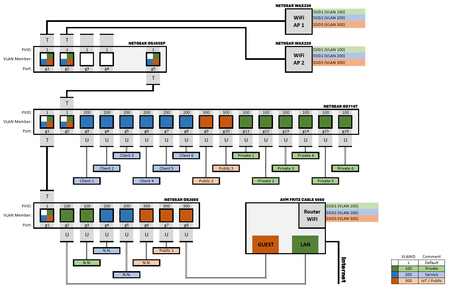
Hallo liebe Community! Ich arbeite mich an folgender Netzwerkinfrastruktur ab: Ich möchte mit einem GS716Tv3 Switch hinter einer FritzBox eine VLAN-Struktur aufbauen. Ich möchte 4 VLANs etablieren: 100 (Endgeräte), 200 (Raspberry, NAS & Co), 300 (IoT-Geräte) und das Default VLAN 1. Die Ports habe ich entdprechend mit der PVID versehen - alle untagged. Da sich beide Geräte in verschiedenen Stockwerken befinden, ist zwischen der Fritz Box und dem GS716Tv3 noch ein GS308E. Jeweils ein Port beider Switche ist getagged und Memeber aller VLANs. Über den Port verbinde ich die Switche. Der Anschlussport an die Fritz Box ist wieder untagged. Außerdem nutze ich LAN5 der FritzBox, um das IoT-VLAN mit dem Gastzuganz zu verbinden - auch mit einem untagged port. Mein Problem ist jetzt, dass die Switches nur miteinander reden können, wenn der tagged port die PVID 100 hat. Mit der PVID1 findet keine Kommunikation statt. Im Moment betreibe ich die Switches auch so, um Konnektivität zu haben. Die Kommunikation der VLANs 200 und 300 kommen aber nicht zustande. Nach meinem Verständnis müsste die PVID1 bei dem getagged Port doch egal sein? Schließlich verlässt das Datenpaket mit dem Tag der VLAN-ID, zu der der Eingangsport (PVID) gehört, über den das Datenpaket erstmals in den Switch eingetreten ist? Dann müsste - da der tagged port mitglied aller betreffenden VLANs ist - doch der Tag nicht verändert werden und das Datenpaket entsprechend korrekt getagged am anderen Switch ankommen? Zsätzlich betreibe ich einen AX4200 AP, der über den PoE Switch GS305EP mit dem GS716Tv3 verbunden ist. Dort kann ich auf den GS305EP zugreifen, wenn dieser einen getagged port hat, der die PVID des VLAN 1 als default hat. Der AP wiederum müsste nach meinem Verständnis auch an einem getagged port angeschlossenwerden, da das WiFi auch mit einer PVID versehen wird. Das klappt aber nicht. Hier muss ich den AP an einen untagged Port anschließen, damit icb Verbindung habe. Die Verwirrung bei mir ist komplett. Ich habe sicher irgendwo eine grundlegende Verständnishürde. Ich hänge mal ein Schema der Netzwerkinfrastruktur an, wie ich dachte, dass es richtig sein müsste (es aber offenbar nicht ist). Sieht jmd. das Problem? Vlg Thore (PS: Firmware ist die jeweils aktuellste)