NETGEAR is aware of a growing number of phone and online scams. To learn how to stay safe click here.
easy plus and smart
75 Topics
IPv6 / DHCPv6 with S350 Smart Switches (GS324T / GS348T)
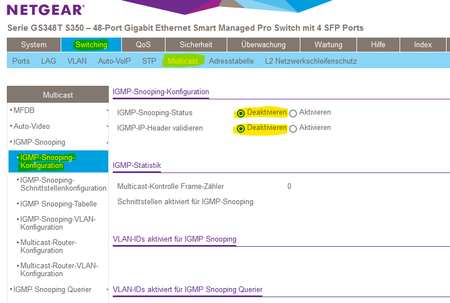
Wie Renefw in diesem Thread gemeldet hat funktioniert die IPv6 Adressvergabe von z.B. FritzBox Routern nicht über S350 Smart Switches. Die Clients erhalten keine IPv6 Adresse und können somit keine IPv6 Seiten im Internet öffnen. Ich hatte das gleiche Problem an meinem GS348T und konnte das Problem durch Deaktivieren der IGMP-Snooping-Konfiguration lösen. Ich habe diverse IGMP-Snooping-Konfigurationen getestet aber alles ohne Erfolg. Nur das Deaktivieren der IGMP-Snooping-Konfiguration hat letztendlich geholfen. Viel Glück, wenn Ihr das gleiche Problem habt. ✌6.3KViews0likes24Comments
GS116Ev2 kein Gbit zu FritzBoxen mehr
Ich bin nicht der erste mit dem Problem, aber leider hat keiner der folgenden Beiträge eine Lösung gebracht: https://community.netgear.com/t5/Managed-Switches/Netgear-GS105Ev2-kein-GBit-zur-FritzBox-7490/m-p/1... https://community.netgear.com/t5/Managed-Switches/Verbindung-drosselt-von-Gigabit-auf-100/td-p/16720... https://community.netgear.com/t5/Smart-Plus-Smart-Cloud-Switches/Gigabit-Verbindung-GS116E-lt-gt-TP-... https://community.netgear.com/t5/Managed-Switches/Switch-drosselt-von-1GB-auf-100-MB/m-p/1848360#M94... Bei mir soll der GS116Ev2 mit einer FritzBox 6360 und einer FritzBox 7560 mit GBit Geschwindigkeit verbinden. Ich bin mir auch ziemlich sicher das ich das schon mal hatte, aber mittlerweile klappt das nicht mal mehr zeitweise. - Alle Geräte sind auf dem letztmöglichen Firmware stand. - Ports der FritzBoxen alle auf PowerMode, habe aber auch ausprobiert obs besser wird wenn nur der betroffene Port im PowerMode ist und die anderen gedrosselt laufen - Stromsparmodus und Flow Control am GS116 sind deaktiviert - Ich habe schon diverse Kabel auprobiert, auch neue gekauft - alle Geräte für mindesten 5 Minuten vom Strom genommen Das tolle ist, meinen Zyxel NAS kann ich vom GS116 an und abklemmen,den Port wechseln oder das Kabel tauschen (Cat5-7) wie und wann ich möchte. Da klappt die GBit Verbindung immer auf Anhieb und dauerhaft stabil. Ich bin langsam ratlos und kurz davor die Kiste gegen was anderes auszutauschen. Hat noch irgendwer eine Idee?SolvedHinter FRITZ!Box 6660 Cable managed Switches und Multi-SSID Access-Point einrichten
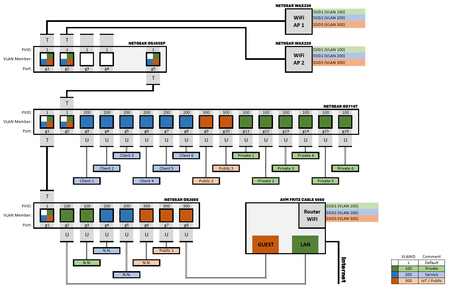
Hallo liebe Community! Ich arbeite mich an folgender Netzwerkinfrastruktur ab: Ich möchte mit einem GS716Tv3 Switch hinter einer FritzBox eine VLAN-Struktur aufbauen. Ich möchte 4 VLANs etablieren: 100 (Endgeräte), 200 (Raspberry, NAS & Co), 300 (IoT-Geräte) und das Default VLAN 1. Die Ports habe ich entdprechend mit der PVID versehen - alle untagged. Da sich beide Geräte in verschiedenen Stockwerken befinden, ist zwischen der Fritz Box und dem GS716Tv3 noch ein GS308E. Jeweils ein Port beider Switche ist getagged und Memeber aller VLANs. Über den Port verbinde ich die Switche. Der Anschlussport an die Fritz Box ist wieder untagged. Außerdem nutze ich LAN5 der FritzBox, um das IoT-VLAN mit dem Gastzuganz zu verbinden - auch mit einem untagged port. Mein Problem ist jetzt, dass die Switches nur miteinander reden können, wenn der tagged port die PVID 100 hat. Mit der PVID1 findet keine Kommunikation statt. Im Moment betreibe ich die Switches auch so, um Konnektivität zu haben. Die Kommunikation der VLANs 200 und 300 kommen aber nicht zustande. Nach meinem Verständnis müsste die PVID1 bei dem getagged Port doch egal sein? Schließlich verlässt das Datenpaket mit dem Tag der VLAN-ID, zu der der Eingangsport (PVID) gehört, über den das Datenpaket erstmals in den Switch eingetreten ist? Dann müsste - da der tagged port mitglied aller betreffenden VLANs ist - doch der Tag nicht verändert werden und das Datenpaket entsprechend korrekt getagged am anderen Switch ankommen? Zsätzlich betreibe ich einen AX4200 AP, der über den PoE Switch GS305EP mit dem GS716Tv3 verbunden ist. Dort kann ich auf den GS305EP zugreifen, wenn dieser einen getagged port hat, der die PVID des VLAN 1 als default hat. Der AP wiederum müsste nach meinem Verständnis auch an einem getagged port angeschlossenwerden, da das WiFi auch mit einer PVID versehen wird. Das klappt aber nicht. Hier muss ich den AP an einen untagged Port anschließen, damit icb Verbindung habe. Die Verwirrung bei mir ist komplett. Ich habe sicher irgendwo eine grundlegende Verständnishürde. Ich hänge mal ein Schema der Netzwerkinfrastruktur an, wie ich dachte, dass es richtig sein müsste (es aber offenbar nicht ist). Sieht jmd. das Problem? Vlg Thore (PS: Firmware ist die jeweils aktuellste)Letter of Volatility LOV Request FAQ
Letters of Volatility LOV resources are not kept in the forums. Users are recommended to reach out to a forum moderator via private message to help you out or make direct contact with official NETGEAR support to request and obtain this information: https://my.netgear.com/support/contact.aspx https://www.netgear.com/support/contact.aspx Then clicking on "What kind of product are you looking for? then click on Business, then select "Chat with us". Thank you.2.5KViews2likes0CommentsDer Agent unterstützt diesen Befehl nicht (Nach Firmwareupdate 2.6.0.48)
Hallo! Ich habe seit meinem Update mit der Switch GS116Ev2 und der Firmware 2.6.0.48 Probleme. Der Switch ist nicht über die Tools, „ProSafe plus (Fehlermeldung: Der Agent unterstützt diesen Befehl nicht) , oder dem „Discovery tool“ (Browser erzeugt eine Error Meldung) erreichbar. (Zusatzinfo… Ich habe noch einen zweiten neuen Netgear Switch, der sich mit dem „Discovery tool“ problemlos öffnet.) Mit der Eingabeaufforderung (CMD) konnte ich den Switch anpingen, … man sieht, dass Daten in MS gesendet und empfangen werden… Ich habe mehrmals ein „Factory reset“ probiert…. 5 Sekunden, 30 Sekunden… in diversen Youtube Kanälen sieht man, dass die Port aufleuchten sollten, bei mir bleiben sie konstant dunkel und leuchten nie… Habe es auch mit gepressten Reset und stromlos machen probiert und Neustart… Den Switch habe ich auch direkt am PC mit einem LAN Kabel angehängt -> dann in den Einstellungen/Netzwerk, manuell IP4 konfiguriert (ist hier im Forum gut beschrieben), den Switch dann Discovery Tool gefunden, blieb aber auch wieder ohne weiteren Erfolg. Kann man das Gerät zwecks Reparatur einsenden, oder ist das ein wirtschaftlicher Totalschaden, nach drei Jahren Betrieb? Vielen Dank, Michi2.1KViews0likes15CommentsVLAN Routing for Newbies
Howdy All, I've recently decided to install a GS752 switch in our offices to segregate traffic to help with security. I've run into a problem that I'm hoping someone can help me with (to keep things simple I'll just go over what VLAN 1 and VLAN 10 look like): VLAN1 - is fine. Systems attached get IP addresses from DHCP server, and can reach the internet. All ports are Untagged "U" in the port membership image. (Port 1-10) VLAN10 - doesn't work. No DHCP traffic through and no access to the internet even when using a static IP address in range. All ports are Untagged "U" in the port membership image. (Port 1, 11-20) My setup is: Broadband Router -> Firewall -> GS752 -> VLANS as follow: VLAN 1 - NAS, DNS Server, DHCP Server, Wifi APs VLAN 10 - PCs How do I allow DHCP and DNS to service VLAN1 and VLAN 10, as well others?1.5KViews0likes12CommentsProblem mit GS748TS beim Port Mirroring
Hallo, Leute, ich bin ganz neu hier im Forum und habe ein Problem. Ich muss dringend das Port Mirroring nutzen, bekomme es aber nicht hin. Das Problem ist im Grund eigentlich das Menü, ich weiß nicht, ob das korrekt dargestellt wird. Jedenfalls kann ich keinen Port oder keinen Switch des betreffenden Ports angeben (es sind insgesamt vier), um das Mirroring duchzufüren. Das gilt für Quell- und Zielport. Was ist denn das Schema, wie muss man den Port angeben? Muss es "g/5" heißen? Einfahc nur "5"? Muss eine raute davor? Ich poste mal ein Bild des Menüs. Es kommt immer die Meldung, der Port sei nicht verfügbar.SolvedÜbertragung von Siemens ProfiNet über Netgear-Switches
Hallo Community, in einem Netzwerk, in dem ausschließlich Netgear-Switches unterschiedlicher Typen, aber im aus der Reihe der Pro- oder Plus-Switches, betrieben werden, soll in einem dedizierten VLAN eine Anlagen-Steuerung die über das Siemens ProfiNet-Protokoll läuft, eingerichtet werden. Bei ProfiNet handelt es sich um ein Layer2-Protokoll, so dass ich dachte, die Einrichtung sollte nich so kompliziert werden. Nun stehe ich aber vor dem Problem, dass ich alle betroffenen Geräte, die sich über eine statische Port-Zuordnung im selben VLAN befinden pingen kann, die Programmiersoftware jedoch keine Verbindung mit dem bereits erwähnten PN herstellen kann. Die Switches sind über VLAN-Trunks miteinander verbunden, darüber hinaus ist, da das Unternehmen über einen Glasfaser -Ring verfügt das Spanning-Tree Protokoll aktiviert. Ich habe auch bereits einmal zwei Switchs aus dem Ring heraus gelöst, dort STP deaktiviert und den Trunk so umkonfiguriert, dass nur noch das VLAN für die Anlagensteuerung ungetaggt über die Glasfaser-Verbindung läuft. Das Verhalten bleibt aber immer dasselbe. Ping funktioniert, ProfiNet nicht. Hat jemand bereits Erfahrung mit der Einrichtung von ProfiNet, am Besten im Zusammenhang mit Netzwerk-Switches gesammelt? Bin für jeden Hinweis dankbar wie ich das zum Laufen kriege. Grüße TobiasSolved1.3KViews0likes3CommentsSwitch komplett tot nach Internetausfall vom Provider
GS308EPP Switch funktionierte einwandfrei, ca 1 Jahr alt und versorgt meine WLAN Accesspoints und LAN Buchsen. Seitdem heute nach starkem Regen ein Magenta Fibre Ausfall war, habe ich kein Internet mehr. Magenta arbeitet an dem Problem. Jedoch leuchtet beim Switch nun nicht einmal mehr die Power LED noch sonst irgendwas. Strom passt jedoch. Ein-/Ausschaltkkopf gibt es nicht. Stromkabel abziehen, warten und anstecken bringt nichts. Kann das Netzgerät defekt geworden sein? Stromausfall gab es jedoch nicht. Oder ist das normal, dass der Switch finster bleibt, wenn kein LAN Signal anliegt. Der Switch ist mit dem Magenta Modem über LAN Kabel verbunden. Habe an den Vervindungen nichts verändert.Solved[MS108TUP] - Switching - VLAN and routing
Hello everyone, I've this network configuration: Firewall --> MS108TUP --> Access Point Wifi The firewall and the AP is not a Netgear product. I've a domotic house so I've decided to separate the smart devices from the Main network. So in this case I've created an dedicated AP SSID with VLAN ID 20 only for manage smart devices. My network is also managed by a dedicated firewall device that manage VLAN Interfaces, WAN Interfaces, LAN Interfaces etc etc. Throught this Firewall, manage all the L2/L3 levels, from DHCP (one for every interfaces) to Privacy control, from Captive Portal (for Guests account) to Policy Control rule, ACL, Static route, QoS etc etc. So, I've configured the MS108TUP with several VLAN created in Switching mode (Switching --> VLAN). This is my current VLAN configuration on MS108TUP: MG1 is the Firewall uplink port, instead MG2 is the AP Uplink port. And this is the configuration of the interfaces into my Firewall: In this way, the AP create a SSID with VLAN 20, MG2 take the VLAN 20 and route it on MG1 VLAN 20; the firewall (MG1) take the VLAN 20 on port P2 and create it's own network with it's own dedicated DHCP and Static IPs list. All works good but when, from the firewall, I try to block traffic from/to the same interface/zone, not working. For example, if I try to block the SSH port from the tablet to my Raspberry PI and the tablet and the RPI is in the same interface/zone, the traffic is not blocked (my rule is: from DomoDevicesVLAN to DomoDevicesLAN source "tablet" destination "RPI" any service --> deny ----> this rule must deny the traffic for any service from the tablet to the RPI "using" the same zone but not work). Seems because the packet traffic is directly managed by the MS108TUP. Seems as the request is not passing throught the firewall, but remains at the switch level. For example: 192.168.0.5 --> 192.168.0.6 directly In this way the traffic is bypassing the firewall, because remain into the "switch" level Instead, how I can route the traffic thought the firewall? 192.168.0.5 --> 192.168.0.254 (Firewall interface) --> 192.168.0.6 In this way the traffic must pass into the firewall, and in this way I can have full-control on the packets and I can apply a Policy Control rule. Thank you so much Best Regards, Valerio1.2KViews0likes13Comments