NETGEAR is aware of a growing number of phone and online scams. To learn how to stay safe click here.
readynas os 6 on legacy models
1011 Topics
RN104: ghost “NG-8TB-Seagate” volume (RAID unknown) flapping Inactive/Unprotected
Hi all, I have a ReadyNAS RN104 that’s working fine from the data point of view, but the volume configuration seems corrupted and is generating constant volume health alerts that I cannot clear. I’m hoping someone familiar with the ReadyNAS OS 6 config DB can advise on a safe way to remove the ghost volume entries without wiping any data. Hardware / firmware: - Model: RN104 - OS version: 6.10.10 - Disks: - sda: 2 TB (NG-WDRED-2TB-1) - sdb: 6 TB (NG-WDRP-6TB-1) - sdc: 3 TB (NG-WDRED-3TB-2) - sdd: 8 TB (NG-8TB-Seagate) – recently replaced a failed 3 TB Symptom: In the web UI → System → Volumes I see 6 volumes even though I only have 4 disks. The top four are green JBOD volumes with data and look healthy: - NG-8TB-Seagate (JBOD, ~7.27 TB, ~2.64 TB used) - NG-WDRED-3TB-2 (JBOD, ~2.72 TB, ~1.17 TB used) - NG-WDRP-6TB-1 (JBOD, ~5.45 TB, ~4.28 TB used) - NG-WDRED-2TB-1 (JBOD, ~1.81 TB, ~0.2 TB used) Below those, there are two blue entries with 0 data and “RAID unknown”: - NG-WDRED-3TB-1 (0 data, 0 free, RAID unknown) - NG-8TB-Seagate (0 data, 0 free, RAID unknown) I believe these are stale/ghost volumes from the old failed 3 TB drive and some mis-step when I first added the 8 TB. They show only “Disk test” and “Destroy” as options. When I try “Destroy” on the old 3 TB entry, it appears to succeed but the entry comes straight back. In the logs I constantly get messages like: - “Volume: Volume NG-8TB-Seagate health changed from Inactive to Unprotected.” - “Volume: Volume NG-8TB-Seagate health changed from Unprotected to Inactive.” These repeat every few seconds/minutes and are clearly coming from the ghost NG-8TB-Seagate entry (the 0-data, RAID-unknown one), not the real 8 TB JBOD volume which is mounted and in use. SSH diagnostics (all arrays look clean): lsblk sda 1.8T ├─sda1 -> md0 (/) ├─sda2 -> md1 (swap) └─sda3 -> md126 /NG-WDRED-2TB-1 sdb 5.5T ├─sdb1 -> md0 (/) ├─sdb2 -> md1 (swap) └─sdb3 -> md127 /NG-WDRP-6TB-1 sdc 2.7T ├─sdc1 -> md0 ├─sdc2 -> md1 └─sdc3 -> md125 /NG-WDRED-3TB-2 sdd 7.3T ├─sdd1 -> md0 ├─sdd2 -> md1 └─sdd3 -> md124 /NG-8TB-Seagate /proc/mdstat md124 : active raid1 sdd3 7809175808 blocks super 1.2 [1/1] [U] md125 : active raid1 sdc3 2925415808 blocks super 1.2 [1/1] [U] md126 : active raid1 sda3 1948663808 blocks super 1.2 [1/1] [U] md127 : active raid1 sdb3 5855671808 blocks super 1.2 [1/1] [U] md1 : active raid10 sda2 sdd2 sdc2 sdb2[1][2][3] 1044480 blocks super 1.2 512K chunks 2 near-copies [4/4] [UUUU] md0 : active raid1 sda1 sdb1 sdd1 sdc1[3][4][1] 4190208 blocks super 1.2 [4/4] [UUUU] /root/mdadm-detail-scan.txt ARRAY /dev/md/0 metadata=1.2 name=0e34093c:0 UUID=b1079eff:ca275c6a:4df7d648:6f176c9c ARRAY /dev/md/1 metadata=1.2 name=0e34093c:1 UUID=9ecdbab8:7ecf3da9:299f9966:0fa46d04 ARRAY /dev/md/NG-WDRP-6TB-1-0 metadata=1.2 name=0e34093c:NG-WDRP-6TB-1-0 UUID=1d40ffff:601db1f8:20e41e54:f5650fa6 ARRAY /dev/md/NG-WDRED-2TB-1-0 metadata=1.2 name=0e34093c:NG-WDRED-2TB-1-0 UUID=d69ab251:67e359ac:16c640ee:2a0409c0 ARRAY /dev/md/NG-WDRED-3TB-2-0 metadata=1.2 name=0e34093c:NG-WDRED-3TB-2-0 UUID=1c072ab5:ea01a5d6:646d6d07:76776925 ARRAY /dev/md/NG-8TB-Seagate-0 metadata=1.2 name=0e34093c:NG-8TB-Seagate-0 UUID=4a957007:c3c04e0b:0aacb1df:3a59d9e8 /root/btrfs-filesystems.txt Label: '0e34093c:NG-WDRP-6TB-1' uuid: 28fcc8ab-9e63-4529-83f4-1e9d4708bd1b Total devices 1 FS bytes used 4.27TiB devid 1 size 5.45TiB used 4.28TiB path /dev/md127 Label: '0e34093c:NG-8TB-Seagate' uuid: 2a912336-755a-48e6-bcee-fd373ae8e6df Total devices 1 FS bytes used 2.63TiB devid 1 size 7.27TiB used 2.64TiB path /dev/md124 Label: '0e34093c:NG-WDRED-3TB-2' uuid: fbd95853-4f22-4041-8583-4e0853decf9b Total devices 1 FS bytes used 1.17TiB devid 1 size 2.72TiB used 1.17TiB path /dev/md125 Label: '0e34093c:NG-WDRED-2TB-1' uuid: 1b34cda6-1cc8-4360-9ca6-4c209100aa48 Total devices 1 FS bytes used 200.08GiB devid 1 size 1.81TiB used 220.02GiB path /dev/md126 So from the RAID/Btrfs point of view, everything looks consistent: four md data arrays, four Btrfs filesystems, all mounted and in use. There is no extra md device and no Btrfs filesystem corresponding to the blue “RAID unknown” ghost NG-8TB-Seagate volume. What I’ve tried: - Using the GUI “Destroy” on the blue NG-WDRED-3TB-1 volume: it disappears briefly but comes back. - Running btrfs scrub on the real NG-8TB-Seagate volume. - Restarting services and rebooting; the ghost entries and the Inactive/Unprotected log spam persist. What I’m asking for: I’d like guidance on how to safely clean up the configuration/database so that the ghost NG-8TB-Seagate and NG-WDRED-3TB-1 volumes are removed from the ReadyNAS UI and stop generating volume-health events, without destroying the real md124/md125/md126/md127 arrays or their Btrfs filesystems. I’m comfortable with SSH and sqlite3 if needed, but I don’t know the internal ReadyNAS schema, so I’d really appreciate precise instructions like: - which DB file to open; - which table(s)/row(s) represent these phantom volumes; - exactly what to delete/change; - and which services to restart afterwards. I do have backups of the most critical data, but I’d obviously prefer not to wipe and rebuild the entire box just to clear two stale volume objects. Thanks in advance for any pointers.7Views0likes0CommentsTrouble Setting Up Non-Admin Remote Access on ReadyNAS
Hi all, I’m running a ReadyNAS RN214 on the latest OS 6 firmware and I’m a bit confused about user accounts and remote access. I’ve created several local user accounts and assigned each one its own shared folder with limited permissions. Everything works fine when accessing the NAS locally, but when I try to connect remotely, only the admin account is able to log in. What I want is for each user to be able to access only their own share remotely, without using the admin account. I’m guessing I’m missing something in the permissions, services, or remote access settings. What’s the recommended way to allow non-admin users to log in remotely while keeping things secure? Any best practices would be appreciated. Thanks in advance.217Views0likes5CommentsUnable to update Readynas Pro 6 to OS6
Hi Everyone I recently pickep a ReadyNas Pro 6 RNDO6000-100. I have already updated it to 4.2.4 and also update the bios Now here is my issue whenever installed the prepfile for os6 addon it seemd like it goes then i try uploading the os4toos6.bin file it keep on saying local upload failed, ive been trying and reading through the forum for the past 3 to 4 days now for a solution and nothing.Solved758Views0likes8Comments
ReadyNAS Ultra 6 OS 4.2.31 corrupted VPD
I upgraded 3 of my ReadyNAS Ultra 6 to OS 6, and although had issues, it is running smooth (touch wood). However, I left 1 of my Ultra 6 as stock on os 4.2.31. The VPD has now been corrupted after failed restart that corrupted root. FrontView and RAIDar are empty when rebuilding the NAS. I am looking for a stock v4.2.31 VPD from an Ultra 6. Willing to divert some funds to procure a valid file. Contact me if you have a file or can help. Not really looking at buying an old Ulyta 6 to scrape it's VPD, but willing to do this if this is the only option. Message me please if you have a solution. Thanks899Views0likes7CommentsReadyNAS Ultra 6 stuck at "ReadyNAS" after degraded mode / failed drive
My ReadyNAS Ultra 6, running 6.10.8 became inaccessible yesterday. I tried to log in via http and SSH. http was non responsive and SSH allowed me to log in but immediately kicked me out. When I looked at the front of the unit i saw, "default: DEGRADED". disk 2 had an "X" through it. I checked with RAIDar and I could see the device. The note was, "Volume default: RAID Level 6, Not redundant; 13.9TB (96%) of 14.5TB used". The unit was making a clicking noise. I left it for a few hours and then decided to reboot - probably a mistake, I now realize. So right now, about 15 hours later, the machine is on with "ReadyNAS" displayed on the front, fans running full blast, and I cannot hear any disk activity. I can see a very small pinpoint sized white LED flashing next to the display. I am not sure what to do next. I would like to recover the data on the drives if i can. Should I replace the failed drive with a new drive? Is the system running an fsck or similar on all 13TB? Should I just leave it? I looked into creating a bootable USB but I only have MacOS, no Windows and that seems to be a requirement for the Intel-based recovery USB. Thanks in advance for any advice.532Views0likes3Comments
Pro6 reduction of power consumption
I have several Netgear Pro6 systems. They were upgraded to RaidOS 6.10, Intel E7600 CPUs and 4GB ram and are working great (had to recap the Seasonic power supplies since the caps were bulging). I also have an Ultra 6. I noticed the Ultra 6 uses (without drives plugged in) 19.5 watts while the Pro6 with E7600 CPUs and no drives plugged in uses 55-60watt. With the original Intel E2160 CPU the power consumption is not much different. I would like to downgrade the CPUs on the Pro6s I have to a single core model which uses as little as possible electricity. I only use them for storage, nothing fancy and since Ultra6 is fast enough with that Atom a single core Celeron in Pro6s should also be fast enough. Anyone knows what CPU should I look for ?680Views0likes3CommentsDrive replacement for failed drive
Hello everyone I've been running a ReadyNAS RNDU4000 (Ultra 4) populated with 4 x ST4000VN000 4TB drives in a RAID 5 configuration giving me 10.9TB available volume space for many years now. I've also upgraded the device to run on OS6 (currently 6.9.3). I've had a single drive failure and was looking at what I could replace it with. The ST4000VN000 are no longer available and was looking at the current Seagate IronWolf 4TB drives. The one that looked promising was the ST4000VN006 but it runs at 5400rpm which differs from the 5900rpm my current drives are. Would this be a problem? I use my NAS for music streaming and media playback. Has anyone used these drives or better still replaced a ST4000VN000 with one? Anyone got any further suggestions on drive replacement as I cannot find a drive compatibility chart anywhere any more especially for upgraded NAS devices on OS6. Many thanks554Views0likes2CommentsReadyNAS Pro 6 data volume split during resync
One of my drives got a bit warm, so I took it out to let it cool down. During the resync, another drive had some issues, so now rather than one 33.6tb volume, I have two volumes: 13.6tb (data-0) and 20tb (data). I know it's a long shot, but is there any chance of recovering the original volume, or should I just start my plex library again? I'm comfortable enough using PuTTY to SSH in for any commmand line level stuff if it's fixable, and can provide logs on the off chance the seemingly legendary StephenB sees this post!509Views0likes2CommentsRN 422 Volume recovery
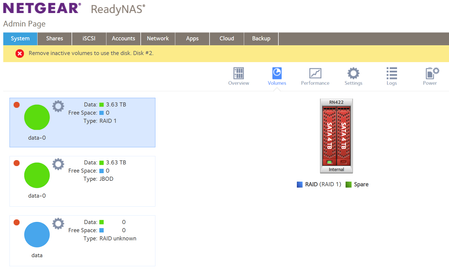
Hi all, Hopefully someone out there will have the expertise to help me recover my data. I have a RN 422 with 2 x 4TB drives running in Raid 1 configuration. All has been good until a month ago it started playing up. Failing to boot and an error message on the screen. After some investigation by myself I purchased a replacement drive fitted it and powered on the unit. From what I have learnt now I believe I did the wrong thing. I have not been able to access my data for about a month now and don't have a back-up. I thought Raid 1 ensured a back-up (mirror) but I have since learnt not. This is what I can see if I log into my NAS. Disk 1 is the original and Disk 2 is new blank and formatted.515Views0likes2Comments