NETGEAR is aware of a growing number of phone and online scams. To learn how to stay safe click here.
troubleshoting
4 Topics
ReadyNAS RN4220 wont boot up after shutdown from WebUI
Hello to anybody who can help, I got a ReadyNAS RN4220 out of eWaste from some company, and it worked perfectly! I have 100tb of NAS HDD storage in it and it has run fine for over a year now. Last week i decided to shut down my home rack gracefully just to give it a breather in the Australia summer heat. For the RN4220 i shut it down by using the Web Interface, telling it to turn off. It did so fine. A few days later, i tried turning it back on. It spins the fans to the highest settings and does not turn on. I have tried leaving it for a few hours overnight (approx. 8) to no avail. Does not even show up on RAIDar. What happens is it just sits there with the power LED blinking green and the network lights blinking green with fans on highest. If i force turn it off by holding down the power button the Red Health LED blinks once then goes away and the power LED goes back to amber as per normal. Again nothing has changed with the setup aside from me just shutting it down from the Web UI and turning it back on. I have done so in the past no issues. No clue whats changed. Here are some of the debugging steps i have tried: I cannot do an OS reinstall or Factory Reset as holding down the reset button for a minute on boot does not change the LEDs at all (as shown in the Hardware user manual, -> https://www.downloads.netgear.com/files/GDC/RN2120/ReadyNAS_OS6_Rackmount_HWM_EN.pdf the power LED, UI LED and Health LED should all be blinking, only the power LED blinks, assume it just isnt taking the reset command for some reason) Taking out all the disks and network cables and trying to boot up, no change Taking out all but 1 disk and booting up, no change I have tried removing both power cables (Its powered by wall power, not a UPS) and leaving it off overnight fully power cycling. no change. I have tried using the serial port on the back with a USB RS232 cable, a null modem cable (as its female port and i needed male-male) and Putty on a windows machine. Nothings happening on the console. Tried a few different baud rates to no avail. I have tried taking the top off, reseating the RAM and a few cables (Not all as im unsure what most of them do and they are quite tight in there) no change. I have tried taking out the CMOS battery from the Mobo and powering off the machine (unplugging) for a few hours. No change. I have tried running with just 1 of the PDUs on the back, it runs a red LED on the health indicator but otherwise no change. Please let me know if any additional info or photos can be useful for fixing this. I know its an older unit (if there are any newer replacements i could just take my drives and plug into with atleast 12 bays let me know, pref rack mount, and i can also look into that). I heard you can just swap drives between READYNAS products and they should work fine yeah? In terms of firmware on the device i think i installed the latest some time last year when i got it. But i cant access it to get the info anymore. I just am so confused why a simple reboot (done through the web UI!!!) would cause it to never boot up again.... Thanks for your time.940Views0likes9CommentsMy Netgear POE switch FS728TP is on but no POE activity
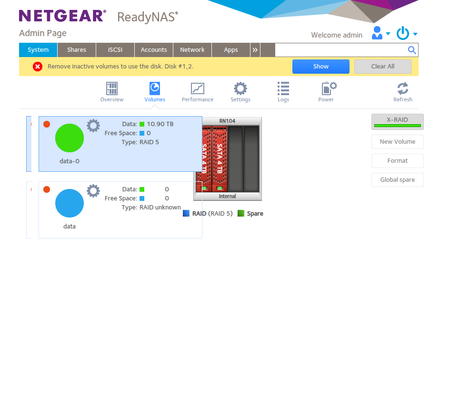
I had 2 of these switches for several years working fine! I just discovered that though the switch is on including the lights of the POE it still does not provide any POE activity when I plug in a device. When I tried to reset the switch all the lights do come on in the top part but still nothing works! Could it be that POE has a fuse that blew? Appreciate your feedback!Remove inactive volumes to use the disk. Disk #1,2. troubleshooting
I had previously posted this thread Remove inactive volumes to use the disk. Disk #1,2,3,4. troubleshooting | NETGEAR Communities but I had to wait for replacement disks that i bought during the summer. Now I started the ReadyNas 104 and I see error "Remove inactive volumes to use the disk. Disk #1,2." In the previous post it looked like disks 3 and 4 were ok but now i dont see them in the volumes section Given the different status I have not tried yet to enter in support mode and do any other steps. I looked at logs and given there might be some personal info i am not sharing them all but smart, kernel and some other that look relevant but I dont really see any new logs. Logs https://www.dropbox.com/scl/fi/y9g7g67rjjvhr7bktb3n8/System_log-nas-bizmate-20250925-093830_reduced.zip?rlkey=rogb99pwsqp9r2143vtovqwmr&dl=0 Should I go ahead with the previous instructions given that only the 1st and 2nd drive actually look alive?734Views0likes20CommentsM5300-52g slow start up when using v11 firmware
Hi During a deployment of a stack to replace an existing one, I ran into a problem. Instead of lift and shift of both units, the 52 port switch running v11 firmware (pre configured) was plugged into a live older switch (running v10). This then sent both switches into a tailspin and broke the configuration of both old and new hardware. The old stack has been restored, however I still need to replace with the 5300 stack. The new M5300 52g switch is showing some VERY strange behaviour even after factory reset and multiple firmware updates and factory resets. Initially after the incident, I had to force a reset using the CLI and to perform a hardware reset from there. Incidentally, all the ports apart from the USB, on the switch just weren't working or detecting any cables. Once I eventually got into the GUI, I could see that it was showing both elements of the v10 AND v11 firmware together. Having followed advice from within this forum, I have loaded v.10.0.0.53 to the switch. This then boots up fine and the ports on the front become live within 90 seconds. However, if I upgrade the same switch to v11.0.0.40 and reboot, It then takes 7 minutes before I can ping it and get access to the GUI. I'm simply not willing to rebuild and deploy this switch until I get this behaving as it was prior to the incident. Please note. I'm pinging the default private addressing 169.254.100.100 and I'm not worried about the config as it's going to need a fresh build. Old kit GSM7228PS and a GSM7352Sv2. Running v10.0.0.53 New kit M5300 52g and M5300-28g-PoE+. Desired firmware V11.0.0.40 I feel I have exhausted all my options and would welcome any other suggestions. Thanks in advance.130Views0likes0Comments