NETGEAR is aware of a growing number of phone and online scams. To learn how to stay safe click here.
Forum Discussion

DigitalVT
Nov 07, 2020Guide
12v fan on 5v supply?
Just received my pair of Noctua NF-A4x20 FLX fans I intended on replacing the stock ones to reduce the noise of the refurbished switch I've just bought, which I waited until I received it to check th...
DigitalVT
Jan 18, 2021Guide
Am sure the stock Netgear fan is great for switches in an enterprise scenario where the switch is under full load, speaking for myself, just want a switch with enough ports that can accomodate various connectivity around the home without additional switches elsewhere or having to manually repatch, thus the device itself wouldnt be under much load, therefore a slight breeze from these quieter fans may be enough to keep the Netgears internals cool enough to be accpetably quiet in a home environment?
I've got 8x PoE cameras, 3x PoE AP's, a PoE Cloudkey and multiple wired ethernet devices. My thoughts that a Noctua or other "quiet fan" running at 100% capacity keeping the internals cool when the switch is not busy and then may take longer to cool for the "short" busy times, is an acceptable useage, giving a quieter environment?
- DigitalVTMar 06, 2021Guide
Hello pn23,
sadly still waiting for delivery. It's been two months tomorrow since I ordered it, the tracking mentions it arrived in destination country on 15th Feb and on the 22nd Feb it was accepted by the last mile courier. Have received two items I've ordered weeks after, and many other items have also followed in the black hole/depot these fans are sitting in.
Maybe this week? But have been hoping that for a number of weeks!
- DigitalVTMar 09, 2021Guide
The fans arrived today!! pn23, your post must have got their attention!!
Received 7 fans, 3 pairs and an odd one. Guess I didnt get 4 pairs when ordered!!
This version of GS752TP has the fan connectors underneath a board, so not as easy to swop fans over.
I've tried all 3x of the new pairs and not one fired up. When I tried the fat SunAce40 (theyre almost 30mm deep), a little smoke came from somewhere, so pulled the power quickly.
Don't understand why Netgear fans are wired differently to ALL Other fans. I presume I need to change the polarity. But why? Netgear, WHY? Guess I've gone through a pair of Noctua, some others and now these!
Can someone just clarify the pin conguration, polarity for me please?
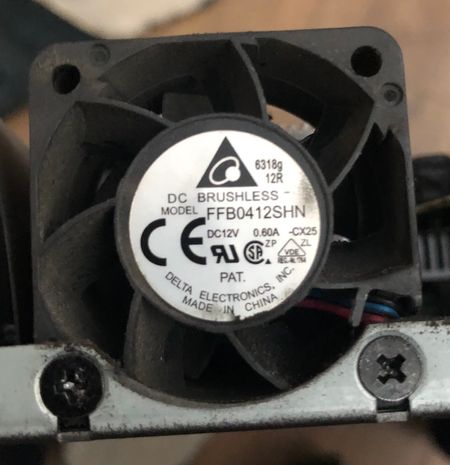
The Netgear stock fans, looking from top, left to right are - Red - Blue - Black
The others i have are - Black - Red - Yellow.
Your help would be apprecaited. Many thanks.
- pn23Mar 09, 2021Aspirant
Hi DigitalVT
I am using a GSM7248Pv1h1. The stock Delta fans that are in it are red (+), black (-) and blue (sense/tacho)
I have tried a few different manufacturers of coolers that match the spec for voltage, current, power, starting voltage etc and they all do the same thing - spin up for a second then stop.
Sunon and others use yellow wires for the sense pin, and the red and black remain the same as you'd expect. When trying Noctua fans, I'm pretty sure I had to reverse the +/- pins as they were the other way around on the switch, but it's been a while since I did that so I could be wrong!
I have also tried different fans in a GSM7248. That device has 3 fans. Trying new fans on the headers for 1 & 2 did the same thing, spin for a second then stop, but when I tried a new fan on the header for 3 it worked. The stock fan connected to 3 was 20mm deep, the ones connected to 1 & 2 were 15mm deep, but the fan on 3 was the noisest. Whether stock or not, it seems to run at full tilt from power on, and having the sense pin connected or not made no difference at all. It is deafening.
Some of the stock fans may have onboard controllers or dependant hardware that the switch may be looking for and if it doesn't see them, cut the power I guess.
I'm going to keep trying when I have time, but may eventually have to call it a day and get rid of them and drop in some silent HP equipment instead. Shame really as I have mountains of Netgear kit and would prefer to stick with one vendor.
- DigitalVTMar 09, 2021Guide
Well, my replacements, havent spun up.
I suspect when yours have spun up, it was on the initial power up and then the temperature sensor noted the temperature was low enough that the fans could idle, and lowered the voltage, hence why yours stopped spinning as the voltage wasnt enough for those fans?
My predicament is that the colour coding on my old ones don't make sense, you'd think it would be standardised. See picture, stock Negear fan on left, new connector on right. My OCD is saying that Red and Black are positive and negative. And the Blue and yellow are the sensor. But the pins all move about!!
Related Content
NETGEAR Academy

Boost your skills with the Netgear Academy - Get trained, certified and stay ahead with the latest Netgear technology!
Join Us!

