NETGEAR is aware of a growing number of phone and online scams. To learn how to stay safe click here.
Forum Discussion

zwavoo
Oct 21, 2016Aspirant
Configuration of RSTP to stop my network frequently Dying.
We have severe problems, I believe with someone in the office crossing network ports, and causing a loop somewhere. This has happened a few times now, and on most occasions, after a few hours Ive man...

Jedi_Exile
Oct 21, 2016NETGEAR Expert
Spanning tree is fairly simple to implement in terms of overall topology but preventing certain activity in the network depends entirely on your overall network implementation.
From the basic information given so far, you seems to have top down topology. Here are few ideas to get you started at addressing this. Beyond this, it would be helpful to post your text configuration (remove the password lines) and your network topology diagram.
- If you have basic downstream implementation as most network, enforce specific rules to prevent root changes which has much larger negative impact. Change the top switch to lower Bridge priority value. Default is 32768 or 16384. Make one the GSM at top be 0 and other 16384
- Since you are using multiple VLAN, I will make a assumption here and ask that you make sure to use MSTP here when possible for now if the switch offers this option, otherwise stick with RSTP setting. By default MSTP configuration is just like RSTP since there is only 1 instance running tied to all the VLANs.
- If the issues is someone is creating a loop, there are few things you can do to help isolate them. If you running into broadcast flood affecting the network, then I suggest taking a basic action on broadcast control under "Storm control" under security. Implement a more strict broadcast setting then default. If given a choice of PPS or %, choose PPS on edge port (user port) and limit it to 100 pps/sec. For the uplink ports on switch which connect switches together, stick with % but limit it to 1-2% at most. Your topology is flat based on what was stated, so consider segmenting the network further if possible. This change has a negative impact on users which will get port shutdown so make sure to implement some kind of trap SNMP server to get alerts of ports being shut down. If you have spare virtual machine or server, install NMS200 which is free for 200 devices and spend a day or two configure it for alerts, monitoring, and notification.
- Each of model depending of datasheet has specific features to address certain behavior dealing with BPDU. I could elaborate those, but I suggest posting the 2 items I suggest before we start a discussion on those.
- Any port that is edge (meaning expected to have users’ desktop connected) should be set to "spanning-tree edgeport"
- To debug spanning tree quickly, when the issue occurs, connect via serial to one of top switches, enable debug for spanning-tree bpdu via command
debug spanning-tree bpdu
You can now look at debug level buffer logging (you may need to enable that as well. "logging console 7" to see any output. Should give you more useful insight into what is going on instead of you flying blind. Make sure undo the debug after you are done fixing it.
"no debug spanning-tree"
- Quickly dealing with flooding. There are few ways to do it. Here are some example
- Review the broadcast rate on the port. If needed, clear the stats on the port, and check them quickly. You can identify the source ports with most in order to track down to the next uplink and all the way to source port quickly to find the culprit.
- It bit harder so I am not going to explain how to do it but how mostimplement it, using pcap to understand the culprit. Implement a port at the top level switch which will act as your eyes on the network. Most people set aside a spare port to act as monitor destination on their top switch and typically set the source to uplink port going to the firewall or edge router. Useful to snoop traffic going in/out of network to determine bad activity if needed. Snoop the traffic and determine the possible endpoint and track the endpoint across the network port map.
Hope this is helpful, I apologize for spelling mistakes.
zwavoo
Oct 24, 2016Aspirant
Wow. This is a wealth of information, and Ive spent days searching the internet. Ive not managed to find nearly half as much as youve offered here, and IM grateful for the assistance.
Our Topology is fairly basic, as the attached diagram shows.
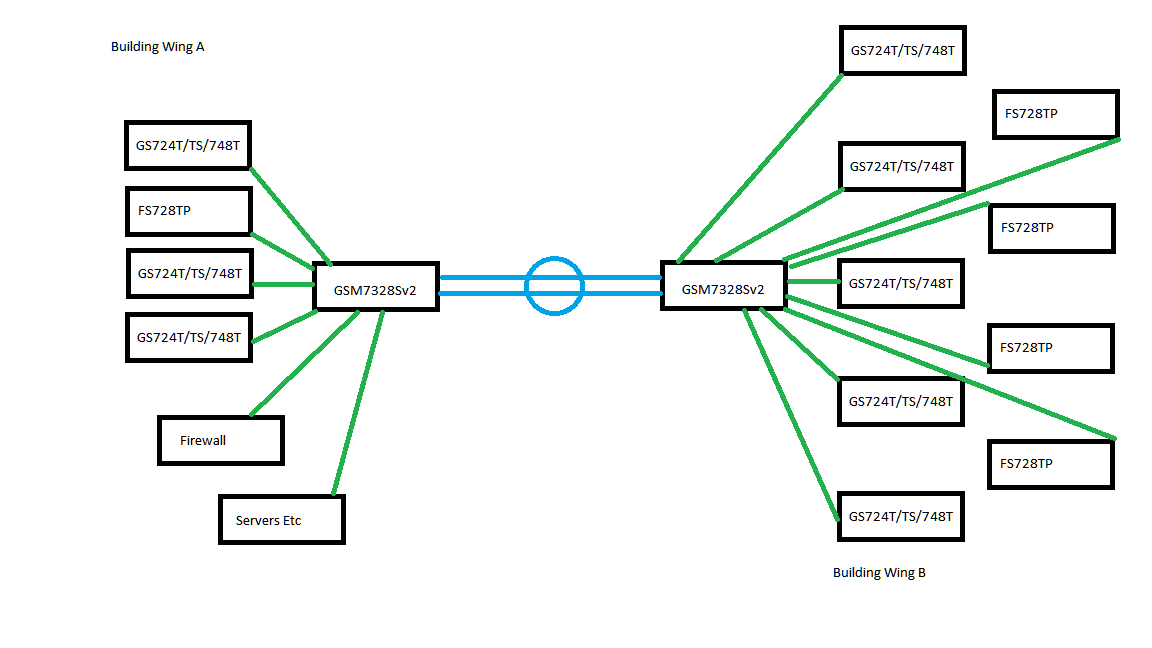
The office is made up of two buildings, physically joined, and networked with 2 x 10GB Fiber connections (shown above in blue). The Green lines represent gigabit uplinks from all of the switches to the two "Core" devices. connected to all of the switches are the users PCs, printers, and Phones (on the FS728TP).
Im not sure what config files you need (from which devices) but Im happy to provide those.. ?
- Jedi_ExileOct 24, 2016NETGEAR Expert
The topology seems simple enough.
For Building Wing A. Change the Bridge priority value on GSM7328Sv2 to 0 under the spanning tree configuration.
For Building Wing B. Change the Bridge priority value on GSM7328Sv2 to 16384 under the spanning tree configuration.
That should take care of root changes immediately. make sure to do this during off production hours. Make sure all other switches are defaulted to 32768 for bridge value (This is default value)
Make sure all switches are switched to MSTP or fallback to RSTP for switches taht do not have it.
1. Make sure the uplink between the 2 core switches is ethernet and not stacking. Stacking in this specific circumstance will be ok if you want to make it unified switch setup but LAG would be preferred to prevent split brain routing since all routing will end up terminating on building A.
2. Log into the switch via telnet or SSH or serial console. At enable prompt type "show tech-support" command to generate the support file. PM this file to me for both core switches
- zwavooOct 25, 2016Aspirant
Thanks again for this update. I will be applying the priority changes this evening after everyone has gone home.
Id like to mention what would be my ideal scenario. If a user were to connect both ends of a cat5 cable to floor ports, thus causing a loop, I would like the switch to disable that port, and let the user come and find me, or indeed let me spot this in our monitoring station when that switch sends a trap.
Previous incidents of this nature have been down to this very act, but Ive only actually traced it on a handful of occasions. we patch the FS728TP ports to odd numbered ports, and the GS724T ports to Even numbered. That way I can tell users to use odd for their phones, and even for network connections. Hasnt really helped though :-)
if you have an idea how I can make the switches disable the ports, then I think Ill have all the tools I need to find the [expletive removed] that is costing us so much downtime.
Thanks again
- Jedi_ExileOct 25, 2016NETGEAR Expert
Well in the statement below, if users connects port x to port y on the wall where port x is connected to FS728TP and port y is connected to GS724T which are also connected to rest of network via uplink, that problem can be easily solved as port should go into blocking state if you mark the port cost of uplink port to be lower and mark the 2 user ports as edge ports.
If you are trying to protect the network from unidirection issues where example a user connect wall port to a unmanaged switch and loops that switch, that will be different problem all together.
PM me the configuration of your FS728TP and GS724T as text configuration files and I can take a look and make suggestion.
- zwavooNov 09, 2016Aspirant
Hello,
This afternoon we suffered another outage, and I watched the secondary GSM switch reset itself again (from my syslogs, I think the ROOT did the same, but I wasnt in that room). At the time of the problem, I had only configured the 2 GSM switches as per your recommendation, and had yet to get round to setting all the others to MSTP (They were all on RSTP with priority at 32768). The problem did not seem to last as long this time, after about 30 mins, everything settled down, and I couldnt see anything in the syslogs suggesting a cause of the outage. Slightly irritated by this, I have now connected to all of the LAN switches (not the FS728TP just yet), and set them to MSTP, 32768 priority, enabled broadcast storm, and set it to disable any of the ports at 1% threshold, EXCEPT for the uplink ports, which Ive left the storm control disabled. As of right now, nothing has happened, so Ill put the same settings on the 728TP switches. If Ive understood any of your suggestions, this should then disable any port that starts flooding topolgy updates, except for the uplink ports.
Your thoughts are of course very welcome.
- Jedi_ExileNov 09, 2016NETGEAR Expert
Broadcast storm won't really cause an outage as you described especially if you network recovered short while later. I suggest pulling the tech support file from both the managed switches and sending it to me so I can take a look.
Also as per my PM reply, The port won't shutdown unless the switch offers such option. On the switches where you have this option and you have selected to shutdown when threshold is met, then yes it will shutdown. Otherwise it will just rate limit it.
Most switches typically do rate limit (not shutdown) when it comes to smart switches. Managed switches will always allow both option types. For smart switches, it varies based on capability of the switch.
Related Content
NETGEAR Academy

Boost your skills with the Netgear Academy - Get trained, certified and stay ahead with the latest Netgear technology!
Join Us!
