NETGEAR is aware of a growing number of phone and online scams. To learn how to stay safe click here.
Forum Discussion

andrea_g
Jun 03, 2021Aspirant
Loop issue multiple lag across M4300 stack
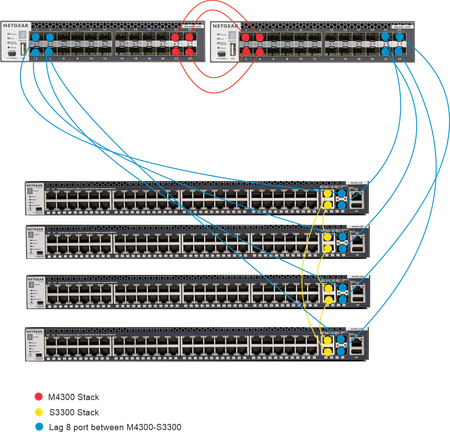
Hi, I'm experimenting different scenarios with 2 M4300 24X and 4 S3300. I'm trying the configuration below, but when I connect the 8 port between the S3300 and the M4300 in the LAG I experience netw...

JohnC_V
Jun 04, 2021NETGEAR Employee Retired
Welcome to our community! :)
It seems that you are having issues creating a LAG on your switches. Have you tried creating a LAG from 1 S3300 switch to 1 M4300 just to test if that will work before adding all the switches on your network? Please also check if STP on all switches is enabled.
Regards,
John
NETGEAR Community Team
andrea_g
Jun 11, 2021Aspirant
Enabling the Local Preference Mode in the lag settings solved this issue.
The Local Preference Mode setting is not explained in the manual, but in the S3300 manual there are more info:
M4300 Manual:
Use Local Preference Mode to Enable or Disable the LAG interface’s local preference mode.
The default is Disable.
The default is Disable.
S3300 Manual
Local Preference Mode. Enable or disable the LAG interface’s Local Preference mode. Local preference is one of the properties of a LAG interface which is intended for a Stacking environment. This is useful when the LAG is formed with ports from across the units. In such a scenario, when this feature is enabled, any known unicast traffic sent to the LAG uses only the LAG interface on the local unit. This ensures that the known unicast traffic, destined to the LAG, does not cross the external stack link when the LAG has a member or members on the local unit. Local preference does not impact behavior with respect to unknown unicast, broadcast and multicast traffic
Related Content
NETGEAR Academy

Boost your skills with the Netgear Academy - Get trained, certified and stay ahead with the latest Netgear technology!
Join Us!
