NETGEAR is aware of a growing number of phone and online scams. To learn how to stay safe click here.
Forum Discussion

raytracy
Feb 11, 2019Aspirant
M4300 service port segregation issue?
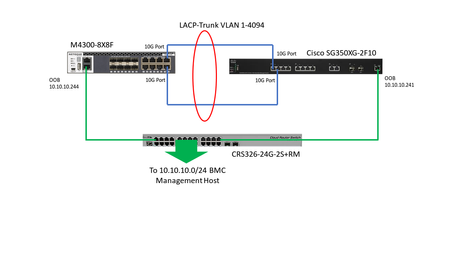
Hi, I faced to a weird issue with M4300 service port, please refer to my diagram at bottom.
The BMC network has no problem before I deploy a new M4300-8x8f.
When I configured all port as diag...

DaneA
Feb 12, 2019NETGEAR Employee Retired
Hi raytracy,
Welcome to the community! :)
Kindly answer the questions below:
a. What is the LAG state on the 10G LACP ports on both M4300-8X8F and Cisco switch?
b. On the M4300-8X8F, what is the Hash Mode of the LAG?
c. On the M4300-8X8F, is STP Mode enabled or disabled on the LAG? How about on the Cisco switch?
d. On the M4300-8X8F, are the 10G LACP ports set as tagged ports?
e. What is the current firmware version of the M4300-8X8F?
Let me share the forum thread below and it might help as reference:
https://community.netgear.com/t5/Managed-Switches/M4300-x-Switch-to-Switch-LACP-LAG/m-p/1669182
Regards,
DaneA
NETGEAR Community Team
- raytracyFeb 14, 2019Aspirant
a. Cisco side: LACP link state is ON, and both port are active member.
M4300 side: LACP mode enbled, both port Link status are Link up.
b. M4300 LACP Hash mode is: 6?) Src/Dest IP and TCP/UDP port fileds
Cisco side LACP Hash mode is: IP/Mac address
c. M4300 LACP set as Trunk allowed VLAN=1-4093, VLAN Tag=disable
Cisco set LACP as Trunk, VLAN 1-20 tagged, 21-4094 Inactive VLAN
BTW, if I blocked the VLAN 1 on Cisco side LACP by set it as Untagged (leave only 2-20 tagged), there is no problem to access all BMC IP, it seems cut off looping issue.
d. No, since I don't know how to set M4300 LACP as tagged, I have not configured it yet.
e. M4300 firmware version: 12.0.7.10, B1.0.0.11
Thanks!
- DaneAFeb 18, 2019NETGEAR Employee Retired
Hi raytracy,
I inquired your concern to the higher tier of NETGEAR Support. I will post here once I got a feedback.
Regards,
DaneA
NETGEAR Community Team
- DaneAMar 04, 2019NETGEAR Employee Retired
Just a follow-up. I tried to replicate your concern. Here below is the network setup I did based on the network diagram you have posted:
I created LACP between the M4300-28G-PoE+ and the M4300-52G using ports 9 & 10 of both switches. Then, I created VLAN 1010 on the GSM7252PS with ports 39-42 as untagged members. Then, I connected the OOB ports of the M4300-52G and M4300-28G-PoE+ to ports 39 & 40 of the GSM7252PS respectively. I created a DHCP pool for VLAN 1010 on the GSM7252PS (to resemble your BMC network).
Then, I connected a PC to port 42 of the GSM7252PS and was able to obtain an IP address as well as I'm able to get replies when I ping the OOB ports of both M4300-28G-PoE+ and M4300-52G switches. RSTP is enabled on all switches. The LACP ports on both M4300-28G-PoE+ and the M4300-52G are still up.
From the replication I did, the NETGEAR switches are working as expected since the ethernet ports and OOB are working independently.
Regards,
DaneA
NETGEAR Community Team
Related Content
NETGEAR Academy

Boost your skills with the Netgear Academy - Get trained, certified and stay ahead with the latest Netgear technology!
Join Us!
