NETGEAR is aware of a growing number of phone and online scams. To learn how to stay safe click here.
Forum Discussion

KrustyK
Mar 16, 2018Aspirant
Port Based VLANs not isolated
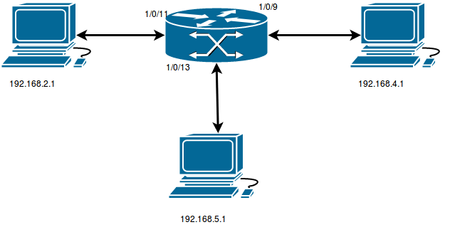
I Hi, I'm trying to configure port based vlan on netgear m4300 8x8f. According to this tutorial : https://kb.netgear.com/29997/How-to-create-Layer-2-VLANs-on-NETGEAR-ProSAFE-Switches, but there ...

TheEther
Mar 16, 2018Guru
It's unusual for VLANs to span multiple IP subnets. I'm guessing that you are trying to use VLANs to block traffic between the subnets. That may work from a Layer 2 perspective, but it can be completely undone by the router, which you haven't identified.
The router is where you need to implement policies to block inter-subnet traffic. Otherwise, a ping from B will go the router, which will happily forward it to C and back.
The router is where you need to implement policies to block inter-subnet traffic. Otherwise, a ping from B will go the router, which will happily forward it to C and back.
- KrustyKMar 18, 2018Aspirant
Hi TheEther,
Thanks for the reply, is there any approach to isolate subnets with switch only ?
Best regards,
- TheEtherMar 18, 2018GuruEven though your switch is a Layer 3 switch, AFAICT, no it has no way of isolating subnets beyond the simple act of putting them in separate VLANs.
Does your router support VLANs? - schumakuMar 19, 2018Guru - Experienced User
KrustyKwrote:Thanks for the reply, is there any approach to isolate subnets with switch only ?
By definition and implying proper configuration, VLANs are isolated L2 networks. EIther you have some L3 routing in place (on a switch, on a router, on any host), interconnect the VLANs somehow, or there is a faulty device not properly handling a VLAN trunk (with tagged VLANs) creating an interconnection.

Related Content
NETGEAR Academy

Boost your skills with the Netgear Academy - Get trained, certified and stay ahead with the latest Netgear technology!
Join Us!
