NETGEAR is aware of a growing number of phone and online scams. To learn how to stay safe click here.
Forum Discussion

jg75996
May 22, 2017Aspirant
Re-creating an RSPAN VLAN on an M4100-50G switch
Hello everyone, I would like assitance in re-creating an RSPAN VLAN on an M4100-50G switch. Background information: We have a firewall that we are monitoring network traffic on. On a previo...
- Retired_MemberJun 06, 2017
Hi jg75996,
Could you disable STP mode for port 0/45~0/48 on M4100 and try again?
Web GUI go to 'Switching'-->'Ports'-->'Configuration', then select port 0/45~0/48, set STP Mode to 'Disable'.
jg75996
May 24, 2017Aspirant
Hello EricZ,
I don't plan on having one switch as source and one as destination. Just trying to replicate what I had on the M4300 originally on to the M4100.
Here is the current layout of the devices involved:
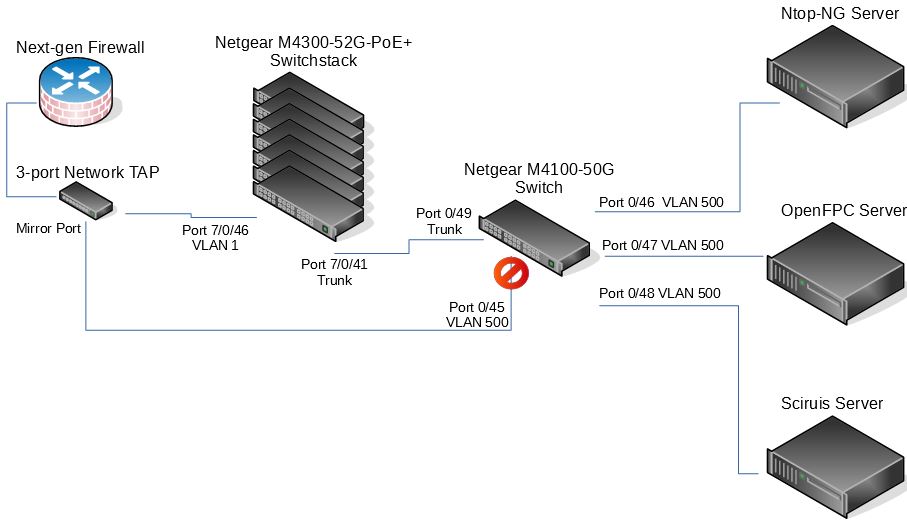
What seems to be happening is that port 0/45 on the M4100 switch is discarding the packets coming from the network tap mirror port.
I think it may be that Spanning Tree is blocking the port. Most likely it is because the link coming from the tap is being detected as a loop in the network.
jg75996
May 24, 2017Aspirant
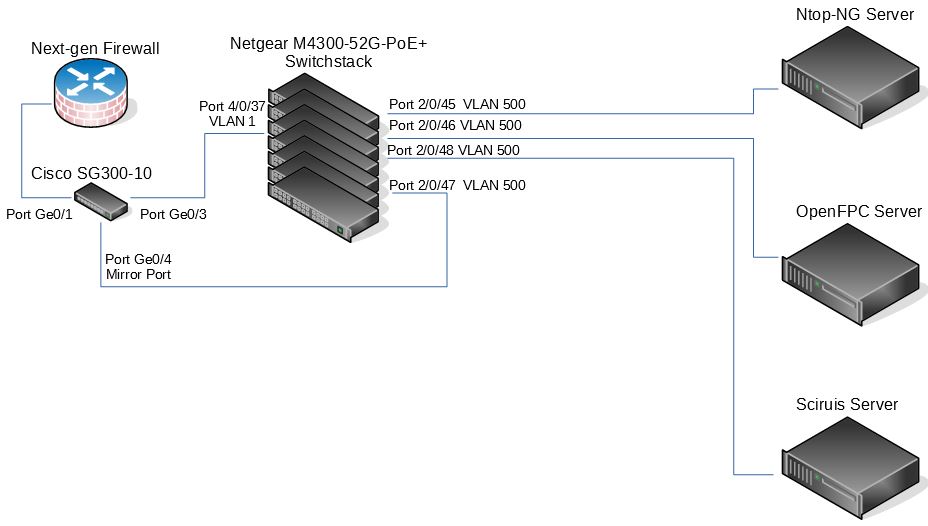
... and here is the old layout that was working before...
- Retired_MemberMay 24, 2017
Hi jg75996,
Ok, according to these two network topology, could you paste the configuration for M4300 port 2/0/45~2/0/48 and for M4100 port 0/45~0/48, we need more detailed information for further analysis.
- jg75996May 25, 2017Aspirant
Hello EricZ,
I had already made changes to the config for the M4300 switchstack, however, I will put it back to what it was and hopefully that will help.
For the M4300, the configuration was:
!System Description "M4300-52G-PoE+ ProSAFE 48-port 1G PoE+ and 2-port 10GBASE-T and 2-port 10G SFP+, 12.0.2.6, 1.0.0.8"
!System Software Version "12.0.2.6"
!Additional Packages QOS,Multicast,IPv6,IPv6 Management,Stacking,Routing
boot auto-copy-sw
vlan database
vlan 500
vlan name 500 "RSPAN 1"
vlan routing 1 1
exitstack
member 1 4
member 2 4
member 3 4
member 4 4
member 5 4
member 6 4
member 7 4
exit
switch 1 priority 14
vlan 500
remote-span
exitinterface 2/0/45
vlan pvid 500
vlan participation auto 1
vlan participation include 500
vlan tagging 500
exitinterface 2/0/46
vlan pvid 500
vlan participation auto 1
vlan participation include 500
vlan tagging 500
exitinterface 2/0/47
vlan pvid 500
vlan participation auto 1
vlan participation include 500
vlan tagging 500
exitinterface 2/0/48
vlan pvid 500
vlan participation auto 1
vlan participation include 500
vlan tagging 500
exitinterface vlan 1
routing
ip address dhcp
exit
router rip
exit
router ospf
trapflags state-change if-state-change
trapflags state-change neighbor-state-change
exit
ipv6 router ospf
exit
service dhcp
exit
(M4300-52G-PoE+) #==============================================
And for the M4100, the configuration is:
!Current Configuration:
!
!System Description "M4100-50G ProSafe 48-port Gigabit L2+ Intelligent Edge Managed Switch, 10.0.2.20, B1.0.1.1"
!System Software Version "10.0.2.20"
!Additional Packages QOS,IPv6 Management,Routing
!
enable password 8fbe5e2eded09692e1d8f96f8ea8a3d3038eb85e8fb528c5a83bfeccd5390a8f49cb5f269f0ed555fe823a122495453ab76464824d6930681f576ede873a8a1e encrypted
vlan database
vlan 500
vlan name 500 "RSPAN 1"
vlan routing 1 1
exitvlan 500
remote-span
exitinterface 0/45
vlan pvid 500
vlan participation auto 1
vlan participation include 500
vlan tagging 500
exitinterface 0/46
description 'RSPAN port for SELKS IDS/IPS'
vlan pvid 500
vlan participation auto 1
vlan participation include 500
vlan tagging 500
exitinterface 0/47
description 'RSPAN port for OpenFPC'
vlan pvid 500
vlan participation auto 1
vlan participation include 500
vlan tagging 500
exitinterface 0/48
description 'RSPAN port for Ntop-NG'
vlan pvid 500
vlan participation auto 1
vlan participation include 500
vlan tagging 500exit
interface vlan 1
routing
ip address dhcp
exit
exit(M4100-50G) #
==================================================
Thank you for looking into this!
- Retired_MemberMay 25, 2017
Hi jg75996,
According your network topology and configuration, we think RSPAN function not take affect actually.
On M4300 scenario, Server can monitor the traffic from Cisco SG-300 switch, it's just because M4300 forwarding the traffic from port 2/0/47 to port 2/0/45&46&48.
But on M4100 scenario, Server cannot monitor the traffic, you can check whether port 0/45 receice traffic or not?
(Via CLI command:
clear counters all
show interface counters
Via web GUI:
'Monitoring-->Ports-->Port Statistics'
)
Related Content
NETGEAR Academy

Boost your skills with the Netgear Academy - Get trained, certified and stay ahead with the latest Netgear technology!
Join Us!
