NETGEAR is aware of a growing number of phone and online scams. To learn how to stay safe click here.
Forum Discussion

NathanP
Mar 20, 2017Aspirant
Trunk port to pass 3 VLANs on a single port for GPON installation
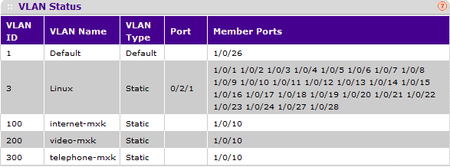
Good morning/afternoon/evening (up to you really), First of all, i just want to lay out that my knowledge on Switching and VLANs are rather limited, im a student in electrical engineering in tele...

DaneA
Mar 21, 2017NETGEAR Employee Retired
Hi NathanP,
Welcome to the community! :)
As I understand, the Zhone MXK-194 is connected to port 10 of the FSM7328S switch. Is the Zhone MXK-194 a VLAN-aware device? If yes, port 10 should be set as tagged (T) port. Tagging a port is same as setting a port as trunk. Then, you can set the PVID = 1 on port 10. Make sure that the port on the Zhone MXK-194 where port 10 of the FSM7328S switch is directly connected to is set as a tagged port (trunk) as well.
Regards,
DaneA
NETGEAR Community Team
NathanP
Mar 23, 2017Aspirant
Hi,
Yes, the MXK-194 is a VLAN-aware device, as far as my understanding goes. In the current configuration, port 10 is tagged for the 3 VLANs associated to the services (100, 200, 300), but physically port 10 is empty and the 3 services are sent to the MXK-194 trough ports 8, 11 and 12 ; which are marked as untagged for VLAN 3 (VLAN for a Linux server). My teacher told me that it works, although he is not sure how. It was set that way by the previous student that attempted this after he could not assign VLANs 100, 200 and 300 to port 10. Is it even possible to assign multiple VLANs to a single port on the switch??
Thank you,
NathanP
NP
Related Content
NETGEAR Academy

Boost your skills with the Netgear Academy - Get trained, certified and stay ahead with the latest Netgear technology!
Join Us!
