NETGEAR is aware of a growing number of phone and online scams. To learn how to stay safe click here.
Forum Discussion

NathanP
Mar 20, 2017Aspirant
Trunk port to pass 3 VLANs on a single port for GPON installation
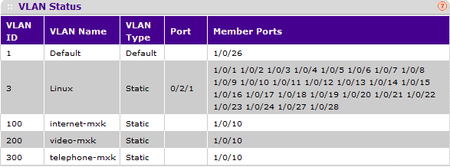
Good morning/afternoon/evening (up to you really), First of all, i just want to lay out that my knowledge on Switching and VLANs are rather limited, im a student in electrical engineering in tele...

DaneA
Mar 21, 2017NETGEAR Employee Retired
Hi NathanP,
Welcome to the community! :)
As I understand, the Zhone MXK-194 is connected to port 10 of the FSM7328S switch. Is the Zhone MXK-194 a VLAN-aware device? If yes, port 10 should be set as tagged (T) port. Tagging a port is same as setting a port as trunk. Then, you can set the PVID = 1 on port 10. Make sure that the port on the Zhone MXK-194 where port 10 of the FSM7328S switch is directly connected to is set as a tagged port (trunk) as well.
Regards,
DaneA
NETGEAR Community Team
Related Content
NETGEAR Academy

Boost your skills with the Netgear Academy - Get trained, certified and stay ahead with the latest Netgear technology!
Join Us!
