NETGEAR is aware of a growing number of phone and online scams. To learn how to stay safe click here.
Forum Discussion

Quantumn
Sep 29, 2017Aspirant
VLan not VLanning on GS728TP
Have several cameras which I'd like to put on their own vlan. And I have a server that handles those camers, which I'd like on the camera vlan and default vlan. I find that the GS728TP has 3 default v...
- Oct 19, 2017
Here is how it should be configured as shown in the image below provided that all devices are within the same subnet:About port 3 where the camera server is connected on VLAN 4, it should be set as untagged (U) with PVID 4. It should also be set as untagged (U) on VLAN 5 to have communication to the cameras connected to ports 14, 16, 18 and 20.
For ports 14, 16, 18 and 20, it should be set as untagged (U) with PVID = 5. These ports should also be set as untagged (U) on VLAN 4 in order for the camera server to have access to the cameras.
About port 23, I did not know that it is the LAN printer. Port 23 should be on VLAN 4, untagged (U) and PVID = 4.
About port 2, you may set it as a member of VLAN 4 (if ever you want it in VLAN 4) set as untagged (U) with PVID = 4.
You can use the default Voice VLAN for IP phones wherein an IP phone is detected by its OID (Object Identifier) and segment all voice traffic.
About the default Auto-Video VLAN, you can use it applications that run multicast traffic.
Regards,
DaneA
NETGEAR Community Team

DaneA
Oct 17, 2017NETGEAR Employee Retired
Kindly post screenshots of the settings you have configured on the GS728TP switch that shows the VLAN Membership, tagged/untagged ports and PVID. Just want to know, what is the brand and model of the cameras you are using?
Regards,
DaneA
NETGEAR Community Team
Quantumn
Oct 17, 2017Aspirant
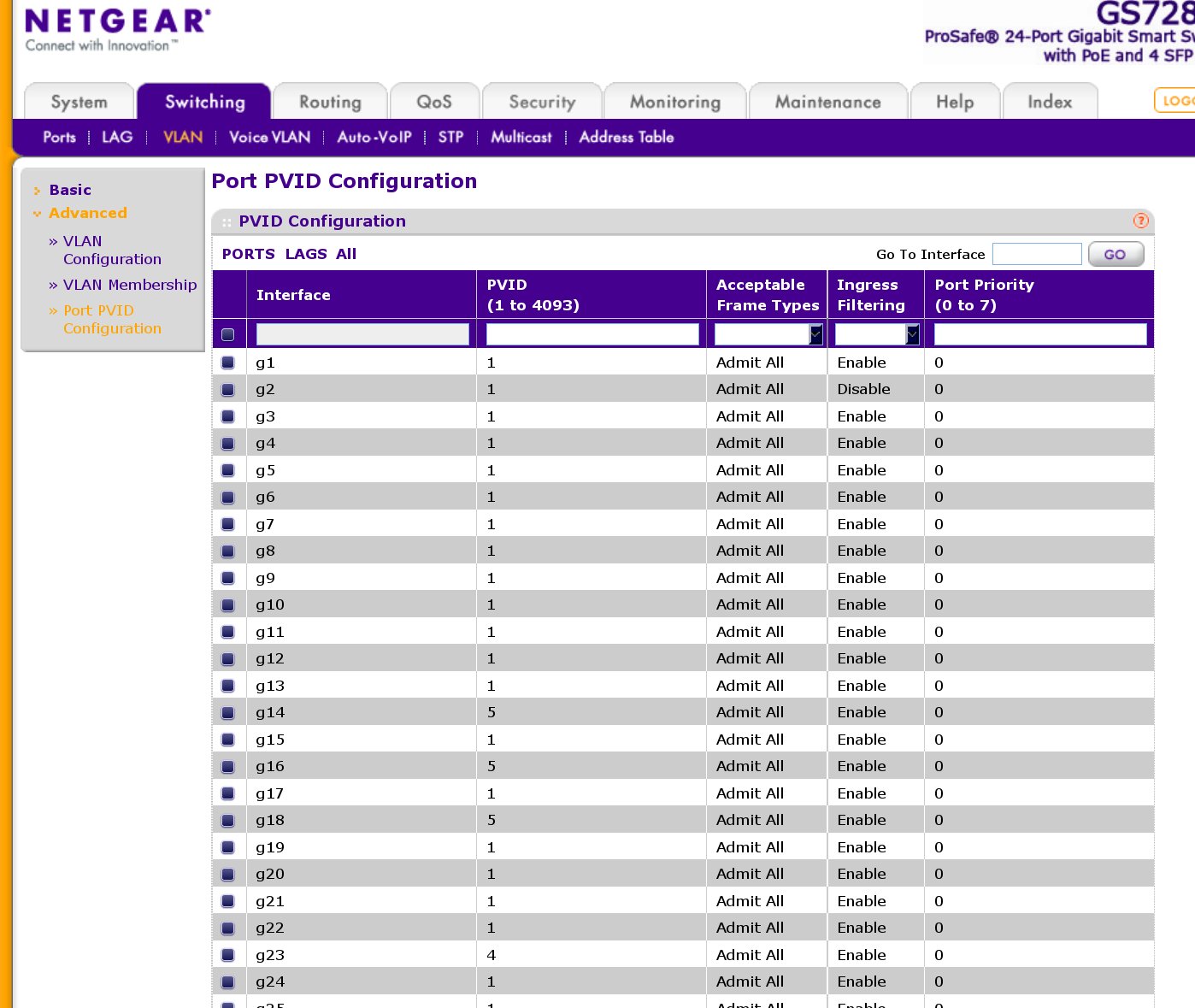
Sure. Port 3 is the cameras server, and ports 14, 16, 18, and 20 are cameras.
Cameras are HikVision DS-2CD2632F-IS and Samsung (Hanwha) PNO-9080R.
This is vlan1.
- QuantumnOct 17, 2017Aspirant
vlan4
- QuantumnOct 17, 2017Aspirant
vlan5.
- QuantumnOct 17, 2017Aspirant
And vpids.
- DaneAOct 18, 2017NETGEAR Employee Retired
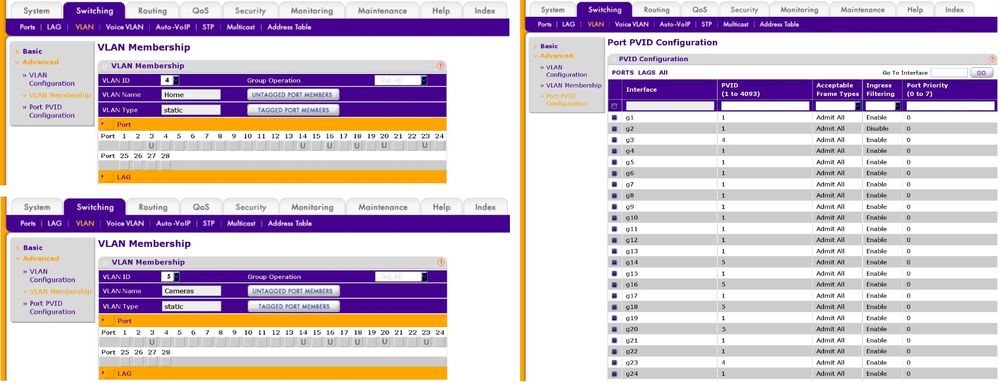
Based from the screenshots you have provided, here below are the steps to configure Asymmetric VLAN on your GS728TP switch:
1. Set ports 3 and 23 as untagged ports (U) on VLAN 4 with PVID = 4.
2. Set ports 14, 16, 18 and 20 as untagged ports (U) on VLAN 4.
3. Set ports 3 and 23 as untagged ports (U) on VLAN 5.
4. Set ports 14, 16, 18 and 20 as untagged ports (U) on VLAN 5 with PVID = 5.
Be sure that both VLANs 4 and 5 are within the same IP address range.
Refer to the image below:
Note: You can check also the image attached for a better view which is the same as posted above.
Regards,
DaneA
NETGEAR Community Team
- QuantumnOct 18, 2017Aspirant
I can indeed now ping the cameras from the cameras server.
But this doesn't make sense. I see why the pvids must be this way, but this is adding the cameras to both vlan4 -and- vlan5? This way I am depending exclusively on ingress filtering to separate the vlans? Nowhere does any documentation describe this method.
Is this the trick so that the cameras server (3) can dwell on both 4 & 5 and so the cameras can communicate with it? But the cameras server has ingress filtering set to 4, so how can it receive anything from 5? Why must the cameras be in both vlan 4 & 5 when 5 is their domain?
Port 23 is the LAN printer, so this should only be on vlan4 and pvid4?
And what about admin of the switch? Port 2 is what I admin through, so should it be on vlans4 and 1with vpid1? Or vpid4?
My understanding is that only one Default vlan is allowed for each vlan? So from a security standpoint (such as it is for vlanning), shouldn't only the admin machine have access to the switch Default vlan? What is the purpose of the A/V and Voice Default vlans?
- DaneAOct 19, 2017NETGEAR Employee Retired
Here is how it should be configured as shown in the image below provided that all devices are within the same subnet:About port 3 where the camera server is connected on VLAN 4, it should be set as untagged (U) with PVID 4. It should also be set as untagged (U) on VLAN 5 to have communication to the cameras connected to ports 14, 16, 18 and 20.
For ports 14, 16, 18 and 20, it should be set as untagged (U) with PVID = 5. These ports should also be set as untagged (U) on VLAN 4 in order for the camera server to have access to the cameras.
About port 23, I did not know that it is the LAN printer. Port 23 should be on VLAN 4, untagged (U) and PVID = 4.
About port 2, you may set it as a member of VLAN 4 (if ever you want it in VLAN 4) set as untagged (U) with PVID = 4.
You can use the default Voice VLAN for IP phones wherein an IP phone is detected by its OID (Object Identifier) and segment all voice traffic.
About the default Auto-Video VLAN, you can use it applications that run multicast traffic.
Regards,
DaneA
NETGEAR Community Team
- QuantumnOct 19, 2017Aspirant
I am now beginning to understand this, thank you.
But with port 2 on vlan4, nothing would remain on vlan1 which I had understood to be the admin vlan? Isn't vlan1 as Default, a special designator for admin, as a security measure?
Is it true that there can only be one port which is also in a Default vlan, for a given vlan like 4? It port 2 is normally in vlan4, must I retain port 2 also in vlan1 (ad Default) in order to control the switch?
- DaneAOct 22, 2017NETGEAR Employee Retired
From what I mentioned on my previous response: "About port 2, you may set it as a member of VLAN 4 (if ever you want it in VLAN 4) set as untagged (U) with PVID = 4," --- I forgot to include that you will need to change the management VLAN to VLAN 4. To do this, access the web-GUI of the GS728TP switch, then go to System > Management > IP Configuration and specify VLAN 4 as the management VLAN. As reference, kindly read pages 27-28 of the GS728TP software administration manual here about changing the management VLAN.
By default VLAN 1 is set as the management VLAN. Refer to the image below:

Set port 2 as untagged (U) on VLAN 1 with PVID = 1. In this way, only the PC connected to port 2 can access the GS728TP switch web-GUI and other VLANs do not have connectivity to it making it secured. Thus, only the administrator can make changes on the settings of the GS728TP switch.
Regards,
DaneA
NETGEAR Community Team - QuantumnOct 23, 2017Aspirant
I understand these things now.
But my question is, I want to make port 2 not just the management port, but I also want port 2 to be a member of vlan4. My prior attempts to do this failed, causing me to have to factory reset the switch.
In other words, I don't grasp the dynamics of input filtering (vpid?) versus vlan membership (vlan?) If I set port 2 to vpid4, I doubt it can manage the switch. I have tried leaving port 2's vpid at 1 and adding it to vlan4 Untagged, but it can not ping any members of vlan4. How can this be? It can still ping and manage the switch, but when Untagged to both vlans1 and 4 it cannot reach anyone on vlan4.
It seems that the sole determinant of vlan membership is vpid.
- DaneAOct 24, 2017NETGEAR Employee Retired
Applying what we know about Asymmetric VLAN, you will need to set the following below in order for port 2 to have connectivity with the devices in VLAN 4:
1. Set port 2 as untagged (U) on VLAN 4 with PVID = 1.
2. Set ports 3 and 23 as untagged (U) ports in VLAN 1 with PVID = 4.
Refer to the image below:

Even though VLAN 1 is the management VLAN by default, some network administrators set the management VLAN to any other VLAN ID because it is already well-known that VLAN 1 is the default management VLAN.
Regards,
DaneA
NETGEAR Community Team - QuantumnOct 27, 2017Aspirant
[quote]1. Set port 2 as untagged (U) on VLAN 4 with PVID = 1.
2. Set ports 3 and 23 as untagged (U) ports in VLAN 1 with PVID = 4. [/quote]
Why yes, that's what I should have thought too. But remember, when I try to Untag ports in VLAN1, which are in another VPID, I get my old friend the unhelpful "VLAN 1 : VLAN was not created by user."
- DaneAOct 29, 2017NETGEAR Employee Retired
As I have mentioned in my initial response to you: "Not all NETGEAR switches support tagging on VLAN 1 and it seems that the GS728TP is one of those switches that is why it does not allow you to tag a port or clear anything on VLAN 1. " With regard to this, I suggest you to not use VLAN 1 as the management VLAN. Change your management VLAN to any other VLAN. As reference, kindly read pages 27-28 of the GS728TP software administration manual here about changing the management VLAN.
Regards,
DaneA
NETGEAR Community Team
- QuantumnNov 02, 2017Aspirant
I know, nice in theory. Unfortunately that is impossible. Evidently you haven't actually tried to do this.
- I create new VLAN12, name it Office and Untag all connected ports to it.
- I create new VLAN 23, name it Cameras, and Untag the Port 3 camera server and all cameras to it.
- I create new VLAN105, do not name it, and Untag port 2 (my management server) to it.
Fine and good. Now comes the bad part. Do I first set the VPID of Port 2 to 105, or do I first set the Management VLAN to 105? Amusingly it doesn't matter, as either approach causes me to lose connection and forces a Festival Of Factory Resets.
- DaneANov 05, 2017NETGEAR Employee Retired
What you did is right. You have set port 2 as untagged (U) port with PVID of 105 then, changed the Management VLAN to 105. Since a new management VLAN is configured, it is expected that the connectivity through the existing management VLAN will be lost. Kindly try the steps below:
a. Make sure that you remember the IP address set on the IP Settings of the GS728TP switch before you have changed the Management VLAN to 105. It would be best that you set a static IP address to the GS728TP switch.
b. Reboot the GS728TP switch.
c. Unplug/replug the PC that is directly connected to port 2 of the GS728TP switch. Set a static IP address on the PC that is within the IP range of the set on the GS728TP switch.
d. Open command prompt on your PC then check if you will get replies when you ping the IP address set on the GS728TP switch. If you are able to get replies, it means that you can access the web-GUI of the switch and managed it.
Regards,
DaneA
NETGEAR Community Team
Related Content
NETGEAR Academy

Boost your skills with the Netgear Academy - Get trained, certified and stay ahead with the latest Netgear technology!
Join Us!