Forum Discussion

AOS-STAHL-IT
Dec 07, 2016Aspirant
VLAN splitted IT and Telephone configuration
Dear Community, I'm currently setting up a configuration and this point the problem is that the telephones do not send their DHCP Request to the Router behind the Switch. I assume this might be a...
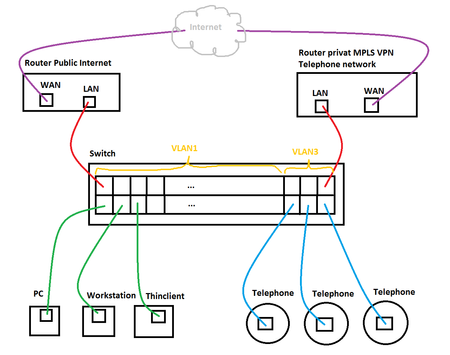
- Mar 01, 2017
Just following-up on this. I inquired your concern to a higher tier of NETGEAR Support as well as the options mentioned by your vendor and here is the feedback I got:
=====================================
Both of the vendor comments are correct, but they are depending on how you use the phones:
Option 1 is only valid if the PC connects into a LAN port on the phone, and the phone connects into the switch, this would be using a Tagged port on the switch. It seems that you will not use this. In this option the PVID is not relevant as PVID is not relevant on a Tagged port.
Option 2 is also possible to work and in this setup, the untagged port must be set with the correct PVID (assuming it is 3).
Going back to your original post, it mentions that ports 37 to 46 are untagged VLAN 3, yet it doesn’t have a PVID of 3, so effectively they are still operating as untagged in VLAN 1.
Kindly set these ports (which contain phone and the router for the voice network) to be Untagged in VLAN, and also set the PVID to 3 and let us know the outcome.
This port 37 on your config, there is no PVID set, so default is 1
interface 0/37
vlan participation auto 1
vlan participation include 3
exit
This is sample port 23 with PVID set to 100 from the lab switch:
interface 0/23
vlan pvid 100
vlan participation include 100
exitRegards,
DaneA
NETGEAR Community Team

AOS-STAHL-IT
Dec 12, 2016Aspirant
I put the telephone ports to VLAN3 with Tagged (t)
even though i dont unterstand because VLAN1 can also come out of the port untagged. an that is what i wanted.
I didnt want to have to configure VLANs on the devices connected...
Yet I did the recommended change from you, with the Tagged Ports and set the PVID of those ports also to VLAN 3
The Telephones are now able to ping the local Router. So I think things are okay.
But i still dont like nor understand why this doesn't work as I designed in the beginning...
I still dont feel comftable with this as I dont know if the packages are not beeing routed since they are tagged and my routertopology isnt dealing with vlans.
The Phones cannot reach the Telephone-System behind the Router at a other Site. (maybe its their Routing) but may its the tagging of the packets...
Kind Regards,
Michael
- DaneADec 12, 2016NETGEAR Employee Retired
Hi AOS-STAHL-IT,
I am glad that the phones are now able to ping the local router. :) The phones are VLAN-aware devices that is why we need to set the ports as tagged ports.
About your other site, you might need to double-check the routing as well as the VLAN tagging.
Regards,
DaneA
NETGEAR Community Team
- AOS-STAHL-ITDec 13, 2016Aspirant
But i dont want the phones the to know in what VLAN they are. as well as the other local Telefon-equipment and the router.
cause of this I might have to do changes on the router and other equipment.
this is not how it was meant to be..
Related Content
NETGEAR Academy

Boost your skills with the Netgear Academy - Get trained, certified and stay ahead with the latest Netgear technology!
Join Us!
