NETGEAR is aware of a growing number of phone and online scams. To learn how to stay safe click here.
Forum Discussion

PharmlyDoc
Jan 01, 2021Tutor
Connecting to GS728TPv2 home network with CAX80 and EAX80?
I just setup the GS728TPv2 in my basement. It's on the opposite side of where my Netgear CAX80 cable modem/WiFi-6 router is located so I ran a cat8 cable to it. I have smart phones and tablets throug...
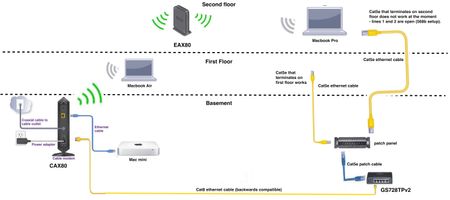
- Jan 05, 2021
Something very basic must be wrong between the GS switch and the CAX router. Either a basic Ethernet link issue, poor wiring, poor cabling, or ports configured to another purpose.
What happens when connecting the Mac USB-Ethernet port to the port/cable/link intended for the switch connection - locally on the CAX, remote near to the switch?


DaneA
Jan 03, 2021NETGEAR Employee Retired
It seems that the GS728TPv2 is set as a DHCP client. I suggest you to assign a static IP address to it. Kindly try the steps below:
1. Disconnect the GS728TPv2 from the existing network. The GS728TPv2 will go back to its default IP address which is 192.168.0.239.
2. Connect your PC/laptop to a LAN port of the GS728TPv2.
3. Set a static IP address of 192.168.0.210 on your PC/laptop.
4. Open a browser like Google Chrome or Firefox then at the address bar, type 192.168.0.239 then press Enter. Login to the user interface of switch. Enter "admin" as the username and "password" as the password without the quotation marks.
5. Click System > Management > IP Configuration.
6. On the IP Configuration page, select Static IP address. Then, enter an IP address that is within the IP Address range of your existing network in the field provided as well as the corresponding subnet mask and default gateway then click Apply.
7. Connect the GS728TPv2 back to your existing network and set the PC/laptop back to Obtain an IP address automatically.
To test the connectivity, connect your PC/laptop directly to the GS728TPv2. Open command prompt on the PC/laptop, then ping the static IP address you have set on the GS728TPv2 and ping the IP address of the router. You should be able to get replies.
Regards,
DaneA
NETGEAR Community Team
PharmlyDoc
Jan 03, 2021Tutor
Thank you for responding. I reset the switch to factory defaults. The firmware is uptodate. I set the IP address to static as 192.168.1.189 , the subnet mask as 255.255.255.0 . But what about the default gateway? Right now the default gateway is 192.168.1.1 ,which is the IP for my CAX80. Is this correct?
I am able to access the user interface of the switch if I (1) connect my laptop directly to the switch, (2) turn off the laptop's WiFi, and (3) set the IP address of the lan port for laptop to the 192.168.1.xxx range . Once I change the lan port on the laptop back to configure IPv4 using DHCP the connection to the switch GUI is lost. I am also unable to access the internet on my laptop when connected to the switch via an ethernet cable. Do I need to configure the routing settings for the switch?
I also went into the Nighthawk interface for the CAX80 and reserved 192.168.1.189 for the corresponding MAC address of the switch, but that doesn't seem to have helped.
Here are the ping results after setting the configuration of my laptop's IPv4 back to DHCP:
Computer ~ % ping 192.168.1.189
PING 192.168.1.189 (192.168.1.189): 56 data bytes
ping: sendto: No route to host
ping: sendto: No route to host
Request timeout for icmp_seq 0
ping: sendto: No route to host
^C
--- 192.168.1.189 ping statistics ---
15 packets transmitted, 0 packets received, 100.0% packet loss
CAX80 CableModem/Router_ReserveIPGS728TPv2_RoutingGS728TPv2_IP_Configuration
- schumakuJan 04, 2021Guru - Experienced User
PharmlyDoc wrote:Here are the ping results after setting the configuration of my laptop's IPv4 back to DHCP:
Computer ~ % ping 192.168.1.189
PING 192.168.1.189 (192.168.1.189): 56 data bytes
ping: sendto: No route to host
ping: sendto: No route to host
Request timeout for icmp_seq 0
ping: sendto: No route to host
^C
--- 192.168.1.189 ping statistics ---
15 packets transmitted, 0 packets received, 100.0% packet loss
This looks wrong to me. If the switch would not be reachable on the LAN, the response would simply timeout, but not result in a "no route to host" message. "No route to host" says this: When the destination of the ICMP message is not on the local direct connected subnet, it will be forwarded to the system default gateway to handle it. If there is no default gateway, or the gateway has no information in its routing table to forward the packets, you will see "no route to host".
- PharmlyDocJan 04, 2021Tutor
I think I inserted the wrong terminal code for pinging the switch.
Please see inserted images which are screenshots from my Macbook Air (MBA) connected via ethernet cable to the switch. The first screenshot is of sending a ping to the switch's IP address when the ethernet cable is hooked up and when the WiFi adaptor is turned on - in which case the WiFi normally takes precedence. Ping-to-switch_with_WiFi_on
As expected, the ping does not work when the MBA is connected to the switch via ethernet cable with the WiFi turned off, and with the LAN port IP is set to DHCP. (self-assigned IP address is 169.254.222.54) MBA ping to switch fails with this MBA network/IP configuration
Setting the IP configuration on the MBA from DHCP to "Manually" - I chose "192.168.1.251" , results in the MBA be able to ping the switch (MBA is directly connected to switch via ethernet cable). MBA ping to switch successful when manually setting the MBA's IP address to a value in the 192.168.1.xxx range
My question now is how do I get my internet signal to pass through the switch and to computers connected to the switch? – What should the configuration be for the routing tab in the GS728TPv2 GUI?
Also, how should I configure the switch settings so that I can access it's GUI from my laptop connected via WiFi to my CAX80 or EAX80? If that makes sense.
Thank you.
- schumakuJan 05, 2021Guru - Experienced User
Something very basic must be wrong between the GS switch and the CAX router. Either a basic Ethernet link issue, poor wiring, poor cabling, or ports configured to another purpose.
What happens when connecting the Mac USB-Ethernet port to the port/cable/link intended for the switch connection - locally on the CAX, remote near to the switch?
Related Content
NETGEAR Academy

Boost your skills with the Netgear Academy - Get trained, certified and stay ahead with the latest Netgear technology!
Join Us!

