NETGEAR is aware of a growing number of phone and online scams. To learn how to stay safe click here.
Forum Discussion

Vaungo
Jan 25, 2020Follower
Connecting two routers, two ISPs, two subnets
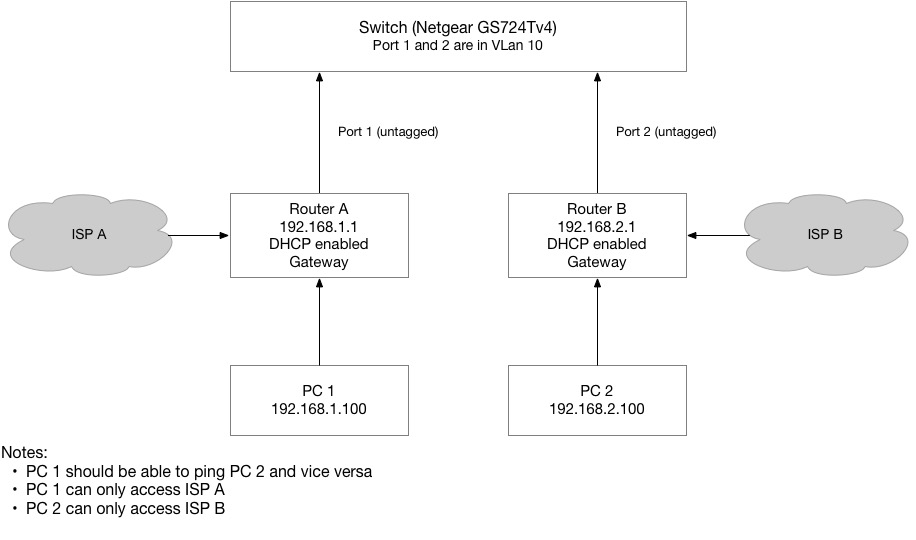
I have two gateway routers with DHCP and their own ISP, and a GS724Tv4 smart switch. How would I set the network up so that the subnets 192.168.1.xx can communicate with 192.168.2.xx and vice versa? ...
- Jan 26, 2020
Vaungo wrote:Physical connections:
- Router A is connected to port 1 on subnet 192.168.1.xx (devices are wirelessly connected, like PC 1)
- Router B is connected to port 2 on subnet 192.168.2.xx (devices are wirelessly connected, like PC 2)
- An additional workstation (not shown in the diagram) is connected to port 3 (call it PC 3)
VLan config:
- Ports 1 and 2 are members of VLan 10 (untagged)
- Ports 1 and 3 are members of VLan 20 (untagged)
PVID config:
- Port 1 is set to PVID 10
- Port 2 is set to PVID 10
Forget that assymetric VLAN stuff - do _not_ overload ports with untagged VLANs.
Configure two dedicated VLANs,
- ports which have to be used with [U]ntagged VLAN 10 put to PVID 10,
- ports to be used with [U]ntaggded VLAN 20 put to PVID20,
- ports which re inteded for VLAN trunking, e.g. for a VLAN aware wireless access point, a trunk t another vlan capable switch run all* ports as [T]agged. * one VLAN can be set untagged as shown above
If this does work accordingly, head to the fine user manual, p.152 ff. Configure VLAN Routing

schumaku
Jan 26, 2020Guru - Experienced User
Vaungo wrote:Physical connections:
- Router A is connected to port 1 on subnet 192.168.1.xx (devices are wirelessly connected, like PC 1)
- Router B is connected to port 2 on subnet 192.168.2.xx (devices are wirelessly connected, like PC 2)
- An additional workstation (not shown in the diagram) is connected to port 3 (call it PC 3)
VLan config:
- Ports 1 and 2 are members of VLan 10 (untagged)
- Ports 1 and 3 are members of VLan 20 (untagged)
PVID config:
- Port 1 is set to PVID 10
- Port 2 is set to PVID 10
Forget that assymetric VLAN stuff - do _not_ overload ports with untagged VLANs.
Configure two dedicated VLANs,
- ports which have to be used with [U]ntagged VLAN 10 put to PVID 10,
- ports to be used with [U]ntaggded VLAN 20 put to PVID20,
- ports which re inteded for VLAN trunking, e.g. for a VLAN aware wireless access point, a trunk t another vlan capable switch run all* ports as [T]agged. * one VLAN can be set untagged as shown above
If this does work accordingly, head to the fine user manual, p.152 ff. Configure VLAN Routing
Related Content
NETGEAR Academy

Boost your skills with the Netgear Academy - Get trained, certified and stay ahead with the latest Netgear technology!
Join Us!