Forum Discussion

marcusrjones
Jan 10, 2018Aspirant
GS105PE Firmware Update fails at Bootloader stage
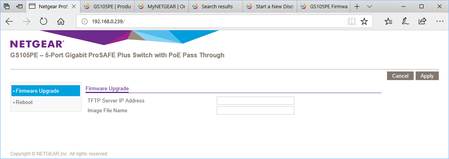
I have tried to upgrade my switch to the lastest FW downloaded from http://www.downloads.netgear.com/files/GDC/GS105PE/GS105PE_V1.5.0.4.zip. I have followed the steps in the release notes; Downloa...
- Jan 12, 2018
Hi,
I managed to resolve the problem last night. The steps I did were;
- Firstly in the Configuration Utility I noticed the the G105PE had a '*' next to the name. I figured this probably meant something and assumed it meant that it was running in some sort of recovery mode.
- On the web page I was being presented with (see first post in thread) I browsed to the firmware image "GS105PE_V1.5.0.4.bin" again and hit Apply. The switch then updated again and this time when it rebooted it went back to using DHCP address and did indeed give a a Bootloader update webpage that did also tell me which file to use.
- I then completed the upgrade from step 9 - and it is up and running OK.
I can only assume that the first attempt at the firmware upgrade failed for some reason and involked some sort of fallback mode (maybe just the bootloader giving a simple web page to allow a FW image to be programmed again)?
marcusrjones
Jan 12, 2018Aspirant
Hi,
I managed to resolve the problem last night. The steps I did were;
- Firstly in the Configuration Utility I noticed the the G105PE had a '*' next to the name. I figured this probably meant something and assumed it meant that it was running in some sort of recovery mode.
- On the web page I was being presented with (see first post in thread) I browsed to the firmware image "GS105PE_V1.5.0.4.bin" again and hit Apply. The switch then updated again and this time when it rebooted it went back to using DHCP address and did indeed give a a Bootloader update webpage that did also tell me which file to use.
- I then completed the upgrade from step 9 - and it is up and running OK.
I can only assume that the first attempt at the firmware upgrade failed for some reason and involked some sort of fallback mode (maybe just the bootloader giving a simple web page to allow a FW image to be programmed again)?
marcusrjones
Jan 12, 2018Aspirant
Just some further notes for others:
I don't think the PE variant of this switch has a V2 version. (Can't find it anywhere).
I just realised that the web page that I uploaded the FW to the second time is not the one I had on my first post in this thread. I don't have a screen shot now - but it simply asked for a FW image and had a browse button. Possibly the switch had been through a power cycle yesterday (as my microwave clock was flashing when I got home).
- schumakuJan 12, 2018Guru - Experienced User
marcusrjones wrote:I don't think the PE variant of this switch has a V2 version. (Can't find it anywhere).
Correct. You can ignore the above post - it's about the GS105Ev2, not the PE version. Both share the same base platform with two chipset variants and dedicated boot loaders. To many models in my head 8-)

Related Content
NETGEAR Academy

Boost your skills with the Netgear Academy - Get trained, certified and stay ahead with the latest Netgear technology!
Join Us!
