NETGEAR is aware of a growing number of phone and online scams. To learn how to stay safe click here.
Forum Discussion

Ra1n
Aug 13, 2015Follower
GS108Ev3 Cannot set VLAN for management interface
I just purchased a GS108Ev3 because I needed some simple VLAN segregation for a small group of machines "down the hall" from my core networking equipment. The switch works great, though there is one ...
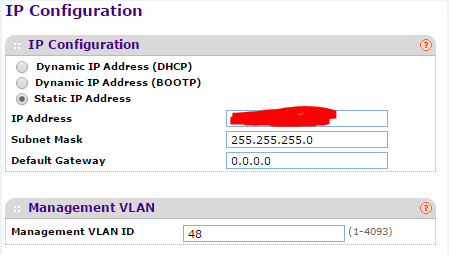
- Jan 07, 2016
Hi chulio,
Welcome to the community! :)
I think this is by design and not a limitation of the GS108Ev3 since its category is a ProSAFE Plus Gigabit switch which adds a configuration layer to the standard unmanaged switch.
For the alternative, I recommend you the GS108Tv2 or GS110TP switches.To know more about the GS108Tv2 and GS110TP switches, check these links below:
GS108Tv2 and GS110TP Product FAQs
Regards,
DaneA
NETGEAR Community Team

bugmenot2
Jun 28, 2016Apprentice
Yeah, right. This is not a hardware issue.
bugmenot2
Jul 01, 2016Apprentice
What I've done with the limitation is (on my "core switch") set the native VLAN on my downstream trunk port to match my MGMT VLAN (previous example VLAN 48). And then also from within the ProSafe Plus Config Utility set the trunk port's "Port PVID" to 48, and "tag" all VLANs on all trunk ports. The goal is to make your MGMT VLAN and "untagged" VLAN in the eyes of the two devices.
- AnguelAug 26, 2016Aspirant
bugmenot2 wrote:What I've done with the limitation is (on my "core switch") set the native VLAN on my downstream trunk port to match my MGMT VLAN (previous example VLAN 48).
Do I undestand correctly that you set the trunked port as UNTAGGED for VLAN 48 only and as TAGGED for all other VLANs on you main (not GS108E) switch?
Thanks,
Anguel
Related Content
- Apr 12, 2023Retired_Member
NETGEAR Academy

Boost your skills with the Netgear Academy - Get trained, certified and stay ahead with the latest Netgear technology!
Join Us!
