NETGEAR is aware of a growing number of phone and online scams. To learn how to stay safe click here.
Forum Discussion

Dantech-1
May 05, 2016Tutor
GS728TP which router to use to route data and VOIP
I am looking at buying two GST728TP PoE switches for my sons Garage/Petrol forecourt business. We want one switch in an office in one building and another switch in the shop itself (linked via armou...
- Jun 15, 2016
Hi
I have created a document which I am now sharing with the community to hopefully save other people having to go through the problems I had. I am not a Google fan so I have shared a file through my Microsoft One-Drive. Click on the link to read the full document which is illustrated with many screen shots and includes the finally network diagram.
Go to Link to How I setup the VLANs
I could never have done this without the help of netgear support because they pointed me in the right direction but did not do it for me. I have to know how to do it myself so that I can repeat it again. Thanks for the support I have had from Netgear and despite the glitches I mentioned I would definitely use them again, mainly because of the huge price advantage compared to Cisco and HP Switches. However I still think Smart Switches are harder to work with than using a comand line and it takes a lot longer because of having to constantly refresh the webpage!

Danthem
May 05, 2016NETGEAR Employee Retired
FVS336Gv3 is a solid router that should work fine in your setup. It's also VLAN aware and can do QoS. So just set up a voice VLAN and prioritize it throughout the switches and the router.
Dantech-1
May 31, 2016Tutor
Hi again. We did buy the two switches as I said earlier but I am still tryiing to get things to work. What I fail to understand is why Netgear have created a Voice VLAN on VLAN 2 and yet the documentation the support person gave me encourages me to create a Voice VLAN! I have done this and made it VLAN 10 and called it VOIP (to have a different name to the VLAN 2 one. I have also changed the Voice VLAN in the relevant page from 2 to 10. We tried it this morning and the VOIP phones did not work, but then tonight I discovered that somehow the switch had lost the route for the phones even though it was there last night. I shall try it again on Thursday this week.
I have noticed that I need to do the latest firmware upgrade because the documentation talk about "Units" and this is not called that on mine.
The documentation seems to imply that all you need to do is plug your phones into the ports and Auto-Voip just prioritises the traffic. It is not that simple. The documentation does not say to set the port as a tagged member of VLAN2, neither does it say you need to remove it as an untagged member of the default VLAN (VLAN 1). It also does not say the PVID needs setting on the port to the VLAN ID of the VOIP VLAN. So I have the phone ports set as tagged onto VLAN 10, the PVID set to 10 and removed the untagged membership of the default VLAN (1).
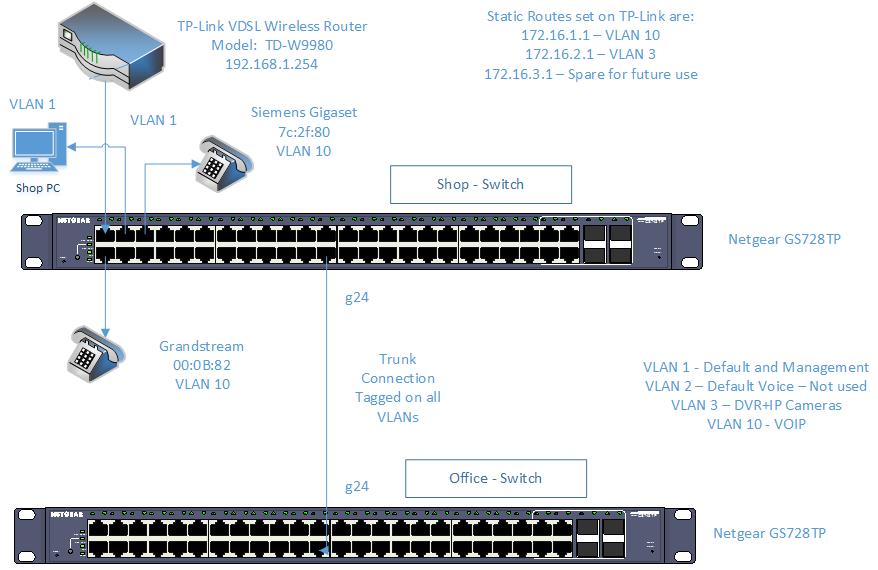
Because the TP-Link router is not a Layer 3 router I am using static routes which I have proved to work at home on mine in a test environment using a cisco switch, but Smart Switches are new to me. It seems. Also the TP-Link is the only DHCP server on the network and so only provides IP addresses in the default 192.168.1.* range. I have configured the VOIP phones with fixed addresses in the 172.16.1.* range. The VLAN 10 ip address has been set to 172.16.1.1 and the static route on the router points to this address.
I need some time to put a client in the VOIP VLAN and check I can ping the phones from both switches. Attached is a diagram of the configuration so far. I welcome any comments on this setup.
- Dantech-1Jun 04, 2016Tutor
I configured everything correctly so I thought, but after 2 hours on the phone to Netgear support they could not get the traffic to route either! I was not sure whether I had to set both switches the same and I did. Could this be the cause of my problem.
After the remote support engineer had messed around my setup was in a real mess and I needed the phones working for the next day so I factory reset both switches and started again only this time I only set up the VLANs on one switch and trunked the uplink port to the second switch so that I had the following tagging which I added on BOTH switch ports 24 which are linked together:
VLAN 1 - Untagged (default VLAN)
VLAN 2 - Tagged (Pre-configured Voice VLAN
VLAN 3 - Tagged (Pre-configured for Video Camers/DVR Box
I checked the MAC addresses on both switches and they were seeing devices on the other switches but everything is still on VLAN 1 until I get time to go back to the shop to test the VLANs. I can see devices across the uplink so things are lloking good.
If I have done anything wrong will someone please comment?
- DaneAJun 06, 2016NETGEAR Employee Retired
Hi Dantech-1,
I don't have VoIP phone(s) to test your concern. However, let me share this article below about VLAN Routing on NETGEAR Smart Switches and this might help:
VLAN Routing on new NETGEAR Smart Switches
Regards,
DaneA
NETGEAR Community Team
- Dantech-1Jun 07, 2016Tutor
This may seem a basic question but forgive me if it is. On my second switch I assume I have to create the VLANs as well otherwise the ports can't be set in the VLAN. Is that correct? I seem to remember a few years ago when configuring HP switches I had to create the VLANs the same on every switch and it was tagging the VLANs on the uplink/trunk port which allow traffic on the vlan to flow across switches.
However I would NOT want to set static routes on the second switch, just join my devices to the correct VLAN by making the port they are connected to a member of the VLAN. Is this correct?
I followed the excellent guide and it all seems straight forward until you actually do it and then find that the PVID does not auto configure. I think this is because I have not connected anything to the ports which are in the VLANs other than the default yet because I cannot change the live environment. I will be testing this all day this Thursday and will be on site and able to ping within VLAN's etc. I am guessing that the Auto PVID configuration works by something being plugged into the ports?

Related Content
NETGEAR Academy

Boost your skills with the Netgear Academy - Get trained, certified and stay ahead with the latest Netgear technology!
Join Us!
