NETGEAR is aware of a growing number of phone and online scams. To learn how to stay safe click here.
Forum Discussion

Dantech-1
May 05, 2016Tutor
GS728TP which router to use to route data and VOIP
I am looking at buying two GST728TP PoE switches for my sons Garage/Petrol forecourt business. We want one switch in an office in one building and another switch in the shop itself (linked via armou...
- Jun 15, 2016
Hi
I have created a document which I am now sharing with the community to hopefully save other people having to go through the problems I had. I am not a Google fan so I have shared a file through my Microsoft One-Drive. Click on the link to read the full document which is illustrated with many screen shots and includes the finally network diagram.
Go to Link to How I setup the VLANs
I could never have done this without the help of netgear support because they pointed me in the right direction but did not do it for me. I have to know how to do it myself so that I can repeat it again. Thanks for the support I have had from Netgear and despite the glitches I mentioned I would definitely use them again, mainly because of the huge price advantage compared to Cisco and HP Switches. However I still think Smart Switches are harder to work with than using a comand line and it takes a lot longer because of having to constantly refresh the webpage!
Dantech-1
Jun 04, 2016Tutor
I configured everything correctly so I thought, but after 2 hours on the phone to Netgear support they could not get the traffic to route either! I was not sure whether I had to set both switches the same and I did. Could this be the cause of my problem.
After the remote support engineer had messed around my setup was in a real mess and I needed the phones working for the next day so I factory reset both switches and started again only this time I only set up the VLANs on one switch and trunked the uplink port to the second switch so that I had the following tagging which I added on BOTH switch ports 24 which are linked together:
VLAN 1 - Untagged (default VLAN)
VLAN 2 - Tagged (Pre-configured Voice VLAN
VLAN 3 - Tagged (Pre-configured for Video Camers/DVR Box
I checked the MAC addresses on both switches and they were seeing devices on the other switches but everything is still on VLAN 1 until I get time to go back to the shop to test the VLANs. I can see devices across the uplink so things are lloking good.
If I have done anything wrong will someone please comment?

DaneA
Jun 06, 2016NETGEAR Employee Retired
Hi Dantech-1,
I don't have VoIP phone(s) to test your concern. However, let me share this article below about VLAN Routing on NETGEAR Smart Switches and this might help:
VLAN Routing on new NETGEAR Smart Switches
Regards,
DaneA
NETGEAR Community Team
- Dantech-1Jun 07, 2016Tutor
This may seem a basic question but forgive me if it is. On my second switch I assume I have to create the VLANs as well otherwise the ports can't be set in the VLAN. Is that correct? I seem to remember a few years ago when configuring HP switches I had to create the VLANs the same on every switch and it was tagging the VLANs on the uplink/trunk port which allow traffic on the vlan to flow across switches.
However I would NOT want to set static routes on the second switch, just join my devices to the correct VLAN by making the port they are connected to a member of the VLAN. Is this correct?
I followed the excellent guide and it all seems straight forward until you actually do it and then find that the PVID does not auto configure. I think this is because I have not connected anything to the ports which are in the VLANs other than the default yet because I cannot change the live environment. I will be testing this all day this Thursday and will be on site and able to ping within VLAN's etc. I am guessing that the Auto PVID configuration works by something being plugged into the ports?
- DaneAJun 08, 2016NETGEAR Employee Retired
Hi Dantech-1,
You will need to create the VLANs on the second switch as well and I don't think its necessary to set static routes on the second switch.
Regards,
DaneA
NETGEAR Community Team
- DaneAJun 12, 2016NETGEAR Employee Retired
Hi Dantech-1,
Just want to follow-up if ever you have any updates?
Regards,
DaneA
NETGEAR Community Team
- Dantech-1Jun 12, 2016Tutor
Hi
I spent a whole day on this and could not get it to work - I rang technical support and fair enough he wanted a network diagram but again he could not fix it. I then took the switch home to start again. It took me about 6 hours to program, test and learn how to download the config off the switch and work out how to upload it. This was necessary because I kept losing contact with the switch when I tried to put it in it's own VLAN. So now I can upload the config from a factory reset and carry on where I left off.
I finally got it working yesterday! I had a new Grandstream telephone on the VLAN2 working correctly and two laptops on two other VLANs both getting on the internet. Yes!!
I did manage to work out what was wrong:
1. The documentation you gave me was not as clear as it appeared and right at the end there are two major statements which needed to be mentioned at the beginning! The first of these was "The IP address of the switch must be on a subnet different from the subnets of the VLANs." However this is confusing because what it means is "The IP address of the switch must be set on a VLAN that is different to all other VLANs". In other words I had to create a VLAN just to manage the switch. The second of these was "The IP address of the switch must be on a subnet different from the local subnet of the router." Again another majorly important point put at the end! Until I followed this I had problems
2. Also until I upgraded the firmware to the latest version, Version 6.0.1.18 because when I tried to follow your instructions the screenshots you gave me did not match what I was seeing.
Also I worked out that there is possibly a fault with the firmware of the switch. This is the procedure I followed and this error was repeated each time:
- With my laptop plugged into a port in the default VLAN (VLAN1) I created a VLAN 300 which I untagged on Port g23 only - I then clicked "Apply". The IP of this VLAN was 192.168.150.1. I then changed the PVID for Port g23 to 300 - and I clicked "Apply"
- I then created a static route to 192.168.150.0, 255.255.255.0 - and clicked "Apply"
- I then changed the fixed IP address of the switch to be 192.168.150.2 - and clicked "Apply"
- So far so good I thought. In thoery then when I move my laptop connection into port g23 and change the fixed IP address to be in the same subnet it should be able to contact the switch right?
- No! I had installed the Smart Control Centre Manager software on the laptop, so I ran discover with that and it found the IP address of the switch as 192.168.150.1 - which is the IP address of the subnet! How strange! I had not made a mistake because I re-did this about four times on Thursday and then had to factory reset the switch and start again. I also did this after factory resetting the switch on Friday and after firmware upgrading the switch as described above. Now that I expected this to fail I factory reset the switch and then uploaded my saved configure to avoid having to go through re-creating all the VLANs, routing, port membership and PVID details again.
It seemed that every time I changed the IP address of the switch to go in the Switch Management VLAN it took on the IP of the VLAN. Once I knew that I could log into the switch and change the IP address to 192.168.150.2. I suggest someone from Netgear might like to test this themselves!
Once I followed the golden rules (firmware upgrade the switch before you do anything! and create a VLAN for the switch which is unique to all other VLANs with a static route configured to it on the switch.) I was then able to progress normally.
In the small hours of Saturday morning I went to bed with everything working, I could ping the gateway of the router - I could even ping www.bbc.co.uk and get the friendly name resolved to an IP address but I got no reply - you should get a reply from this website.
After taking a long break I had another re-read of your documentation and someone along the line of resets I had forgotten to re-create the default route which for my router was 0.0.0.0 0.0.0.0 192.168.2.1
It all worked! Then I tried setting up my Grandstream phone on VLAN2 and Untagged the port. This did not work. With my laptop in the same subnet I could not ping the IP of the phone. I tried changing it to Tagged on the port and suddenly it all worked! Strangely it sis not seem to matter whethr I set the VLAN membership on the phone of not, but I left it configured to VLAN 2 on the phone. I was able call and internal call to my sons number which re-directs to his mobile and he was able to call the phone back so traffice was definitely going both ways.
Once I discovered I could print out the running-config file I was much happier. All I have to do now is take the switch back and change the default gateway settings from 192.168.2.1 to 192.168.1.254 which is what it needs to be. This was easy with a print out to read!
I cannot believe how long this has taken to fix. I found it easier configuring a Cisco switch which was a fully managed one.
There are two other things I discovered which I would like changed and that is on the screen to download the configuration it seems to make no sense to me. If I click "Download" I would expect to download the file to my PC. However it downloads the file from the PC to the switch! If I click "Upload" I would expect it to upload a file to my PC but no, it uploads the file from my PC to the switch. This seems to me to be the wrong way round and had me puzzling for ten minuted wondering what was happening.
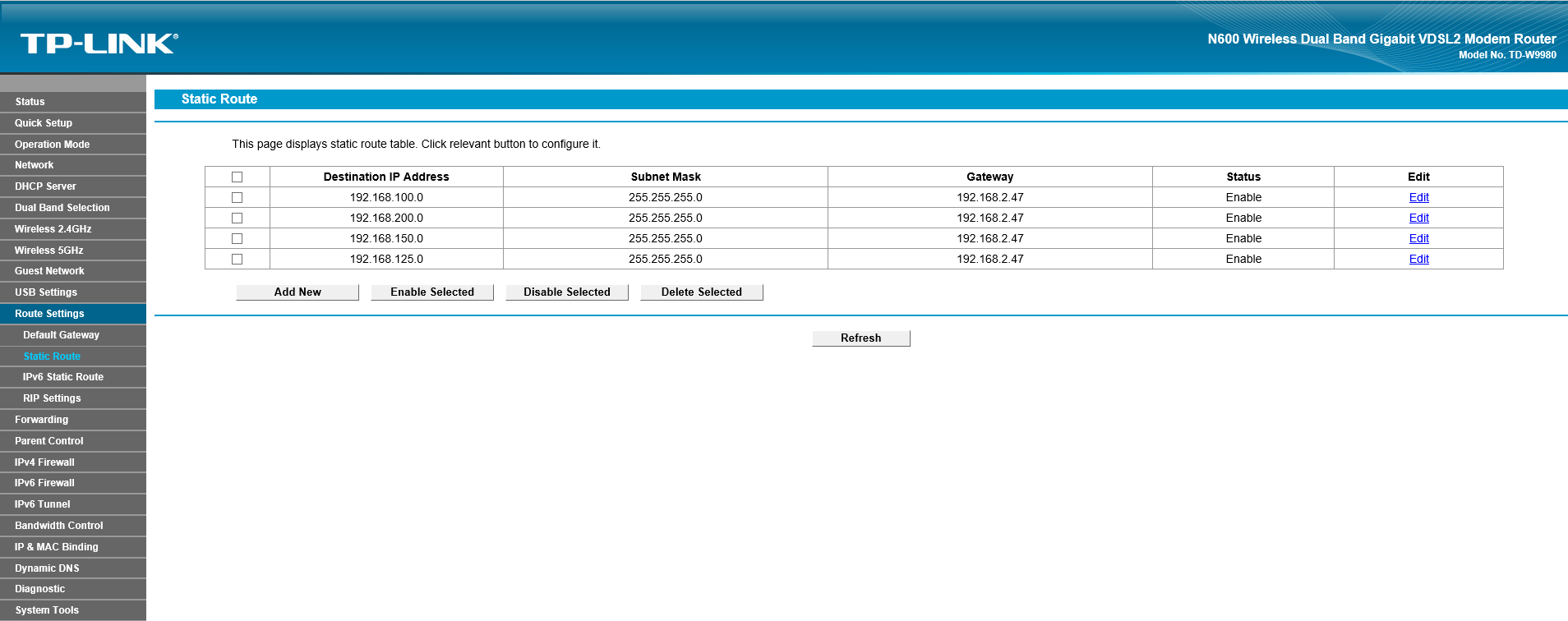
I also found that with my router I had to set a static route for every VLAN which needed internet access. My router is a TP-Link TD-W9980 and costs arond £70. I have included a screen shot of the working static routes which all point to the VLAN IP address of the VLAN which is untagged in VLAN10 and to which the router is untagged in as well.
I am going to write a PDF document of the exact procedure from beginning to end so when I come back to this later I do not have to go through this learning curve again. I will then upload it to this forum to help anyone else who needs it.
Related Content
NETGEAR Academy

Boost your skills with the Netgear Academy - Get trained, certified and stay ahead with the latest Netgear technology!
Join Us!
