NETGEAR is aware of a growing number of phone and online scams. To learn how to stay safe click here.
Forum Discussion

gdlgiii
Apr 09, 2017Tutor
Redesign home LAN for IoT
I am looking to redesign my current network for my home to accommodate these new IoT devices and want to maintain a secure way in isolating that traffic from my private LAN. Some of the IoT devices w...
- Apr 24, 2017
For the AP, I would recommend the WAC730. The WAC730 supports VLAN wherein you could assign a wireless network for the loT network as well as for the Private network that are broadcast at the same time. Also, the WAC730 supports PoE. Kindly check its data sheet here.
Here below is a network diagram that I recommend:

From the network diagram above, the ports connecting the Ubiquiti EdgeRouter Lite and the GS110TP on the 2nd floor will be configured as tagged ports so that it will become a trunk link. The same goes to the ports connecting the GS110TP on the 1st floor and the GS110TP at the 2nd floor. Tagging the ports is needed in order to identify which VLAN the packet belongs to.
The ports connecting the GS110TP on the 2nd floor to the RN104 and the WAC730 will be configured as tagged ports as well because both RN104 and WAC730 are VLAN-aware devices. However, the rest of the ports on the GS110TP (both on the 1st and 2nd floor) connected to the desktops and Arlo Base Stations will be set as untagged ports because the desktops and the Arlo Base Stations are not VLAN-aware devices.
Regards,
DaneA
NETGEAR Community Team

DaneA
Apr 13, 2017NETGEAR Employee Retired
Hi gdlgiii,
On the GS108E switch, you need to use 802.1Q VLAN in order to configure one port to be a member of 2 or more VLANs. As I understand your initial post, you will be connecting the Arlo Camera base station and the Roku to the GS108E switch, am I right? The ports where the Arlo Camera base station and the Roku will be set as access ports because as far as I know, the Arlo Camera base station and the Roku are not VLAN-aware devices.
Regards,
DaneA
NETGEAR Community Team
 gdlgiiiApr 13, 2017Tutor
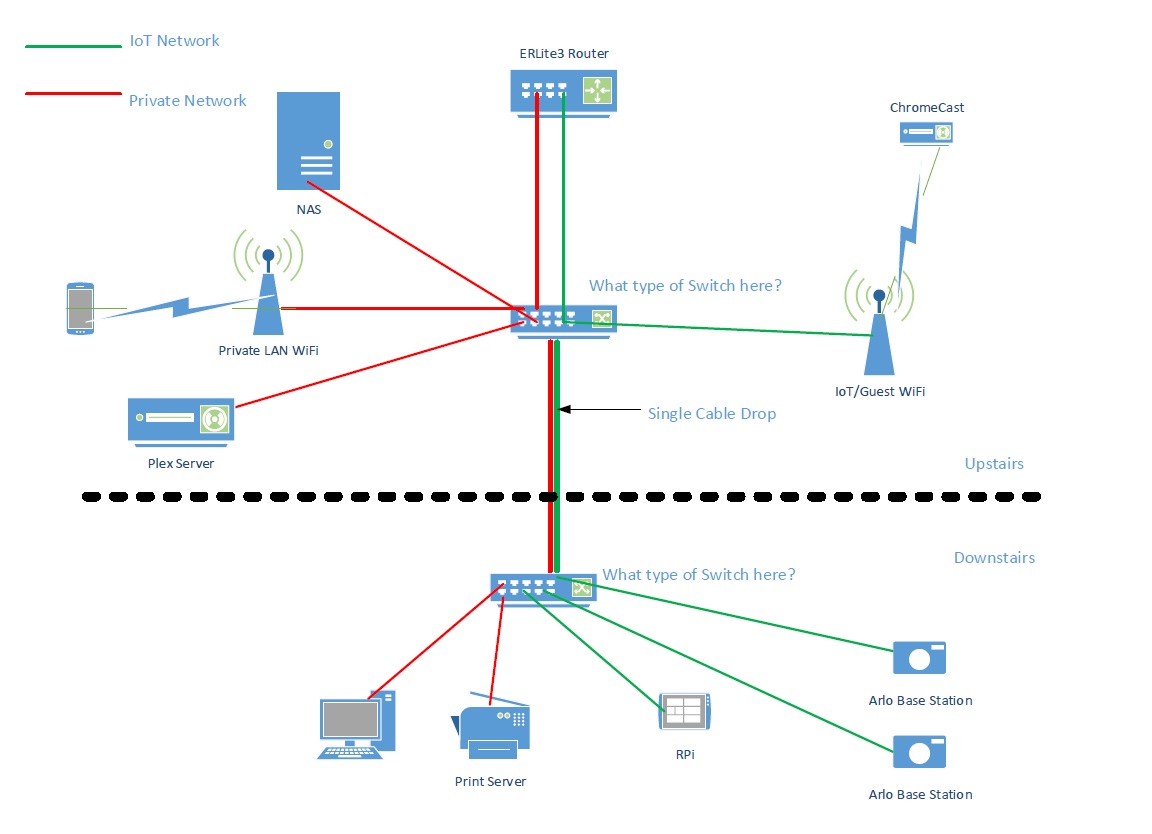
Is there a setting on the other ports for the 1st floor GS108 switch to allow only specific vlan for each port so that it's respected device can connect w/o VLAN ID? I have included a basic drawing of what I am trying to accomplish. From what I gather, segmenting the upstairs traffic looks pretty easy, but since I only have one network drop downstairs and have a mixture of PC, printer and IoT devices, it gets a little fuzzy to me on how to accomplish this.
The firewall/router will be repalced with an Ubiquiti ERLite3 device where the VLANs will be created and managed from. I just need the switches to deliver the correct traffic to the correct devices. Will devices on Private network (VLAN1) first floor, be able to communicate with devices upstairs on VLAN1 (private)?
- DaneAApr 17, 2017NETGEAR Employee Retired
The GS108 is an unmanaged switch. I believe you are referring to the GS108E switch. Based from the network diagram you posted, you will need to configure 802.1Q VLAN. For example, configure VLAN10 for the private network then configure VLAN20 for the loT devices. Also, the devices on VLAN10 on the first floor will be able to communicate with the devices on VLAN 10 upstairs because they are on the same VLAN and the same goes for VLAN20.
I pointed out using 802.1Q VLAN because from the network diagram, there are access points within the Private and loT networks. I believe your access points supports VLAN so that it can be tagged to the corresponding VLAN it should belong. Also, I believe your NAS supports VLAN as well.
You might want to check on the GS110TP switch. I suggested this switch because the GS108E switch only supports static LAG. You might be interested to configure LACP (dynamic LAG) to your NAS. Also, the GS110TP supports PoE (Power over Ethernet). I believe your access points supports PoE so that they could get power through the PoE port of the switch instead of using individual power adapters.
For more information about the GS108Ev3 and GS110TP switches, kindly check their respective data sheets below:
Regards,
DaneA
NETGEAR Community Team
- gdlgiiiApr 17, 2017Tutor
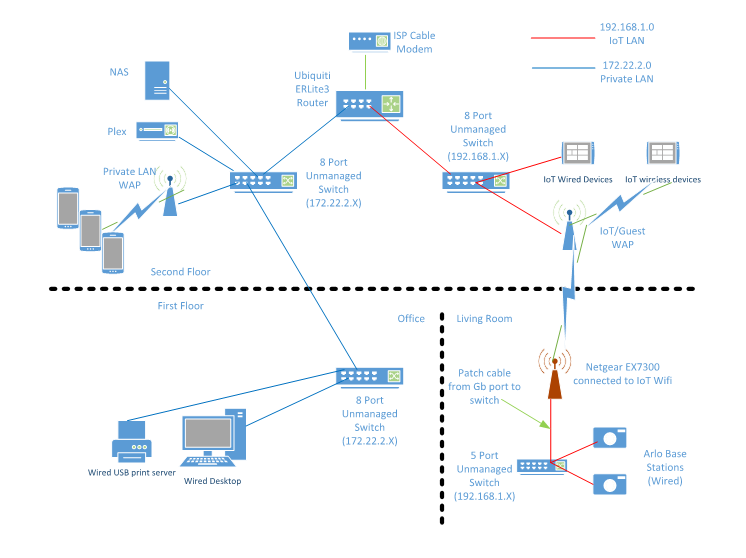
Since I have a Netgear EX7300 extender, I thought it would be a little easier to use this device to handle IoT devices that are wired to use the IoT network. Using the single Gb port, I hooked that to a GS105 Prosafe unmanaged switch then plugged the Roku 4 and Arlo base station into that. Then I configured the EX7300 to be in extender mode and connected that to my Guest WiFi solving the delimna of running multiple wires from the second floor to first floor since only on network drop exists. But then it got me to thinking a little more. Instead of using two WiFi APs, could I just use one and configure two VLANs on the 2.4 and 5.0Ghz wireless networks on a L2 smart switch that has one port configured for 2 VLANs on the second floor?
Granted, this updated diagram shows two separate networks and I may still go this route, but if I want to save just a little more $$ purchasing an additional AP, going back the way of VLANs would be the best way to go and just look at purchaing ONE 8 port L2 smart switch upstairs and connect the first floor to an existing unmanaged GS105 Prosafe switch. As you can see in the diagram, I included the EX7300 in a red'ish color to point out that it will be connected to a Wifi AP on the IoT network.
Related Content
NETGEAR Academy

Boost your skills with the Netgear Academy - Get trained, certified and stay ahead with the latest Netgear technology!
Join Us!
