NETGEAR is aware of a growing number of phone and online scams. To learn how to stay safe click here.
Forum Discussion

scotrod
Aug 09, 2023Aspirant
S350 GS308T - Not getting VLANs correctly
Hello, recently I purchased S350 Smart Switch (GS308T) for home usage. This is my first managed switch and main reason for purchasing it was to better manage my homelab and learn about VLANs. I c...
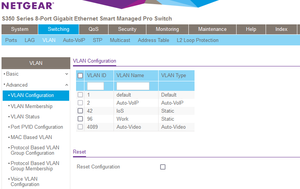
- Aug 09, 2023
scotrod wrote:
Problem is: According to Netgear's documentation:https://kb.netgear.com/31026/How-to-configure-a-VLAN-on-a-NETGEAR-managed-switch
"Ports which connect to client devices such as PCs should be marked as untagged (U). This is also known as an access port."
In my case, this does not work. When I set the port as untagged (U), the Windows 10 Pro 64x based laptop cannot get connection to anything. I've tried rebooting it, disabling the Ethernet adapter, setting manual IPs and DHCP, but nothing works. With setting the port as tagged (T), it works just like a charm.
Question is, why in my case this does not work? As far as I'm aware, Windows should not be VLAN aware (without additional modifications?).
The documentation is correct For an untagged port, and you want the port on VLAN 96 [U]ntagged, you have to set the PVID to 96, too - otherwise the untagged incoming frames will be sent to the VLAN 1, the default PVID. Just setting the port to [U]tagged for the VLAN 96 alone isn't sufficient.
Scroll down a little bit until you get the "Configure port PVID settings for untagged ports:" section.
Worth reading? S350 Series 8-Port Gigabit Ethernet Smart Switch Models GS308T and GS310TP User Manual - Configuration Examples - VLAN Configuration Examples p.334/335
The KB entry referred above applies to the Managed Switches and almost all VLAN capable switches.

schumaku
Aug 09, 2023Guru - Experienced User
Check the VLAN Membership, select VLAN 1 ... guess you find an U for port
The Web UI should in my opinion complain about this double [U]ntagged setting (added while adding the Untagged 96?) for this port. One more beer for me from Netgear?
scotrod
Aug 10, 2023Aspirant
Correct, but I've never touched any of these:
Does this means that every time I am setting up any port, I need to go to VLAN ID 1, and remove the "U" tag from there? I guess it needs to be empty?
- schumakuAug 10, 2023Guru - Experienced User
By default, all ports are configured as an access port for VLAN 1 [U]ntaggd, PVID 1. How should the new owner get access and take control otherwise?
- scotrodAug 10, 2023Aspirant
Makes sence, I'm not trash-talking the product or anything, but trying to make it through. I just saw that this step is described under:
https://kb.netgear.com/31026/How-to-configure-a-VLAN-on-a-NETGEAR-managed-switch
"For each port added as untagged above, remove that port from VLAN 1. To do this, select VLAN 1 from the VLAN ID drop down menu and clear ports 5, 6, 7, 8, 9 & 10:"
So far so good, I still have plenty to learn (yes, I removed the 1 ID from the untagged VLANs menu for port 3), but you solved my problem and answered my questions. Many thanks for this.
- schumakuAug 10, 2023Guru - Experienced User
scotrod wrote:
Makes sence, I'm not trash-talking the product or anything, but trying to make it through. I just saw that this step is described under:
https://kb.netgear.com/31026/How-to-configure-a-VLAN-on-a-NETGEAR-managed-switch
"For each port added as untagged above, remove that port from VLAN 1. To do this, select VLAN 1 from the VLAN ID drop down menu and clear ports 5, 6, 7, 8, 9 & 10:"
No time for trash talk here.
As you referred this KB thread - applicable to a bunch of Managed Switch models only as per the "This article applies to:" information - for the second time, I can just repeat this is a KB for Managed Switches - however, many things are very similar on the Smart Switches. So when you scroll down a little bit more, you will find this:
Hope you still enjoy the stay on your VLAN switch learning tour!
Regards
-Kurt
Related Content
NETGEAR Academy

Boost your skills with the Netgear Academy - Get trained, certified and stay ahead with the latest Netgear technology!
Join Us!
