Forum Discussion

HomeServerGuy
Dec 02, 2016Aspirant
Time Configuration problems on a GS724Tv4
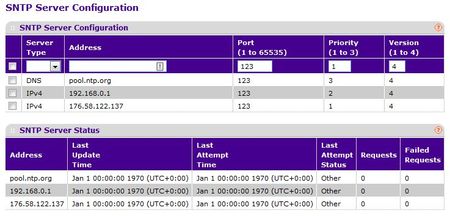
I am having problems getting the SNTP Time Configuration client to work. Its doesnt even look like its trying to get a time from any server I enter. Has anybody got any advice on how to make it work?...
- May 09, 2019
Here are the steps in troubleshooting Time Configuration on a NETGEAR Smart Switch:
1. Make the firmware is on the latest version.
2. On the SNTP Server Configuration Address, try to use an NTP pool specific to your country. For example: if you are in Czech Republic, use cz.pool.ntp.org or the equivalent IP Address of the NTP pool.
3. Check if you have a DNS configured on the switch.
4. Try to set the IP Address of the default gateway on the SNTP Server Configuration Address.
5. Factory reset the switch and start from scratch.
6. If the same problem occurs after trying the steps above, kindly open a chat or online support ticket with NETGEAR Support at anytime.
Regards,
DaneA
NETGEAR Community Team


Carl_z
Dec 05, 2016NETGEAR Expert
Welcome to Netgear Community!
Last Attempt Status of 'Other' offen appears when SNTP is not started. And the fact that the Requests remains at 0 mean its not even trying to get a time update.
Suggest to upgrade to the latest version(6.3.1.16),and enable SNTP via "SNTP Global Configuration" again.
You can download the version here .
Hope it helps
Regards
Carl
Netgeaer Employee

HomeServerGuy
Dec 06, 2016Aspirant
Thanks, but it was the update to 6.3.1.16 last week that started this off. The time on the switch was alway fine before.
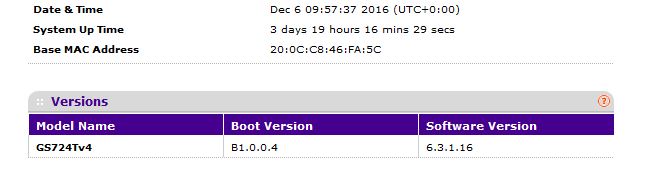
Oddly though, after leaving it for a couple hours, it decided to start working. Nothing I did, as I left it alone after posting this question.
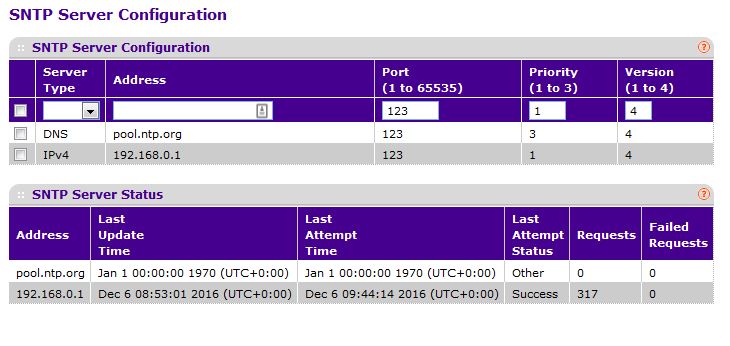
Strange.
- DaneADec 06, 2016NETGEAR Employee Retired
Hi HomeServerGuy,
Since it worked after leaving it a couple of hours, I suggest you to observe if the same problem occurs. Keep us posted.
Regards,
DaneA
NETGEAR Community Team
- JohnRoDec 09, 2016NETGEAR Employee Retired
Hi HomeServerGuy,
We’d greatly appreciate hearing your feedback letting us know if the information we provided has helped resolve your issue or if you need further assistance.
If your issue is now resolved we encourage you to mark the appropriate reply as the “Accepted Solution” so others can be confident in benefiting from the solution. The Netgear community looks forward to hearing from you and being a helpful resource in the future!Thanks,
- XDRichFeb 05, 2017Guide
Hello Support I have the exact same issue as the user above. Except the unit has never actually attempted to contact any configures SNTP servers.
Last attempt is Other
Request 0
Failed 0
I have two GS716tv3 units running 6.3.1.16
Nothing is happening with SNTP
Please help.
-Rich

Related Content
NETGEAR Academy

Boost your skills with the Netgear Academy - Get trained, certified and stay ahead with the latest Netgear technology!
Join Us!
