NETGEAR is aware of a growing number of phone and online scams. To learn how to stay safe click here.
Forum Discussion

iceet
Jul 24, 2026Aspirant
XS724EM in which all three fans spin at startup but only one remained active afterwards
For anyone else facing this issue, I wanted to write about my experience.
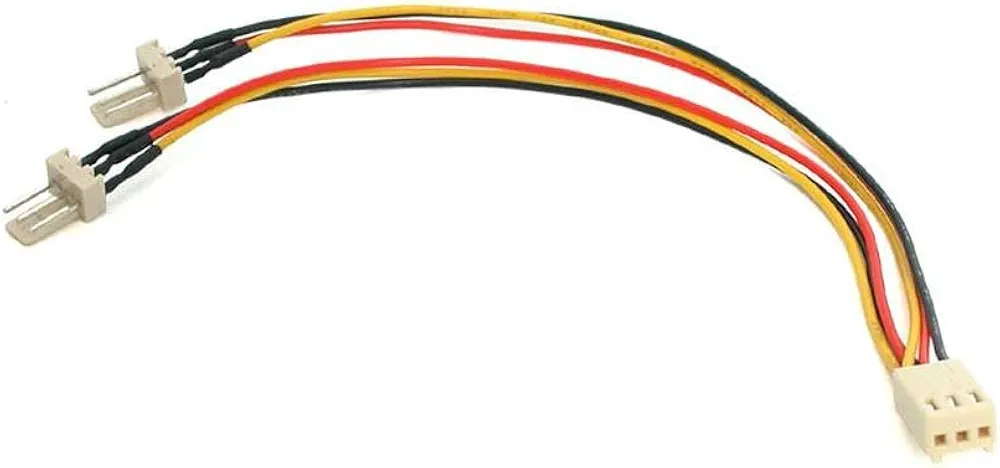
I too had a XS724EM in which all three fans spin at startup but only one remained active afterwards. It turns out only one of the internal fan headers was functional. What I did was open up the switch and connect all the fans to the working fan header with a 3-pin fan splitter cable. Ideally, the cable should be a 3-pin splitter as shown in the attachment, not a 4-pin splitter.
This XS724EM has now been operating without issue for almost 2 years in a commercial environment.
6 Replies
- schumakuGuru - Experienced User
What issue please?
The fan behaviour is intentional: The power-up test does spin up all fans, just one is usually active - more fans kick in if more cooling is required.
iceet wrote:
It turns out only one of the internal fan headers was functional.
Why do you think all fans spin-up on the power-up test sequence if the headers for the other fans aren't functional?
iceet wrote:
What I did was open up the switch and connect all the fans to the working fan header with a 3-pin fan splitter cable.
This makes all fans operating on parallel, the other fans can no longer be controlled or monitored...
- iceetAspirant
All three fans only spin up at startup. After that, only one fan spins, no matter how hot the unit gets. Being a 10Gbe switch, after a while (usually a day or two) the unit overheats and becomes unresponsive. It also becomes extremely hot to the touch. The only solution at that point is to powercycle the unit by unplugging it. This test was replicated multiple times in my homelab.
Once the non-spinning fans were connected via the splitter to the responsive fan, they all finally began spinning post-startup. At this point, the XS724EM was able to maintain a stable temperature and did not freeze. Once again, being a 10Gbe switch, the unit was not "cool" to the touch but cool enough to not become unresponsive. I left it running in this manner in my homelab for several days and did not experience any freezing at all once all three fans were connected in parallel via the splitter. Only then did I feel confident deploying the unit into the field.
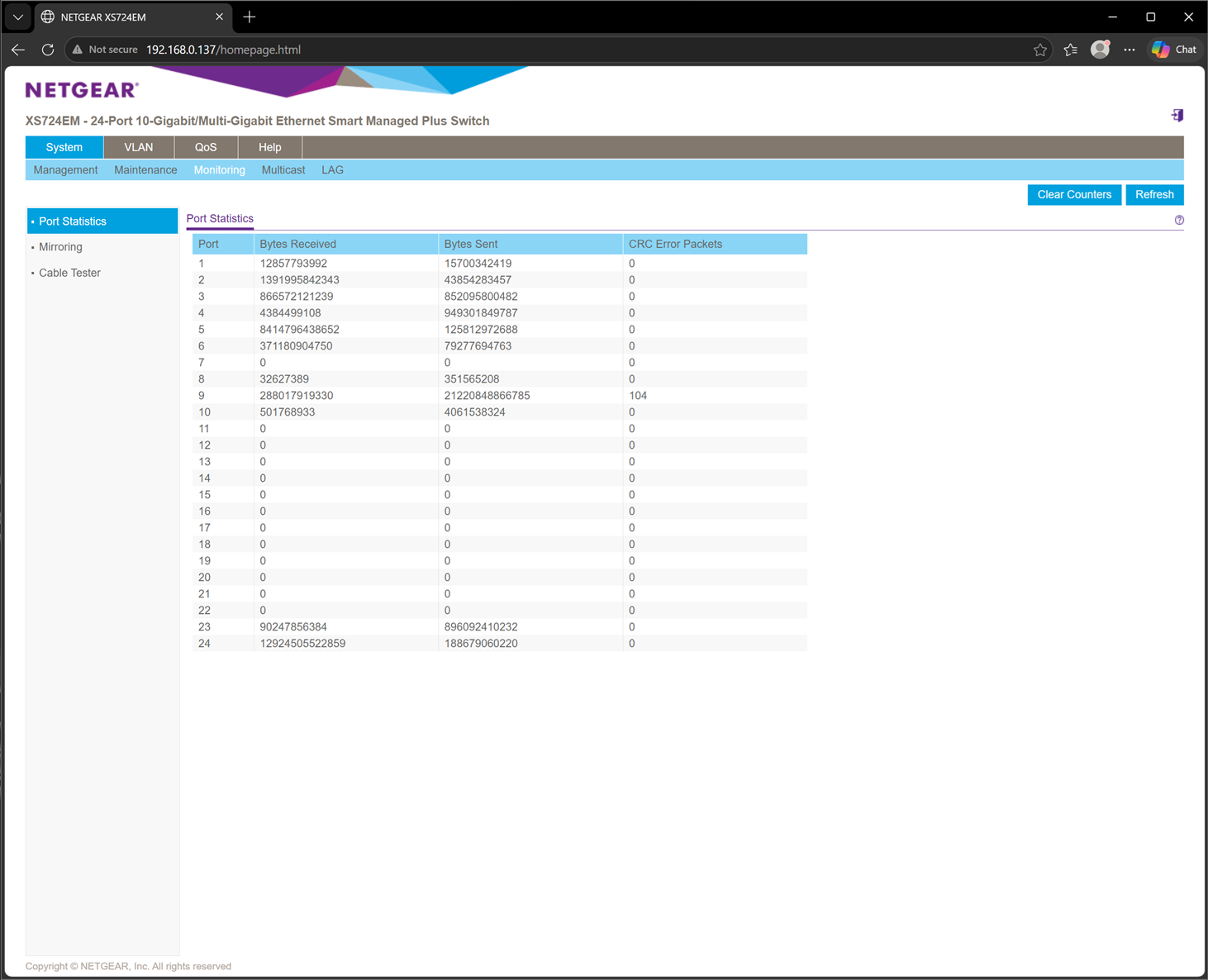
The XS724EM web configuration page does not allow fans to be monitored or controlled (see attached image).
- schumakuGuru - Experienced User
iceet wrote:
Being a 10Gbe switch, after a while (usually a day or two) the unit overheats and becomes unresponsive. It also becomes extremely hot to the touch
Primarely something for Netgear support to ivesigate.
iceet wrote:
Once the non-spinning fans were connected via the splitter to the responsive fan, they all finally began spinning post-startup.
Parallel powered fans ... you can do if you depsrately want, it's your device.
iceet wrote:
The XS724EM web configuration page does not allow fans to be monitored or controlled (see attached image).
The fan speed is controlled by the hardware. By product specification applicable to the Easy Smart Managed switch model line the fans and thir activity are not visible in the Web UI, and not controllable.
The only indication on the FAN status is given by the Fan LED on the front.
iceet wrote:
Once again, being a 10Gbe switch, the unit was not "cool" to the touch but cool enough to not become unresponsive.
All XS724EM and it's newer XS724EMv2 sibling are coming with limited lifetime* warranty.
*This product comes with a limited warranty that is valid only if purchased from a NETGEAR authorized reseller, and covers unmodified hardware, fans and internal power supplies – not software or external power supplies, and requires product registration at https://www.netgear.com/business/registration within 90 days of purchase; see https://www.netgear.com/about/warranty for details. Intended for indoor use only.
- iceetAspirant
For anyone else facing this issue, I wanted to write about my experience.
I too had a XS724EM in which all three fans spin at startup but only one remained active afterwards. It turns out only one of the internal fan headers was functional. What I did was open up the switch and connect all the fans to the working fan header with a 3-pin fan splitter cable. Ideally, the cable should be a 3-pin splitter as shown in the attachment, not a 4-pin splitter.
This XS724EM has now been operating without issue for almost 2 years in a commercial environment.
- schumakuGuru - Experienced User
Queried and answered already -> XS724EM: Questions about fans/cooling | NETGEAR Communities
- iceetAspirant
I have responded to your query in that thread.

Related Content
NETGEAR Academy

Boost your skills with the Netgear Academy - Get trained, certified and stay ahead with the latest Netgear technology!
Join Us!