NETGEAR is aware of a growing number of phone and online scams. To learn how to stay safe click here.
Forum Discussion

usao
Dec 23, 2016Aspirant
2x gs116 wont link
I have 2x GS116 switches. The first is my primary switch, out of the router. The second is in my server room, and port 1 is connected with a straight-through cable to the second. It will not link ...
usao
Dec 26, 2016Aspirant
Here is a pix of my testing setup.
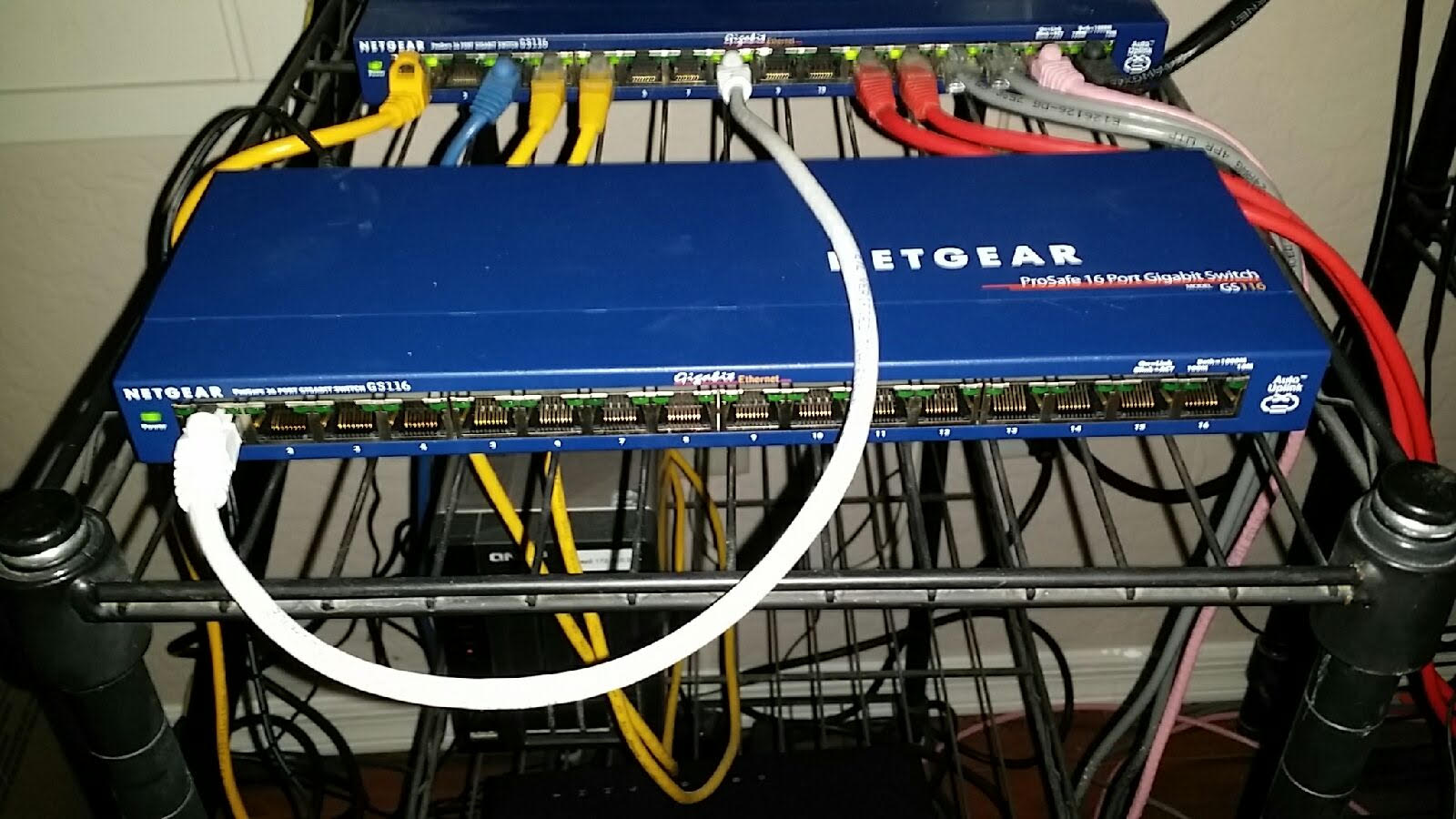
The working GS116 is in back, the new GS116 is up front.
I have a straight through cable connected from the old GS116 to the new GS116 in port 1.
As you can see, no lights on the new GS116, although the old GS116 shows both port lights on.
Computers plugged into the new GS116 can talk to each other, but cannot see anything through the uplink. The internet is not visable and the default router is not seen either.
Thus, my conclusing that the switches cannot uplink.
Looking for suggestions as I need to use this GS116 in the server room as I am out of physical ports on my 8port netgear currently in the server room.

DaneA
Dec 27, 2016NETGEAR Employee Retired
usao,
Kindly try to use a crossover cable between the 2 GS116 switches. Let us know the results.
Regards,
DaneA
NETGEAR Community Team
- usaoDec 28, 2016Aspirant
Ive ordered a crossover adapter from ebay, will take a week to get here.
However, reading GS116 docs indicate it supports auto uplink.
Auto Uplink™ automatically adjusts for straight-through or crossover cables- DaneADec 29, 2016NETGEAR Employee Retired
I apologize for this. I did not mean that you will have to buy a crossover cable.
 I assumed that you already have a crossover cable or will make a crossover cable out of the typical ethernet cable.
 You are right that the GS116 switch supports Auto Uplink. However, by the time I have read your reply, I have thought to isolate the problem by using a crossover cable. That is why I suggested it in order to isolate the problem since swapping the 2 GS116 switches (as I have also suggested) would involve an outage as you have mentioned from your previous reply.
Regards,
DaneA
NETGEAR Community Team
- usaoDec 29, 2016Aspirant
Its no problem, having a crossover adapter is a good idea and something I should have in my tool kit anyhow.
I will try swapping the routers this weekend. I have about 10 machines with either smb/nfs or iscsi. Just need to do it cleanly so as to not cause any host issues.
Related Content
NETGEAR Academy

Boost your skills with the Netgear Academy - Get trained, certified and stay ahead with the latest Netgear technology!
Join Us!
