NETGEAR is aware of a growing number of phone and online scams. To learn how to stay safe click here.
Forum Discussion

dsdoyle
Nov 04, 2015Aspirant
FVS336GV3 loses WAN connection
Hello,
We have a FVS336GV3 with 2 WAN connections. It appears to lose connectivity on WAN 1 (default connection) too often. I called Brighthouse to see if the issue is on their end, but it is not. In the past, I have had them replace their device, but we still have the same issue randomly. It has become a big problem yesterday and today. I believe it has been up for about 4 weeks since the last time this occurred.
I have fimrware verson 4.3.3-6 installed.
Please advise.
Have a great day,
Don
3 Replies
- DaneANETGEAR Employee Retired
Hi dsdoyle,
Let us isolate the problem. Kindly answer the questions below:
a. Have you tried to swap the WAN connections then observe if same problem occurs? Connect the Brighthouse connection to WAN2 port then connect the WAN2 connection to the WAN1 port.
b. Are both WAN connections subscribed to Brighthouse?
c. Is the device from Brighthouse a modem-only device or a combination of modem-router?
d. Have you tried to factory reset the FVS336Gv3 then reconfigure the settings from scratch and observe if same problem occurs?
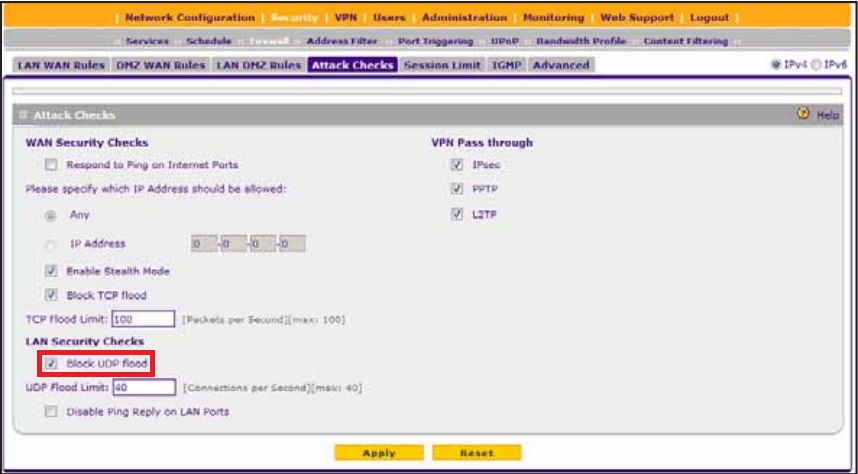
Also, kindly try to uncheck "Block UDP Floods" under Attack Checks shown on the image below then check if same problem occurs.
I look forward to your response.
Regards,
DaneA
NETGEAR Community Team
- dsdoyleAspirant
Hello,
Sorry to have taken so long to get back.
1. I have not swapped WAN1 fro WAN2 because I cannot afford/risk to have my client down again. I have moved the BrightHouse connection directly to the Netgear modem (which has also had intermittent problems.
2. The Brighthouse device is a Ubee modeom/router combo set to bridge mode
3. One connection is Brighthouse and other is Earthlink.
4. Firmware is update on both devices.
5. Block UDP Flood was already unchecked. Any other ideas?
Please advise.
Thanks for your help,
Don
- JohnRoNETGEAR Employee Retired
Hello dsdoyle,
I believe the best way to isolate the issue is to swap the connections between the two WAN ports or connect a device directly to the Brighthouse modem and see if it will give you the same issue. Before changing any settings on the router, it is best to know if the connections coming from the modems are working properly. How often does the disconnection happen? Is there a large number of users when this happens?
Looking forward to your response.
Thanks,


Related Content
NETGEAR Academy

Boost your skills with the Netgear Academy - Get trained, certified and stay ahead with the latest Netgear technology!
Join Us!
