NETGEAR is aware of a growing number of phone and online scams. To learn how to stay safe click here.
Forum Discussion

GDRitter
May 05, 2017Aspirant
SRX5308 How to isolate some clients so they have internet only and can't contact peers
We are a small business with an SRX5308. I have a basic, consumer WiFi router also hooked into it. What I want to know, is if there is a way to configure these so that known work computers o...

DaneA
May 08, 2017NETGEAR Employee Retired
Hi GDRitter,
Welcome to the community! :)
Setting up VLANs on the SRX5308 is correct in order to separate the guest network from the private network. However, the SRX5308 does not have the option to tag/untag ports. Also, is the WiFi router that you have a VLAN-aware device?
Here is a network setup that I suggest:

From the network diagram above, the Private VLAN and Guest VLAN should be configured on both SRX5308 and GS110TP. As you observe, port 1 of the SRX5308 is connected to port 8 of the GS110TP. Port 8 of the GS110TP should be configured as a tagged port to establish a trunk link between the SRX5308 and GS110TP. Port 1 of the GS110TP is connected to the LAN port of the WAC730. Port 1 of the GS110TP should be also configured as a tagged port because the WAC730 is a VLAN-aware device. Tagging the ports is needed in order to identify which VLAN the packet belongs to. The ports of the GS110TP connected to the PCs are configured as untagged ports since the PCs are not-VLAN-aware devices. The laptops and PCs are set as members of their respective VLANs.
I recommend you the WAC730 access points because you can create a wireless network and dedicate a VLAN to it. For example, create a Guest wireless network that is dedicated to the Guest VLAN. Also, the WAC730 can be powered on through its LAN port. For more information about its specification, check its data sheet here.
I recommend the GS110TP smart switch because it supports VLAN as well as PoE (Power over Ethernet) on all 8 LAN ports. For more information about its specification, check its data sheet here.
Regards,
DaneA
NETGEAR Community Team
- GDRitterMay 09, 2017Aspirant
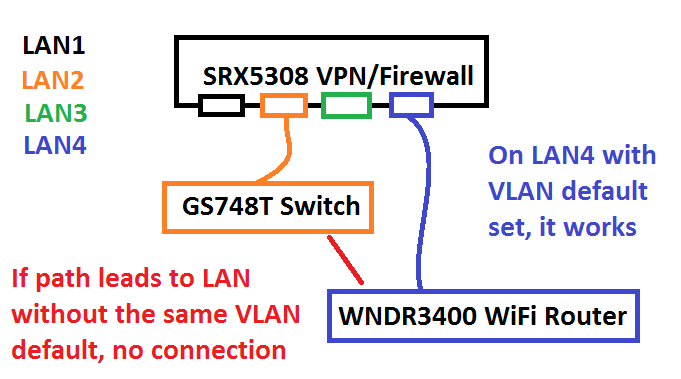
Here's an image of what I tried to set up but it's not working.
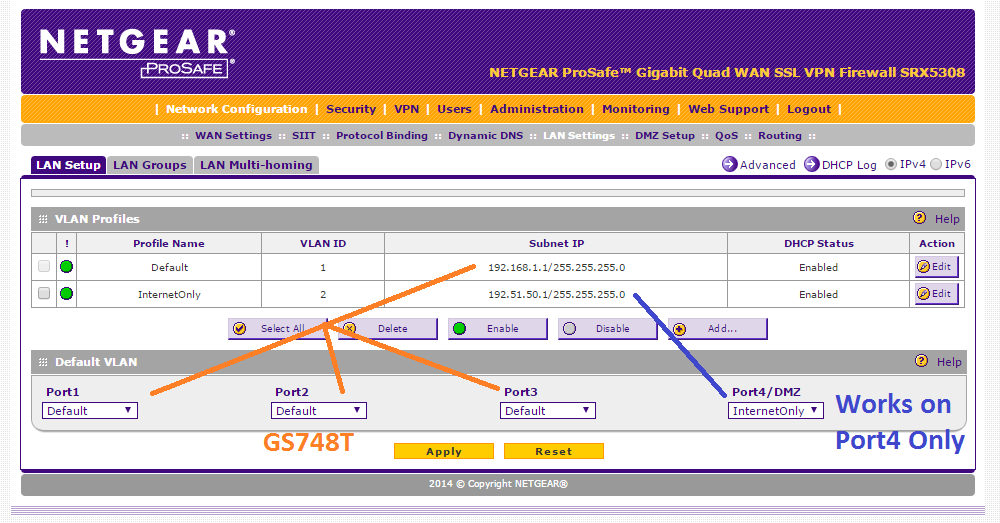
I have two different VLANs. One is our local LAN (VLAN1 / Default) and the new one is intended for internet only access (VLAN2 / Guests) and won't talk to the other VLAN.
I configured the WIFI Router to a static IP through the VLAN2 gateway. If WiFi Router is plugged into a LAN Port on SRX5308 which has the VLAN2 set as default for the port, then it works as expected. You get internet access only and can't talk to the other VLAN.
However, if WiFi is plugged into a port that has VLAN1 set as default, it can't seem to connect to VLAN2 and give any access at all, even internet access.
I want to set up the WiFi downstairs near a conference room for guests to get good signal and have it be isolated from our regular network. So it will have to travel via our switch to LAN2.
What am I configuring wrong?
- DaneAMay 10, 2017NETGEAR Employee Retired
Let me inform you that the WNDR3400 router (even if its configured as an access point) does not support VLAN. The reason why it works when you connect the WNDR3400 to port 4 of the SRX5308 which is a member of VLAN 2 is because the static IP address set on the WNDR3400 is within the IP range of VLAN 2 configured on the SRX5308. The moment you connect the WNDR3400 to other ports (ports 1-3) of the SRX5308, it will not work because ports 1-3 belongs to the default VLAN 1 which has a different IP range.
Pertaining to your current network setup, here are my suggestions:
a. Add another WNDR3400 router configured as an access point and dedicate it only for VLAN 1. Or,
b. Replace the WNDR3400 with an access point wherein you can create a wireless network dedicated to each VLAN. If you will choose this option, refer again to my suggested network setup. You could still use your existing GS748T switch for the network setup I suggest. However, since the GS748T doesn't support PoE, I suggest you the WN203 access point. Check the WN203 specifications here.
Regards,
DaneA
NETGEAR Community Team
- GDRitterMay 10, 2017Aspirant
Thanks so much for your help Dane.
Could I insert a VLAN aware switch such as GSS108E that then has a port defined VLAN between the GS748T and WNDR3400 to enable what I'm after? I happen to have a GSS108E laying on the shelf and I don't want to spend more $ if I can avoid it.
If not, I'll probably just leave the WNDR3400 on LAN4 of the SRX5308 and guests will have a bit weaker signal strength downstairs.
Thanks again!
Related Content
NETGEAR Academy

Boost your skills with the Netgear Academy - Get trained, certified and stay ahead with the latest Netgear technology!
Join Us!
