NETGEAR is aware of a growing number of phone and online scams. To learn how to stay safe click here.
Forum Discussion

fred339
Aug 18, 2015Tutor
Windows 10 Netgear ProSafe VPN Client not working at all or not well?
Using an FVS336Gv2 and Netgear ProSafe VPN client:
It works with Windows 7
It sometimes does not work at all with Windows 10.
It sometimes works with Windows 10 but has dropouts.
What should I do?
OK. It appears that we finally have it working.
This is using an FVS336Gv2 and we updated the firmware to the latest. Perhaps this was the key change.
The clients are 5.51.001
Service: "IKE and AuthIP IPSEC Keying Modules" is Disabled.
It worked fine for Windows 7 but Windows 10 required that we uninstall the client and reinstall it after the router firmware change.
Now it seems to be working for all the Windows 10 machines.
13 Replies
Replies have been turned off for this discussion
- DaneANETGEAR Employee Retired
Hi fred339,
I have read this forum thread: https://community.netgear.com/t5/VPN-Software/Has-anyone-tested-Prosafe-VPN-Client-on-Windows-10/m-p/972726#M6 and you have tried the steps given but it did not work.
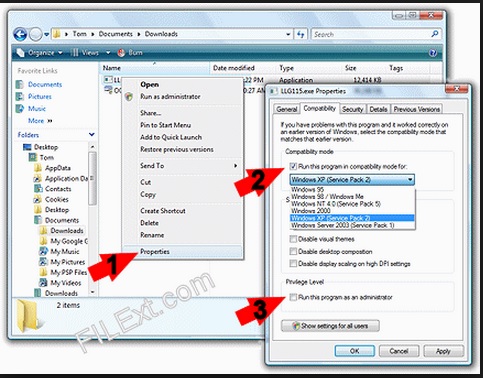
Kindly refer to the image below and check if the Windows Compatibility Mode for Windows 7 would help:
Regards,
DaneA
Netgear Community Team
 fred339Tutor
I did that but no change on one that doesn't work.
The Console shows repeated:
Default (SA Ikev1Gateway-P-1) SEND phase 1 Aggressive Mode [SA] [KEY_EXCH] [NONCE] [ID] [VID] [VID][VID][VID][VID]
- JohnRoNETGEAR Employee Retired
Hello fred339,
What VPN software version are you using? Can you please test this version of the client software? Also, as what DaneA suggested you also have to run it in compatibility mode.
I'll look forward to your response.
Thanks,


Related Content
NETGEAR Academy

Boost your skills with the Netgear Academy - Get trained, certified and stay ahead with the latest Netgear technology!
Join Us!
