NETGEAR is aware of a growing number of phone and online scams. To learn how to stay safe click here.
Forum Discussion

jamesstoner
Jul 25, 2023Star
Multiple APs broadcasting the same SSID twice
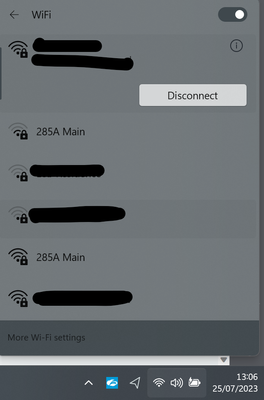
Hi, Support. I have a an issue where I have two separate APs (A WAX214 and a WAX214v2) broadcasting the same SSID but my devices are seeing the SSID twice. The channels are different on both APs....

schumaku
Jul 25, 2023Guru - Experienced User
jamesstoner wrote:
It seems this is not an issue on my IOS / Android devices, but is an issue on my Windows laptop.
Oh, had missed this conclusion. My eye isn't adopted to the Windows tablet view.
What Wi-Fi adapter is installed in your Windows system, and which driver version is active? In case it's an Intel adapter, you might find the Intel® Driver & Support Assistant useful.
jamesstoner
Jul 25, 2023Star
Hi,
The laptop is using an intel adapter version 22.40.0.7, however i don't think this is the issue.
It turns out this is still an issue on other devices. The attached image is from a Fire TV Stick which clearly shows the same SSID broadcasting twice.
My IOS device is hit and miss with it, where it will show sometimes, not always.
On my windows laptop, i have used cmd to show available networks and get the following output:
C:\Users\JamesStoner>netsh wlan show network
Interface name : WiFi
There are 7 networks currently visible.
SSID 2 : 285AÂ Main
Network type : Infrastructure
Authentication : WPA3-Personal
Encryption : CCMP
SSID 6 : 285A Main
Network type : Infrastructure
Authentication : WPA3-Personal
Encryption : CCMP
NOTE: Output omitted for brevity.
It shows one of the SSIDs with an extra A with a line above it believe this is the probably the issue.
Question is, how do I resolve this?
Thank you,
James Stoner
- schumakuJul 26, 2023Guru - Experienced User
Hard to deny it's not there my friend.
I would suggest to change the network name on both APs again and see if the obscure trailing character is retained.
Worst case, do a factory reset of both APs.
- BasuKhodanapurJul 26, 2023Apprentice
Hi jamesstoner
I tried to recreate in my testbed , We are not seeing multiple ssid's of the same name and same configurations , My laptop seeing only one SSID
Please refer screenshots, I have configured 2 SSID's in 2 different AP's i.e one in WAX214 and another one in WAX610. I can see only one SSID of same type.
Same insider tool will display all the SSID's with based on mac addresses
Looks like client issue, please double check with other clients .
- jamesstonerJul 28, 2023Star
Hi,
Thanks for the update.
I have lowered the power output on the 2nd AP so clients now only see one SSID when out of range of the other, however when i move closer to the 2nd AP they don't 'roam' as the configured SSID on the 2nd AP appears the same but has that invisible end character which is causing it to appear as two separate SSIDs.
This is very frustrating. I have factory reset both APs to no avail.
Has anyone seen this issue before? Surly this is not a one off.
Thank you,
James Stoner
- jamesstonerJul 28, 2023Star
HI,
I have tried a factory reset on both APs and the rouge character still remains.I have also tried setting up another SSID and it still remains.
Any other suggestions?
Thank you,
James Stoner
Related Content
NETGEAR Academy

Boost your skills with the Netgear Academy - Get trained, certified and stay ahead with the latest Netgear technology!
Join Us!

