NETGEAR is aware of a growing number of phone and online scams. To learn how to stay safe click here.
Forum Discussion

GJW56
Aug 19, 2026Aspirant
RBR850 Won’t connect to Orbi App
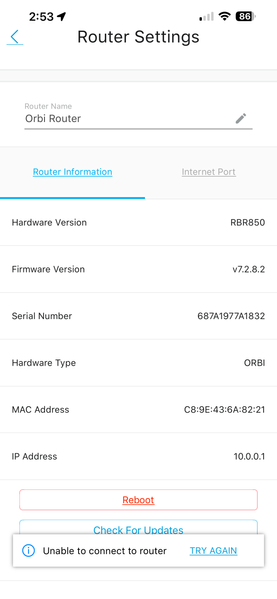
I opened the Orbi App (2.54.1.2) on my iPhone (iOS 26.6.1) to monitor some devices on my network and get the message "We can’t find your Orbi". My iPhone is connected to the WiFi SSID noted in my RBR...
GJW56
Aug 19, 2026Aspirant
See my network map for the above situation. Whats weird is all my devices are connected to the Orbi WiFi and working just fine. I just can’t see what devices are connected.
- FURRYe38Aug 19, 2026Guru - Experienced User
And your one devices with Orbi app IS connected to the Orbi wifi signal?
Happens on a different mobile device?
Try disconnecting the RBR from the ATT gateway and power cycle it off then back ON with out reconnecting it. See if you can get into 10.0.0.1 or orbilogin.com in MS Edge or Firefox? If yo u can get in here, you can then update the RBS first, then RBR lastly using a ethernet PC. If you can't seem to get in at all, you'll need to factory reset the system and setup from scratch:
Orbi Systems Manual Factory Reset Process | NETGEAR Communities
- GJW56Aug 19, 2026Aspirant
Thanks again for your assistance. Yes my iPhone with the Orbi App is connected to the Orbi generated WiFi SSID. I have not tried installing the Orbi App on my wifes phone yet.
Once I power cycle the Orbi Router, do I try to connect my phone or MAC via WiFi to try the 10.0.0.1 or orbilogin.com? Or should I try a network cable? Haven’t done that in a long time :-) If by network cable, do I plug into the internet port or one of the gigabit ethernet ports?
FYI, I tried via WiFi connecting my MAC to 10.0.0.1 and orbilogin.com it could not connect (MAC was connected to the Orbi WiFi).
Is there anyway to turn on Anywhere Access besides the Orbi App? It seems like I am blocked from connecting?
I am thinking it may be time to do a Factory Reset? Many thanks for your help!

