NETGEAR is aware of a growing number of phone and online scams. To learn how to stay safe click here.
Forum Discussion

GJW56
Aug 19, 2026Aspirant
RBR850 Won’t connect to Orbi App
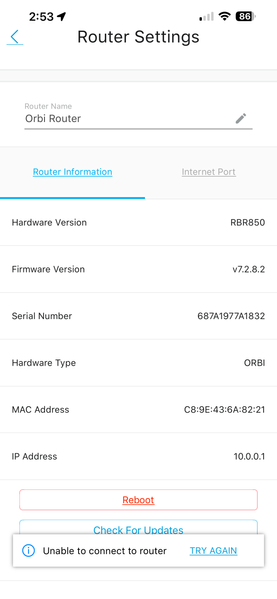
I opened the Orbi App (2.54.1.2) on my iPhone (iOS 26.6.1) to monitor some devices on my network and get the message "We can’t find your Orbi". My iPhone is connected to the WiFi SSID noted in my RBR...


FURRYe38
Aug 19, 2026Guru - Experienced User
Be sure to disable any MAC Address randomizers on phones and pads while at home:
NETGEAR Mobile Applications and Android/Apple/Windows Devices FAQ | NETGEAR Communities
If your ISP Modem already has a built in router and wifi. This would be a double NAT (two router) condition which isn't recommended. https://kb.netgear.com/30186/What-is-Double-NAT
https://kb.netgear.com/30187/How-to-fix-issues-with-Double-NAT
Couple of options,
1. Configure the modem for transparent bridge or modem only mode. Then use the Orbi router in router mode. You'll need to contact the ISP for help and information in regards to the modem being bridged correctly.
2. If you can't bridge the modem, disable ALL wifi radios on the modem, configure the modems DMZ/ExposedHost or IP Pass-Through for the IP address the Orbi router gets from the modem. Then you can use the Orbi router in Router mode.
3. Or disable all wifi radios on the modem and connect the Orbi router to the modem, configure AP mode on the Orbi router.
Static IP Address Configuration for AP Mode | NETGEAR Communities
https://kb.netgear.com/31218/How-do-I-configure-my-Orbi-router-to-act-as-an-access-point and https://www.youtube.com/watch?v=H7LOcJ8GdDo&app=desktop
Try option #2 first...
Has a power off for 1 minute then back ON with the ISP modem and router and satellite(s) been performed since last update?
Be sure to restart your network in this sequence:
Turn off and unplug modem.
Turn off router and computers.
Plug in and turn on modem. Wait 2 minutes for it to connect.
Turn on the router and wait 2 minutes for it to connect.
Turn on computers and rest of network.
Try disconnecting the RBR from the ATT gateway and power cycle it off then back ON with out reconnecting it. See if you can get into 10.0.0.1 or orbilogin.com in MS Edge or Firefox?
For manually updating a Orbi system, please follow this:
GJW56
Aug 19, 2026Aspirant
Thank you FURRYe38. Some more information:
I have a ATT / Nokia BGW320-505 Router /Fiber Modem that recently replaced an 9 yr old router/Fiber Modem and it was operating just fine.
I am connected to the Main Orbi WiFi Network.
When I click the hamburger icon on the top left of the Orbi App, I see the the RBR is connected locally, but when I click on that it goes to a “My Products” Acreen that says: "No devices with Anywhere Access enabled. To enable, while connected to your routers WiFi, go to Menu > Settings > Anywhere Access within the App."
When I try to navigate there in the App to "Enable Anywhere Access" it tells me to Check My Internet Connection. The “switch” does not enable anywhere access. See additional screen shots.
- FURRYe38Aug 20, 2026Guru - Experienced User
Your ISP Modem already has a built in router and wifi. This would be a double NAT (two router) condition which isn't recommended. https://kb.netgear.com/30186/What-is-Double-NAT
https://kb.netgear.com/30187/How-to-fix-issues-with-Double-NAT
Couple of options,
- Configure the modem for transparent bridge or modem only mode. Then use the Orbi router in router mode. You'll need to contact the ISP for help and information in regards to the modem being bridged correctly.
- If you can't bridge the modem, disable ALL wifi radios on the modem, configure the modems DMZ/ExposedHost or IP Pass-Through for the IP address the Orbi router gets from the modem. Then you can use the Orbi router in Router mode.
- Or disable all wifi radios on the modem and connect the Orbi router to the modem, configure AP mode on the Orbi router.
Static IP Address Configuration for AP Mode | NETGEAR Communities
https://kb.netgear.com/31218/How-do-I-configure-my-Orbi-router-to-act-as-an-access-point and https://www.youtube.com/watch?v=H7LOcJ8GdDo&app=desktop
Try option #2 first...
You may need to reset the RBR and setup from scratch using a ethernet connected PC/Laptop and web browser.