NETGEAR is aware of a growing number of phone and online scams. To learn how to stay safe click here.
Forum Discussion

darmotus
Sep 23, 2023Aspirant
Problème de connection FTP à distance avec Readynas.
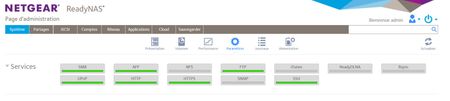
Bonjour, Je souhaite me connecter à distance en FTP avec mon readynas et j’ai plusieur problème. J’ai déjà attribué une adresse IP statique en IPV4 et en DHCP en IPV6 à mon readynas. J’ai acti...

schumaku
Sep 24, 2023Guru - Experienced User
There is more, or much more required for operating FTP over a NAT connection/router than port 21/TCP:
Ideally, your NAT router does support the so called FTP-ALG (application layer gateway). Either way, the Use Masquerade Address must be enabled under the IPv4 NAT connection.
The passive port range is much to big for a NAT environment, probably cumbersome. Hard to state a number, I would not define more then 10 for a small number of FTP connection.
Keep in mind by far not all ftp clients can deal with passive ftp, or allow this by default.
For learning (and troubleshooting), I suggest you to start with an FTP client offering verbose insight of the connection, for example FileZilla.
Nothing of all this is specific to the legacy ReadyNAS. While IPv4 and NAT are the most common case, it's the most difficult one to understand and deploy mon ami.

darmotus
Oct 19, 2023Aspirant
Bonjour,
Merci, mais je n'ai pas réussi avec la réponse à résoudre mon problème.
J'ai seulement compris que c'était difficile et qu'il fallait utiliser Filezilla pour y parvenir.
J'aimerais vraiment avoir des explications simple car depuis que le readycloud ne fonctionne plus mon serveur ne me sert plus à rien.
Je ne dois pas être le seul à être dans ce cas la ?
Cordialement.
Related Content
NETGEAR Academy

Améliorez vos compétences avec la Netgear Academy - Formez-vous, certifiez-vous et restez à la pointe de la technologie Netgear !
Rejoignez-nous!
