NETGEAR is aware of a growing number of phone and online scams. To learn how to stay safe click here.
Forum Discussion

migsta
Apr 12, 2018Apprentice
PLP2000 Firmware, monitoring, how many PLP2000
I have a set of the PLP2000. One in the basment connected to my router and one on the third floor about 70 plus feet away. The 3 lights stay solid and when I connect my laptop to the one upstairs i...
Chris_2018
Jun 20, 2018Aspirant
Hello Michael,
Thanks for your feedback. I understand that the situation isn't easy for you.
I had opened a ticket to the support N°40060994 before joigning this community.
The Netgear support answered me that they were in a migration of their database and they can't answer to me by mail and to contact them by phone and then they close the ticket ;- ) ))
I'm going to phone them as soon as possible and I hope that their labs will find a solution to this issue.
If someone obtains a solution I will be interested.
Thanks again Michael.
Chris_2018
Jun 21, 2018Aspirant
Hello,
I phoned to the support Netgear this morning.
Thanks to the support level 1 because they understood immediatly that they couldn't do anything about this issue and they listen carefully to what I said. They are very professional. Congratulations.
We did quick manipulations to collect information and immediatly they decided to do an escalation to the labs because they understood the situation.
Electrical intallation is very recent, the issue not due to a defective CPL, Installation and synchronisation of the CPLs compliant to best patrices / recommandations of Netgear and confirmation that when we plug a 5th CPL the bandwith is less than 50 Mb/s ( light of bandwith becomes red on all CPLs of the network ).
A ticket is now open to the labs of Netgear. We wait for their feedback.
- pvdublo7Jun 27, 2018Star
SAME EXACT PROBLEM I am having! As soon as I plug in the 5th adapter, all the Pick A Pug LED indicators go red. I am getting connection, which is fine, but I have NO way of knowing the real bandwidth of the units now.
PLEASE KEEP US POSTED ON ANY UPDATES YOU MAY HEAR OF - THANKS!
- Chris_2018Jun 28, 2018Aspirant
Hello,
You have a free support of 90 days after buying this model of CPL if you register your material on their website.
The best way is to register you material on the site of Netgear and to open a ticket.
You can give the reference to this discussion of this community to indicate them that you are in the same situation.
The support opened a ticket last week to do an escalation to the labs and I'm going to contact again the support next week to know the situation of it.
I hope that if the labs have a lot of same incidents they will do something to resolve this issue.
- pvdublo7Jun 28, 2018Star
Yes - did that right away. I am going to hound these people until I get an answer. I also recommeded to them that they somehow come up with a way that we can monitor these things with a software, where we can also run firmware updates, and check bandwidth status.
FYI - I had none of these problems when I had the PLP 1200's - I needed to upgrade to improve the ASUS mesh I am running in the house right now.
Thanks for the info - and for working hard on your end to help get this resolved!
Paul
- pvdublo7Jun 28, 2018Star
By the way, NETGEAR PHONE SUPPORT IS A COMPLETE DISASTER. A TOTAL JOKE. Not only can I NOT get an American to speak with me - or a person without an accent - BUT - I have now TWICE BEEN ON HOLD with these clowns for MORE THAN 45 MINUTES EACH.
They do NOT listen to me explaining the issue - and they just read off of some Knowledge Base documentation.
WHAT THE HELL HAS HAPPENED TO TECH SUPPORT WITH NETGEAR? We need DONALD TRUMP to bring Tech Support BACK TO THE UNITED STATES!This is a TOTAL JOKE with these people. I am sitting here for 50 minutes now waiting after someone told me they would get a Level 2 tech support person. I guess they are this busy because their equipment is garbage?
- michaelkenwardJun 28, 2018Guru - Experienced User
pvdublo7 wrote:
Not only can I NOT get an American to speak with me - or a person without an accent
I feel your pain. I get really annoyed when I hear a Yank accent on the end of the line. Why can't every one sound like a true Brit?
- Chris_2018Jul 03, 2018Aspirant
Hello,
Support Netgear contacted yesterday morning.
No feedback from the labs.
To be continued.
- pvdublo7Jul 03, 2018Star
I finally spoke with someone intelligent, who walked me through a bunch of steps. All to no avail of course.
I am noticing that the PLP-2000's kick on and off (I can see their connectivity on my router by the mesh routers I have connected to them. That concerns me. I had none of this trouble with the PLP-1200's. It's a great connection one minute, and then it drops.
IT DOES NOT HELP THAT THERE IS NO SOFTWARE TO MONITOR THESE FOOLISH THINGS OR TO CHECK FIRMWARE, ELECTRICAL NOISE, ETC. COME ON, NETGEAR - IT'S FRICKIN 2018 ALREADY. AND YOU WONDER WHY PEOPLE CHOOSE ASUS ROUTERS OVER YOURS.
I am very close to returning the whole bunch fo these things.
- michaelkenwardJul 04, 2018Guru - Experienced User
pvdublo7 wrote:
IT DOES NOT HELP THAT THERE IS NO SOFTWARE TO MONITOR THESE FOOLISH THINGS OR TO CHECK FIRMWARE, ELECTRICAL NOISE, ETC. COME ON, NETGEAR - IT'S FRICKIN 2018 ALREADY.
This has always puzzled me. The first generation of AV standard powerline devices did have their own utility. It does not support faster plugs. Netgear has been asked about this, but it seems to be impossible to get to the senior people on that product line.
It seems that the only way to get anything that might help is to look at the software from alternative manufacturers. The ZyXEL utility gets mentioned here from time to time. That is particularly useful if you want to disable sleep mode, which some people find kills their networks.
Unfortunately, these things do not seem to offer the all singing all dancing diagnostic features you want. But they might be worth looking at.
Here are a few places to look:
Look for Home > Network Expansion > Powerline adapters
Then there is here:
Powerline and Adapters | Zyxel
and then the download library.
The latest ZyXEL utility works here, certainly better than Nethgeatr's alternative, er nothing.
These things probably work because like most of these widgets they are all one maker's take on an underlying technology, and a bunch of chips, made by someone else. Netgear, and others, just design what they hope is a distinctive device and then put these chips inside it with their own firmware tweaks.
- pvdublo7Jul 05, 2018Star
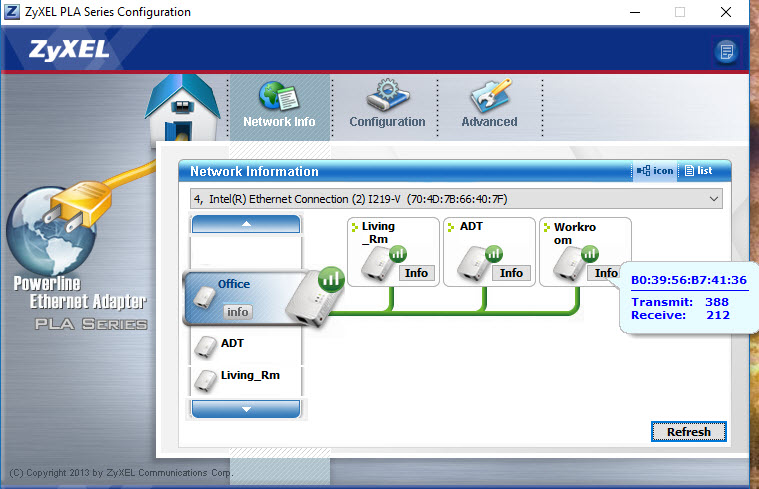
I installted the Zyzel PLA5456_V7.0.6.17.0926 Configuration software - and indeed I was able to see everything with my six Netgear PLP2000 adapters! Works quite nicely indeed. I did shut off the sleep option on all.
What I did find in the meantime is that the 5th and 6th Powerline units were USELESS. I was using the 5th and 6th t0 backhaul my two ASUS AI Mesh router nodes. I found that using the nodes in Wifi mode and not with the PLP adapters increased performance by a factor of 10.
I can't say that I blame the PLP units - the electrical connection in those two places is just not sufficient.
So I have four of them in place and they are running fine - actually helping.
THANK YOU for that tip on the ZYZEL software. Now Netgear - any plans to get your act together and come up with your own sotware and apps? Or are you going to just keep reading these posts and ignoring them?
- pvdublo7Jul 07, 2018Star
UPDATE: more data on the problem: see attached.
I have noticed that the bandwidth decreased dramatically on all units when the 5th and/or 6th unit was plugged in - and HENCE the red LED on ALL SIX of the PLP units. I am able to see more detail with the ZyZel detection software. See attached.
The furthest device is transmitting 388mps and receiving 212 mps - and that is with FOUR plugged in. As soon as you plug in a 5th and/or 6th unit, transmission rates drop to 11 / 11mbps on ALL of the units, regardless of their location.
According to the specs, you can have as many as 16 of these devices on a home electrical grid.
There is definitely a problem with the product.
At least now I have figured out that adding the 5th and/or 6th units causes some major bandwidth degradation between the units - and therefore the RED Pick-a-Plug LED.
DEFECTIVE MANUFACTURING!!!! Please send me new units once you have this problem fixed!!!!
- Chris_2018Jul 07, 2018Aspirant
Hello,
I've received the feedback from the Labs Netgear about the issue and I'm really a so stupid boy, the solution was so easy to find to solve the problem that they don't understand why I don't find it alone.
The problem come from my internet connection that is low so theirs CPLs are .... low too. I hope that you undestand that it's a amazing joke.
Here's the answer from the support. Sorry it's in french ( but we are in the semi-final of the world cup 2018 ;-p and England too ). The problem comes from my installation and they suggest me to replace connection ethernet / CPL with Wifi / CPL and to test on an installation with fiber connection ( and not copper as me ) for the box. Sure Im' going to build a new house and to deploy Fiber all over the world ;-) )))
If I bought this CPLs its because I need to use video in 4K on my private home network.
I'm going to contact them again next week.
"Bonjour Monsieur,
Nous avons reçu la réponse du niveau ingénieurs, vu que les PLP2000 que vous possédez sont très performantes il peuvent créer des interférences dans le réseau dans la situation où les débit de connexion est très faibles, ce qui est malheureusement votre cas.
Dans cette situation nous vous conseillons de changer les PL2000 contre les CPL moins performants. Vous ne verrez pas de différences au niveau de vitesse parce que toues les CPL disponibles sur le marché peut être utilisé chez vous.
Si vous souhaitez nous pouvons effectuer l'échange de votre produit contre une PLW1000 (la prise avec wifi) mais personnellement je voudrais vous proposer encore une autre solution. Vous pouvez toujours contacter votre revendeur qui est à l'obligation de vous reprendre les prises qui ne correspondent pas à vos besoins, et prendre les prises moins performantes (plus conseillé dans votre situation) et moins chers en même temps.
Afin d'être sur si le problème ne se produise pas avec la fibre je voudrais vous proposer un test chez quelqu’un qui a cette type de connexion internet. Il s'agit juste de vérifier si les voyant pick and plug changent la couleur en rouge au moment où 4 prises sont connectées en même temps.
Je vous prie de bien vouloir m'informer quelle est votre décision.
Je vous remercie pour votre compréhension et pour votre coopération.
Dans l'attente de votre réponse, je vous souhaite une excellente journée.
Cordialement,
*Veuillez noter que nous sommes en train de migrer toutes les données vers une nouvelle base et il se peut que l'option "répondre" ne fonctionne pas correctement de ce fait vous n'avez pas la possibilité de nous envoyer des messages. Dans ce cas je vous prie de bien vouloir préparer un document .doc, .txt ou .pdf et le joindre dans le menu à gauche en appuyant sur "Joindre des fichiers à une demande d'assistance".
ref:_00D30xsV._500801ClYQj:ref"
Thanks michaelkenward for the information about the software tools to identify the bandwith. Zyxel and TP Link and not Netgear it's so funny ;-)
I've tried the following test :
I've disconnected the Internet BOX so ... no copper or fiber connection ;-) )))
All CPLs are connected on the same electrical breaker ( disjoncteur electrique ) on my electrical panel.
That's the 2nd best configuration ( The 1st one is to connect all CPLs on the same electrical multiplugs ... but no interest to buy CPLs for this configuration a network switch is enough .. the best way in this case is to by a network switch from the company named .... Netgear ;- ) )))) ).
To confirm when electrical breaker is down all CPLs are power off in the room.
All CPLs are connected to the eletrical plug on wall ( and not on a multiplug ).
I insist again about the fact that my House was built in year 2006 and not in the nineteenth century :-) I've got the electrical ground on my electrical installation to use MIMO ;-) )))
I use the software tool Zyxel PLA Series Configuration and tpPLC from TP-Link to identify the bandwith
When I connect the 5th CPL I've got the same situation as pvdublo7 some CPLs are transmitting or receiving at ... 11 MBPs that's why the LEDs are red on all CPLS and the connection on all CPLs is bad.
When I connect one CPL => everything is fine ... yes I know ... it's a joke once again ;-) but the netgear Labs are better than me about jokes ;-) )))
When I connect 2 CPLs = bandwith is approximatively 1700 MBPs LEDs are green
When I connect 3 CPLs => bandwith is approximatively 1500 MBPs LEDS are green
When I connect 4 CPLs => bandwith is approximatively 1400 MBPs LEDs are green
When I connect 5 CPLs => bandwith is approximatively 1200 MBPs LEDs are red and stay red and some CPLs are reivening or transmitting at 11MBPs. I've done the test with 3 different CPLS to be sure that one CPL is not defuncted.
When I connect 6 CPLs => bandwith is approximatively 1200 MBPs LEDs are red and stay red and some CPLs are reivening or transmitting at 11MBPs
In the specifications they write that we can connect 16 CPLs at the same time without problem and the support confirms this specification.
to be continued ....
Why I don't buy others CPLs from another company and I don't refund from Amazon and Netgear
1 ) because others CPLs 2000MBPs are more expensive
2 ) because I think the problem is exactly the same for TP-Link or for Zyxel - pvdublo7Jul 07, 2018Star
My problem has nothing to do with my internet connection. It is a 200MB download pipe.
The problem is with the devices. I had six PLP 1200 devices and they worked fine - just slower.
Something in the devices is making them crosstalk and lose bandwidth.
- Chris_2018Jul 09, 2018Aspirant
Hello,
Support Netgear contacted once again this morning.
Answer : "Our engineers have given their answers, the problem comes from your installation and your low internet connection"
I need to insist and my contact does a new escalation to the support level above.
I indicate her the link to this community to indicate that's I'm not alone with this problem.
It seems that their labs don't try to reproduce/simulate the problem. Strange.
Here's the mail I received after this call
"Monsieur,
Suite à votre demande, aujourd’hui nous avons contacté le niveau supérieur.
Vu que dans votre situation l'installation de plus que 4 CPLs n'est pas satisfaisante, nous pouvons vous proposer une configuration alternative qui concerne l'utilisation du répéteur au lieu des CPLs.
Pourriez-vous me préciser combien des périphériques souhaitez-vous connecter par câble ?
Combien de télés en 4K doivent avoir la connexion simultanément? Est-ce qu'il est possible de connecter vos télés en wifi ?
Comme le produit de remplacement nous pouvons vous proposer un EX7500.
Voici plus d'informations:
https://www.netgear.com/home/products/networking/wifi-range-extenders/EX7500.aspx
Je voudrais vous informer également que, si le produit ne répond pas à vos besoins, vous pouvez vous rapprocher auprès de votre revendeur pour un remboursement ou une échange.
Dans l'attente de votre réponse, je vous souhaite une excellente journée.
*Sans nouvelles de votre part avant le 13/07/2018, je vous informe que votre dossier sera considéré comme résolu et clôturé par le système.
Cordialement,
Expert Netgear
*Veuillez noter que nous sommes en train de migrer toutes les données vers une nouvelle base et il se peut que l'option "répondre" ne fonctionne pas correctement de ce fait vous n'avez pas la possibilité de nous envoyer des messages. Dans ce cas je vous prie de bien vouloir préparer un document .doc, .txt ou .pdf et le joindre dans le menu à gauche en appuyant sur "Joindre des fichiers à une demande d'assistance".
ref:_00D30xsV._500801ClYQj:ref"
Solutions suggested :
1 ) Replace some CPLs by a Wifi repeater to connect my 2 TVs on the 1st floor.
2 ) To be refunded by the vendor
I'm going to think about these suggestions - pvdublo7Jul 09, 2018Star
In other words, these things become bricks of CRAP when you go beyond four devices on one house circuit.
WAKE UP, NEATGEAR PEOPLE - YOU HAVE A PROBLEM HERE. STOP GIVING FAKE SOLUTIONS OUT TO PEOPLE. IT IS NOT AN INTERNET OR LOCATION PROBLEM. You remind me of CNN - FAKE NEWS SPECIALISTS.
FIX THE PROBLEM PLEASE, and STOP with the STUPID, BRAINLESS SOLUTIONS. - Chris_2018Jul 11, 2018Aspirant
Hello,
After a last call to the support this morning, I declined the offer to change 2 CPLs with a Netgear Wifi repeater.
Reason : I've lost the trust in the Netgear materials and I don't want to discover a problem with this Wifi Repeater and to here from the support that my installation is the root cause of the problem.
I'm thinking about sending back all CPLs to the seller and to find reliable ones from another Company.
Only the labs Netgear doesn't encounter the problem we have with these CPLs.
The ticket is going to be closed by the support but the problem is still here for us.
- pvdublo7Jul 11, 2018Star
That is unfortunate. NETGEAR needs to get their act together here. I will not close my ticket until they fix the problem. I will be happy to be a test case for them.
Why would they close a ticket when multiple users are having the exact same issue? I don’t get it. Might it be because they know they have a bunch of bricks now for PLP2000’s?!!!!
I will not stop until this issue is resolved. I will keep everyone posted. As of this moment, the issue is NOT resolved, and I need someone from support to return my support ticket request.
Thanks for the update, Chris.
- ewanbotterillAug 20, 2018AspirantHi, I am experiencing the same issue. I purchased 6 PLP2000 adaptors. As soon as I plug in the 5th, the pick-a-plug goes red. It does not matter which sockets I plug the units in, nor the order I plug them in. Above 4 units is an issue... Nor can you put the model number in to a reply as it does not seem to be registered for folks to ask questions. And online live Chat to Netgear does not seem to be any use as they start a chat and then disappear... Surely Netgear must be better than this? Any help appreciated. Ewan
- pvdublo7Aug 20, 2018Star
Ewan - I have been working with support and engineering on this. They are aware of the issue and are doing testing and troubleshooting - sadly at a molasses pace.
I am using this software to diagnose and see the transmission rate of these PLP2000 units:
https://www.zyxel.com/support/DownloadLandingSR.shtml?c=gb&l=en&kbid=M-02103&md=PLA5456#
They have all my screenshots and are seeing the problem - when 5 or more of these units are plugged in, the transmission rate drops to 11mbps on ALL units - hence the red light.
It is a problem.
As soon as they have an update I will let everyone know. You might want to try a couple of PLP1200’s in the interim while waiting for a fix/replacement.
I told them they MUST fix/replace these once they have the solution - and free of charge.
I am all over them. They know I am NOT happy with them or the glacial pace they are moving at to fix this problem.
- pvdublo7Aug 20, 2018Star
A couple of things about the Zyxel software. It really does work well - however, it takes a good 1-2 minutes to load - so you have to be patient with that. It is NOT NETGEAR software, but the guts of these things are all made by the same manufacturer.
You can also set encrypted passwords, name the units individually AND you can see the send/receive transmission rates of all the units individually.It does NOT have a firmware update option - and that is problematic to me. It tells me that these things cannot be updated. HOWEVER, they do have Ethernet ports on them - and maybe it is possible to do any future firmware updates / fixes to the problem via one of the Ethernet ports? We’ll have to see what NETGEAR says about that.
You think these people would have run these kinds of tests BEFORE sending them out to the consumer. What a dismal failure.
In the meantime, you can rest assured - ANYONE who has tried to install 5 or more of these things is having the SAME problem. Four seem to be fine. Five and above plugged in at the same time are when all hell breaks loose.
- ewanbotterillAug 20, 2018AspirantMany thanks for that... BTW. I could not get to the FTP site to download the software. Is it still active? Cheers Ewan
- pvdublo7Aug 20, 2018Star
Yes Ewan - I was able to download it again just now. On the list that shows ‘Software’ select either of the two download sites. If they do not work for you, you can also go to the other PLA 5400 series powerline adapters and try the download there too - it’s all the same!
- pvdublo7Aug 24, 2018Star
Friends,
I just got off the phone with NETGEAR Corporate offices. They returned my call. I spoke with a competent person who has promised to get answers to the fix for this problem, AND he told me he has forwarded my concerns about the ABYSMAL outsourced tech support to India to the executive staff.
I am expecting this resolution to start moving faster now.
If not, THERE WILL BE HELL TO PAY. Either they fix the firmware OR they replace these with version 2 PLP2000 adapters. I made this abundantly clear to the exec at NETGEAR.
More to come...
- michaelkenwardAug 25, 2018Guru - Experienced User
Good on you for persevering. Keep up the good work. I must say that my own attempts to use "back channels" to get answers have failed.
I get the impression that Netgear would rather like Powerline to die. No support to speak of, and no attempt to write a utility that addresses user needs. The desktop genie in Windows does some of the job, but it has its shortcomings.
- pvdublo7Sep 12, 2018Star
September 12 update:
I received 2 software updates from engineering to attempt to update the firmware on these PLP2000 units. The first software had no firmware package (gee, what a shock), but the diagnostic software is good. You can see the devices easily, along with their data transfer rates.The second software update was more promising. I was able to update the main adapter (the one connected to the router), but for some reason, the software would not recognize the other adapters after the first one updated. The engineers are working on fixing this.
We are making some progress. It appears that the one that actually WAS updated is actually showing all green lights and has full throughput. With all 6 adapters plugged in, this one updated adapter was fixed and is now working normally.
The engineer working with me noted some inconsistencies in the software and the instructions that came with the software. I was able to update the firmware on the main adapter without being directly connected to the adapter (the adapter and my desktop are plugged into the router), and yet the instructions tell us to install the software with the adapter being directly connected to an Ethernet cable and directly connected to your computer.
More to come. I am NOT giving up on this. The engineer I am working with is good and wants to see this resolved. The software writers are in Taiwan, so we are at their mercy. If we can get the update to work on the rest of the adapters, we may be in business.
I am also expecting that once this is done, regular firmware updates will be made available for these units.  Blanca_OSep 16, 2018NETGEAR Employee Retired
Hi pvdublo7,
We appreciate your cooperation and patience working with us. I will also forward this update to the support team.
Regards,
Blanca
Community Team