NETGEAR is aware of a growing number of phone and online scams. To learn how to stay safe click here.
Forum Discussion

frizzo
Sep 26, 2016Aspirant
DLNA on XBox One fails to go to the next video when the previous one ends.
I have an external hard drive connected to the router and I share its contents (most videos and photos) via DLNA. I use XBox One as the client, specifically its Media Player application. I have 10 video files (about 30 minutes to an 1 hour each) in a folder. I play and watch the first one. Once it finishes playing, XBox tries to go to the next file in the folder. Unfortunately, it throws up an error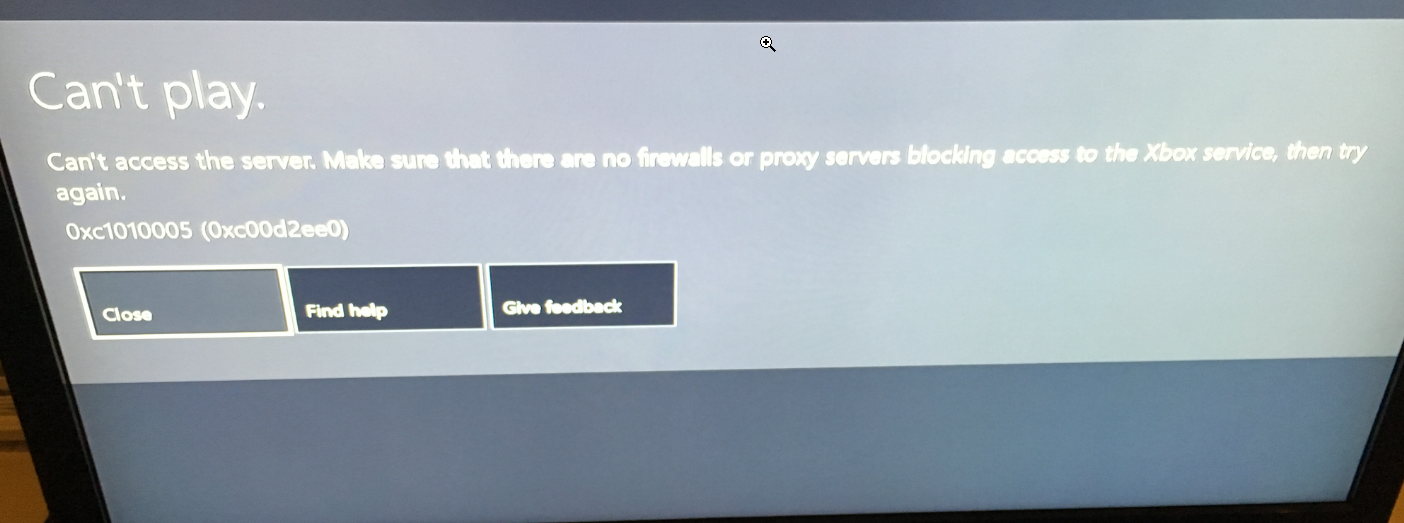
However, if I then close out and go to the root of the DLNA server and then go back to my folder, I can play the next video fine.
What can I do to make the DLNA be able to play the next file?
James,
Turning DLNA off and then back on ended up fixing the problem. I never tried the solution you mentioned.
Regards,
Robert
4 Replies
 JamesGLNETGEAR Employee Retired
Hi frizzo,
If you connect the drive directly to the Xbox, will you be able to play the files continuously or getting the same error?
JamesGL
Community Team
- JamesGLNETGEAR Employee Retired
Hi frizzo,
We’d greatly appreciate hearing your feedback letting us know if you need further assistance.
JamesGL
Community Team
- frizzoAspirant
James,
Turning DLNA off and then back on ended up fixing the problem. I never tried the solution you mentioned.
Regards,
Robert
- JamesGLNETGEAR Employee Retired
Hi Robert,
If your issue is now resolved we encourage you to mark the appropriate reply as the “Accepted Solution” so others can be confident in benefiting from the solution. The Netgear community looks forward to hearing from you and being a helpful resource in the future!
JamesGL
Community Team