NETGEAR is aware of a growing number of phone and online scams. To learn how to stay safe click here.
Forum Discussion

Bingman111
Dec 31, 2020Guide
Nighthawk R6230 bricked after firmware upgrade
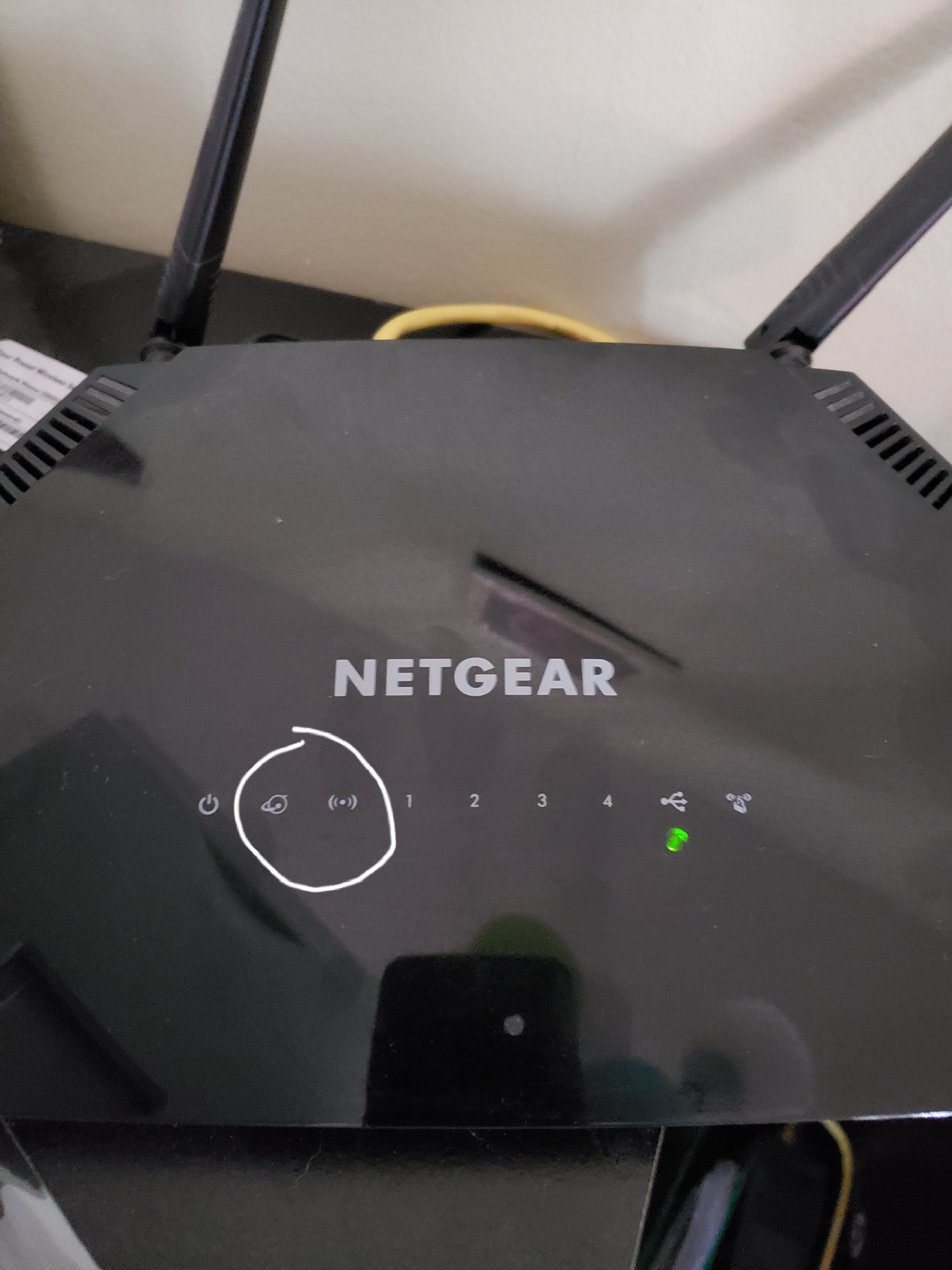
After performing the firmware upgrade (104, I believe) the router shut off and never rebooted. The picture shows how the router looks. After 30/30/30 reset the two lights I circled will alternate flashing with the power light constant.
I powered the router off, powered the internet modem off, waited 3 minutes and turned the internet modem back on. After another 5 minutes I turned the router back on. At that point the router goes back to the single light on as in the picture, same as after the firmware update.
Tried firmware reflash from windows PC. It won't work. The computer doesn't recognize an ethernet connection. I connected the ethernet to another ethernet device and it recognizes that device. I tried the process with the router in both states as described above.
The router is approx. 18 months old so Netgear won't help me. It seems you can buy their equipment, but if there are issues down the line you must pay them to help you get the problem fixed. Real useful! I'm worried I need a new router now, since the warranty expired. They won't even troubleshoot, I doubt they will replace it.
Any help please?
I powered the router off, powered the internet modem off, waited 3 minutes and turned the internet modem back on. After another 5 minutes I turned the router back on. At that point the router goes back to the single light on as in the picture, same as after the firmware update.
Tried firmware reflash from windows PC. It won't work. The computer doesn't recognize an ethernet connection. I connected the ethernet to another ethernet device and it recognizes that device. I tried the process with the router in both states as described above.
The router is approx. 18 months old so Netgear won't help me. It seems you can buy their equipment, but if there are issues down the line you must pay them to help you get the problem fixed. Real useful! I'm worried I need a new router now, since the warranty expired. They won't even troubleshoot, I doubt they will replace it.
Any help please?
30 Replies
- plemansGuru - Experienced User
did you watch the video?
You can try recovering it using tftp or nmrpflash
are you on windows? if so, follow this guide
https://kb.netgear.com/000059634/How-to-upload-firmware-to-a-NETGEAR-router-using-Windows-TFTP
just make sure you enable tftp
https://www.thewindowsclub.com/enable-tftp-windows-10
and here's a video walk through.
https://www.youtube.com/watch?v=R9DLrLQrpaw
and if that doesn't work, you can try using nmrpflash
- Yes, I watched the video.
I have made some progress I had the ethernet cable plugged into the internet port on the router. Now that I have plugged it into the LAN port 1 the computer recognizes it and the tftp flash attempts to work. However, the attempts all fail saying "Unable to get responses from the server."- jobiewanTutor
Well I don't know if this is progress or not, but I am at least getting an error message now... When clicking "Put" on the Tftp client I am getting:
"Error in Recv.Error code is 10054 (An existing connection was forcibly closed by the remote host.)"
Does that clue anyone in to what I might be doing wrong?
- jobiewanTutor
Exact same thing happened to me on exact same router trying to install the exact same firmware update. I'm working from home so it caused quite a problem. Back up and operating using an 8 year old router. Don't want to give up on this one because it is barely a year old.
I tried all the same things as you with zero success.
very frustrating
Yep, I'm in the same boat. Happened the day after my tech support access ended. What are the odds.
I've been trying to reboot the firmware via tftp, got pretty close but then got stuck. Here's where I'm at: https://community.netgear.com/t5/Nighthawk-WiFi-Routers/Bricked-AC1200-issue-rebooting-firmware-via-tftp-on-mac-os/m-p/2033452
- jobiewanTutor
thexterarcury i just went over and subscribed to that thread too! fingers crossed for a solution for all of us...
- jobiewanTutor
One discovery I had last night that maybe y'all could try (or maybe it is common sense to everyone already)...
I was having trouble when trying to load the image file from both my desktop and my downloads folder. I was getting something along the lines of a cannot read from file error or just no activity at all. I got further along than I have so far by moving the file to my C:\ root. With the file in that location using the command prompt option, I at least got the transfer successful message.
Still not completely up and going but thought I would share in case it helps someone else.
- NMRPFlash01Aspirant
Use NMRPFlash
Download the program nmrpflash, install npcap and then set a static IP. Once setup with a static up and plugged into the router, run the nmrp with the correct network device (nmrpflash.exe -L to list) and power the router. The router will boot off the LAN port you are plugged into:
See attachment
https://github.com/jclehner/nmrpflash
https://github.com/jclehner/nmrpflash/releases
Then you can use whatever FW you want to put back on the router. The older versions still have bridged mode but newer versions have removed that option.