NETGEAR is aware of a growing number of phone and online scams. To learn how to stay safe click here.
Forum Discussion

Loose
Jun 20, 2018Aspirant
Backup job path error
Dear All,
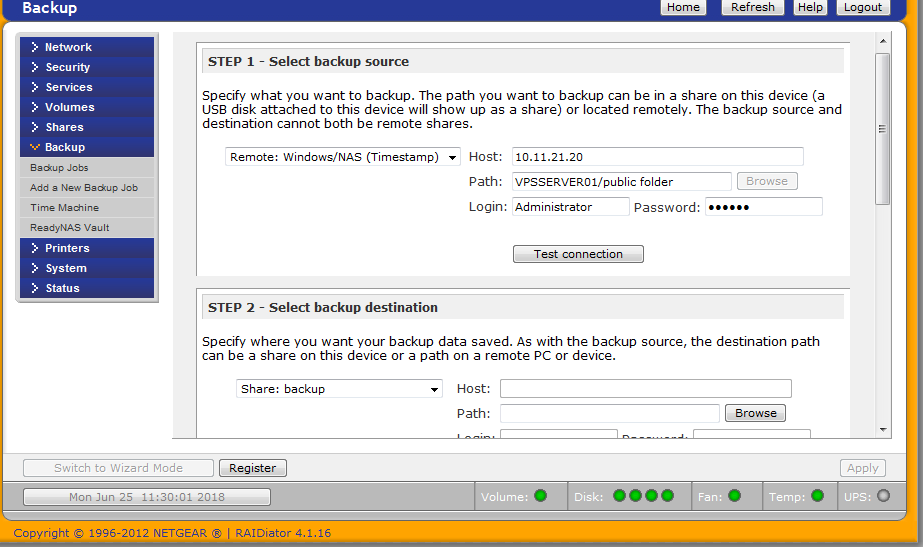
I having issues when I want to setup a remote backup job for my file server. The source path is giving me error connection and I ready need to backup. I'm running firmware 4.1.16.
Kind...
Loose
Jun 25, 2018Aspirant
INCREMENTAL Backup started. Mon Jun 25 11:42:42 WET 2018
Job: 001
Protocol: cifs-ab
Source: //10.11.21.20/administrator/public folder
Destination: [backup]/
tree connect failed: NT_STATUS_BAD_NETWORK_NAME
Files copied: 0
Backup finished. Mon Jun 25 11:42:44 WET 2018
--------------------------------------------------------------------------------
INCREMENTAL Backup started. Mon Jun 25 11:40:26 WET 2018
Job: 001
Protocol: cifs
Source: //10.11.21.20/VPSSERVER01/Administrator/public folder
Destination: [backup]/
Backup failed. Mon Jun 25 11:40:28 WET 2018.
Reason for failure:
Unable to access remote path //10.11.21.20/VPSSERVER01/Administrator/public folder.
--------------------------------------------------------------------------------
INCREMENTAL Backup started. Mon Jun 25 11:37:57 WET 2018
Job: 001
Protocol: cifs
Source: //10.11.21.20/Administrator/public folder
Destination: [backup]/
Backup failed. Mon Jun 25 11:37:59 WET 2018.
Reason for failure:
Unable to access remote path //10.11.21.20/Administrator/public folder.
--------------------------------------------------------------------------------
INCREMENTAL Backup started. Mon Jun 25 11:33:11 WET 2018
Job: 001
Protocol: cifs
Source: //10.11.21.20/VPSSERVER01/public folder
Destination: [backup]/
Backup failed. Mon Jun 25 11:33:12 WET 2018.
Reason for failure:
Unable to access remote path //10.11.21.20/VPSSERVER01/public folder.
--------------------------------------------------------------------------------
INCREMENTAL Backup started. Mon Jun 25 11:25:41 WET 2018
Job: 001
Protocol: cifs
Source: //10.11.21.20/VPSSERVER01/public folder
Destination: [backup]/
Backup failed. Mon Jun 25 11:25:42 WET 2018.
Reason for failure:
Unable to access remote path //10.11.21.20/VPSSERVER01/public folder.
--------------------------------------------------------------------------------
INCREMENTAL Backup started. Mon Jun 25 11:23:45 WET 2018
Job: 001
Protocol: cifs
Source: //10.11.21.20/10.11.21.20/public folder
Destination: [backup]/
Backup failed. Mon Jun 25 11:23:47 WET 2018.
Reason for failure:
Unable to access remote path //10.11.21.20/10.11.21.20/public folder.
--------------------------------------------------------------------------------
INCREMENTAL Backup started. Mon Jun 25 11:22:40 WET 2018
Job: 001
Protocol: cifs
Source: //10.11.21.20/10.11.21.20/public folder
Destination: [backup]/
Backup failed. Mon Jun 25 11:22:41 WET 2018.
Reason for failure:
Unable to access remote path //10.11.21.20/10.11.21.20/public folder.
--------------------------------------------------------------------------------
FULL Backup started. Mon Jun 25 10:06:27 WET 2018
Job: 001
Protocol: cifs
Source: //10.11.21.20///10.11.21.20/Administrator/public folder
Destination: [backup]/
Backup failed. Mon Jun 25 10:06:29 WET 2018.
Reason for failure:
Unable to access remote path //10.11.21.20///10.11.21.20/Administrator/public folder.
 StephenBJun 25, 2018Guru - Experienced User
Try entering \\10.11.21.20 into file explorer on another windows machine, and take a look at the share name. That's the share name that should be entered as the backup job source.
Also, make sure you can actually access that share with from the Windows PC using whatever credentials you are using in the NAS.
Generally I find it more convenient to run a backup utility on the PC with the NAS as the destination. I use Acronis TrueImage for this.
Related Content
NETGEAR Academy

Boost your skills with the Netgear Academy - Get trained, certified and stay ahead with the latest Netgear technology!
Join Us!