NETGEAR is aware of a growing number of phone and online scams. To learn how to stay safe click here.
Forum Discussion

dcheitel
Jan 17, 2025Aspirant
Firmware update Readynas 102
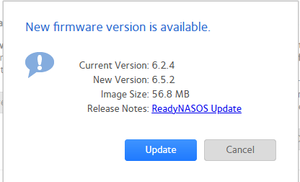
I am trying to update firmware on my readynas 102. I get the shown error when attempting the update using check for updates function. please advise if able. Thank you
dcheitel
Jan 20, 2025Aspirant
no, its not stuck. its back to offering 6.5.2 and currently on 6.2.5.

StephenB
Jan 20, 2025Guru - Experienced User
dcheitel wrote:
no, its not stuck. its back to offering 6.5.2 and currently on 6.2.5.
Did you try rebooting after it showed the error?
- dcheitelJan 24, 2025Aspirant
many times
- StephenBJan 24, 2025Guru - Experienced User
Have you downloaded the log zip file?
- dcheitelJan 24, 2025Aspirant
i have but wouldnt know what to look for
- StephenBJan 24, 2025Guru - Experienced User
dcheitel wrote:
i have but wouldnt know what to look for
If you like, you can send me a PM with a download link (dropbox, google drive, etc). Make sure the permissions allow anyone with the link to download.
No idea if I'll find anything useful, but happy to take a look.
- StephenBJan 24, 2025Guru - Experienced User
Just to follow up, the firmware install is trying to access archived debian repositories. So the next step is to apply the fixes in post 37 here: https://community.netgear.com/t5/Using-your-ReadyNAS-in-Business/How-I-got-apt-update-and-install-to-work-with-Debian-Jessie/td-p/2306772
There are also some errors in accessing apt.readynas.com (Netgear's repository). Not sure if they will still happen after apt is updated (or if the errors will prevent the firmware update).
- NXIXNFeb 06, 2025Apprentice
Not sure but this might help: https://kb.netgear.com/29974/ReadyNAS-OS-6-RN100-RN2120-cannot-update-due-to-invalid-checksum

Related Content
NETGEAR Academy

Boost your skills with the Netgear Academy - Get trained, certified and stay ahead with the latest Netgear technology!
Join Us!
