NETGEAR is aware of a growing number of phone and online scams. To learn how to stay safe click here.
Forum Discussion

KayZak
Nov 15, 2016Aspirant
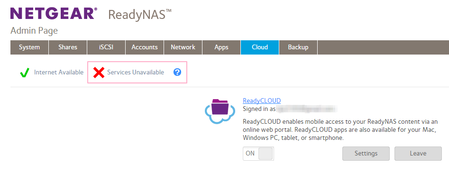
Getting Errors: X Service Unavailable; Cannot Attach Device. Try Again LAter
Hi, I have had nothing but problems with my ReadyNAS'es. I recently purchased a second ReadyNAS RN102. Both ReadyNAS RN 102's are running on OS 6.6.0 and are on the same network. I have done eve...
KayZak
Nov 18, 2016Aspirant
mdgm-ntgr Alrighty. You PM'd me. I'll go ahead and turn on diagnostics mode.
Retired_Member
Nov 20, 2016Hello KayZak
I found error in Leafp2p logs that indicates the service toggle in leafp2p configuration is set to "0"
errors in log
Nov 15 16:09:11 KaylaSandbox leafp2p[1927]: Started...
Nov 15 16:09:11 KaylaSandbox leafp2p[1927]: No run
Nov 15 16:09:11 KaylaSandbox leafp2p[1927]: Error starting application -7
Nov 15 16:09:11 KaylaSandbox leafp2p[1927]: Start state -1
Nov 15 16:09:11 KaylaSandbox leafp2p[1927]: Accepting
Please login your NAS via SSH connection and correct this fault in the configuration
#vi /opt/p2p/conf/lnconfiguration.xml
<?xml version="1.0" encoding="utf-8"?>
<Configuration>
<AccountInformation>
<Username>*********_*****_**************</Username>
<Password>*******************</Password>
</AccountInformation>
<Settings>
<Run>1</Run> <<<<<make sure <Run> is set to 1
If you can't do this activity please contact mdgm to remote check your NAS device.
Related Content
NETGEAR Academy

Boost your skills with the Netgear Academy - Get trained, certified and stay ahead with the latest Netgear technology!
Join Us!
